

Closed (fixed)
Project:
Flatcomments
Version:
6.x-2.0
Component:
User interface
Priority:
Normal
Category:
Feature request
Assigned:
Unassigned
Reporter:
Created:
3 Apr 2009 at 03:18 UTC
Updated:
31 Jan 2017 at 12:19 UTC
Jump to comment: Most recent, Most recent file

Comments
Comment #1
aharown07 commentedComment #2
dragonwize commentedThat option is in my future vision.
Comment #3
aharown07 commentedGood to know!
Comment #4
the force commentedA workaround:
Add:
.comment_reply img{
display: none;
}
to your style.css or advanced_forum.css
Comment #5
aharown07 commentedGreat idea, but I'm not using the images... just the text link. But maybe the same method can work w/o the img selector. Will give it a try.
Comment #6
aharown07 commentedWell, in my theme this works remove the reply text....
the problem is that, since I'm based on zen classic, there are dividers between the comment links, so have to figure out how to get just one of those out as well. The dividers are a border-left style (ul.links li) so I'd have to disable the border but only for the link immediately to the right of the reply link... which happens to be a link some people see and others don't so... I don't think I can do it via CSS, though I'm sure in lots of other themes, that would work fine.
Comment #7
dragonwize commentedOption to remove the reply link has been committed. Will be in the upcoming 2.0 release.
Comment #8
frankcarey commentedso, for the new "remove reply" option, does it remove the link completely, or just brings you to the bottom of the page?
Comment #9
dragonwize commentedIt "removes" the reply link from comments. The "add comment" link is still shown on the node. Also below the comment thread if your form is on a separate page.
Comment #10
aharown07 commentedThanks, sounds good.
Comment #11
Tally commentedChanging this from "fixed" to "active" instead of creating a new issue.
I just installed the 6.x-2.0 version on my test site, and after checking the box to remove the reply button for each content type, I still have the reply button on my comments. I even created a new blog and made comments. The Reply button is still there.
I am running Advanced Forum and my links are buttons. When I disable Advanced Forum, the links go back to text links, and the Reply link is gone.
Comment #12
dragonwize commented@Tally:
That is because the only way we have to remove the link at this time is through the theme layer with a regex. So we remove the link. For the majority of users this is a work around until D7 or beyond when this is fixed.
A new issue would be more appropriate to file this under but I can save you some time and tell you now that issue would be marked "by design" or "won't fix" until the core patch lands.
See this issue for more detail: #374463: Alter comment links..
Comment #13
frankcarey commentedI'm not seeing the option... maybe you could highlight some instructions to get this working?
Comment #14
frankcarey commentedREADME.txt has the documentation. Go to content->content-type-> YOUR CONTENT TYPE -> Comment Settings -> Remove links checkbox
Comment #15
frankcarey commentedFYI, not working even after enabling and flushing cache. Will start a new issue per dragonwize.
Comment #16
dragonwize commentedI've made a note on the project page to hopefully clear up this issue for the time being.
Comment #26
hanginthere commentedthese directions don't work for d7 content->content-type-> YOUR CONTENT TYPE -> Comment Settings -> Remove links checkbox
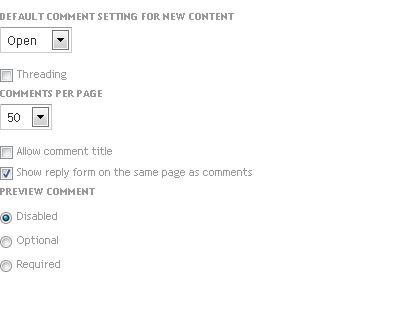
when you select content, there is only add content or find content option. there is no content type. in the comment settings for basic page, it only has open or close comment. i don't see any remove links checbox
Comment #27
dragonwize commentedIt sounds like you are looking at the node edit form and not the content type edit form.
Comment #28
hanginthere commentedhello dragon, thx for reply. the content type edit form is under structure>content types>edit>comment settings, but the only option is checkbox 'Show reply form on the same page as comments'. There is no option to remove reply link. i'm not talking about the reply form. i want to remove the reply LINK.
Comment #30
dragonwize commentedAll my test work. If you are still having an issue please open a separate issue as a bug report. A screen shot would also help.
Comment #31
mishac commentedThis issue is still happening on Drupal 7.
Screenshot attached.
Comment #32
dragonwize commentedD7 is different. Please create a different issue if you think you are experiencing a problem.
Comment #33
mishac commentedthis issue _was_ labeled 7.x when I added my comment.
Comment #34
nagiek commentedYou can do it in your theme's
template.phpfile pretty easily.Comment #35
cdiaz_seres commentedThanks Nagiek, very helpful! Any ideas on how to remove the ability to Reply to comments altogether? I just don't want any replies to comments at all, it becomes a mess when you have to delete one reply,the function deletes all subsequent replies as well. (common problem with forums) Your code nicely removes Replies from being viewed, but when logged in the ability is to Reply is still there. Any help much appreciated!
Comment #36
dragonwize commented@cdiaz_seres: That is exactly what flatcomments module does. It forces comments to be a reply to the node hence removing the ability to reply to a comment.