

Active
Project:
Ubercart Stock Notify
Version:
6.x-1.x-dev
Component:
User interface
Priority:
Normal
Category:
Feature request
Assigned:
Unassigned
Reporter:
Created:
4 Apr 2009 at 00:06 UTC
Updated:
4 Dec 2012 at 19:58 UTC
Jump to comment: Most recent file

Comments
Comment #1
babbage commentedI agree; this'd be great. The ideal would be to expose the data to Views so it can be used in whatever way desired...
[Going to bump this up to D6 at this point...]
Comment #2
maksim24 commented+1 subscribe
Comment #3
cehfisher commentedany news on this feature?
+1 subscribe
Comment #4
BigMike commentedHello guys,
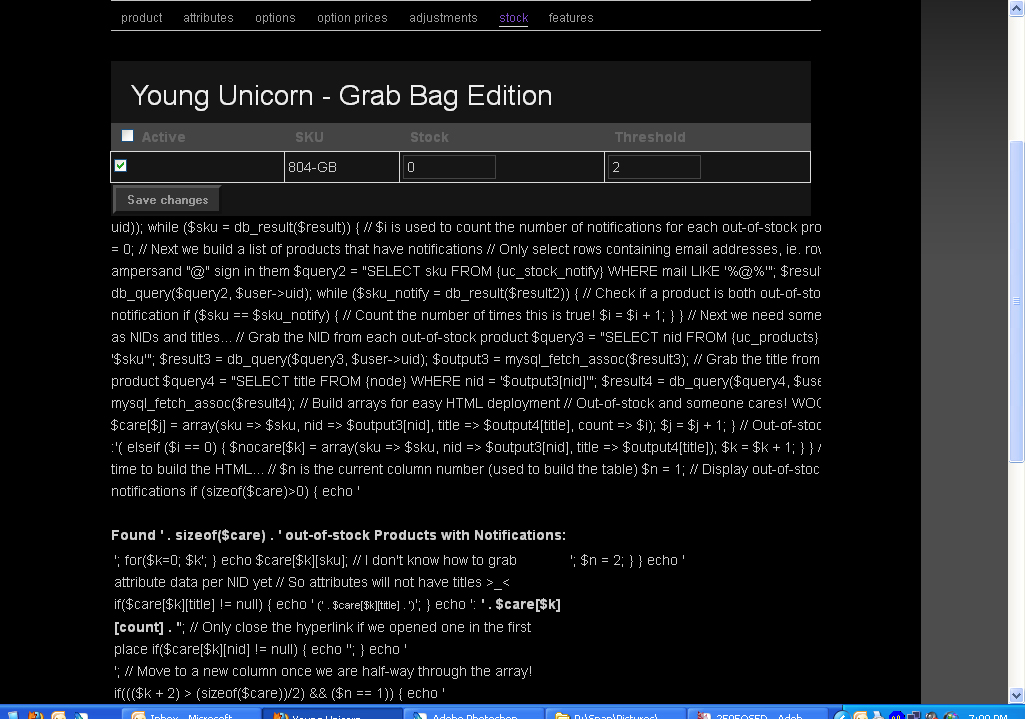
I have achieved this functionality through a block that I display at the bottom of any node's Stock Edit page, ie. node/###/edit/stock. I created this a long time ago and it is pretty crude (has many queries) but it still works great.
1) Create a new block with an available input filter that allows PHP code.
2) Insert the following PHP snippet into the block. I added many comments to explain what is going on:
3) Set the page specific visibility as "Show on only the listed pages." for node/*/edit/stock
4) Save your block and move the block to some region on your theme.
5) Enjoy!
Notes:
--This will only appear for those who have permission to edit the stock levels of your products. If you don't want all of your content editors to have access to this, then simply configure the block with an appropriate role specific visibility setting.
--I chose to have the data sorted by SKU (done in the first query). Because I constructed arrays, you can use additional php to re-sort the $care() array by 'count' if you wish to have it sorted by the most popular notified product (I have not done this and would need to learn how to do it before I could provide any assistance).
--Because the uc_product_stock table uses snid instead of nid, I don't know how to connect attribute SKU's created through the "Alternate SKU" (see node/###/edit/adjustments) of each possible attribute combination. Therefore, titles will only appear for each main SKU.
--Also, similar to the title issue above, node numbers only exist once for the main SKU, so I cannot link SKUs pulled from each "Alternate SKU" to their respective node. So only the main SKUs will have links to the node's stock edit page for easy stock editing.
--Nice feature: Because this block will appear on any node's stock edit page, when you click a link to edit it's stock, wa-la, the list goes with you :-D
If you have a solution for the title and nid issues pointed out above, please share!
Thanks
BigMike
Comment #5
BigMike commentedIt's been so long since I wrote this code, looking it over again and I realized this does not exclude unpublished products. This is gonna cause even more queries because `uc_product_stock` doesn't have any publishing info, so we will have to wrap everything around checking table `node` for it's 'status' first. >_<
I am not going to worry about this right now. If I do make any changes I will post up.
Regards,
BigMike
Comment #6
Seijun commentedFor me, the code is breaking after
I am not a php expert though, so I can't pinpoint the problem.
Comment #7
BigMike commentedDid you forget to copy the entire line?
$result2 = db_query($query2, $user->Which should be...
$result2 = db_query($query2, $user->uid);Update...
I have noticed that the numbers do not match up all the time. For instance, my script said 8 people were waiting for a notification, and when we put the product back in stock by increasing the stock number, the system reported that it sent out 10 notices. I can't see how it doesn't match since every email address contains an ampersand, but at least it provides an enough of an honest report for forecasting and marketing needs.
BigMike
Comment #8
Seijun commentedWhat I mean is that the code seems to act like php up until the "->" mark. Everything after that shows up on the webpage as plain text. I have the exact code copied into the block body that you provided in reply #4. The block's input format is set to php.
Attached is a screenshot of what the block displays.EDIT: Attached the wrong snapshot, this one is correct:http://i887.photobucket.com/albums/ac72/Seijun/stockphp2.jpg
Our drupal version is 6.22.
UPDATE: Our php filter module was turned off. The problem is fixed now, and the stock notify list shows up perfectly now. Thank you so much for writing this, it will be a big help for us.
Comment #9
BigMike commentedAwesome!! Very happy it is working for you! I know it's not the best, but it works great for us and is certainly better than nothing! :-D
Cheers!
BigMike
Comment #10
Seijun commentedJust an FYI about the script accuracy issue.. The script reported 40 back in stock messages had been requested for one particular item. When we restocked it, drupal reported sending 116 notifications. Some items are also being reported as having no requested messages, when they should have at least one.
Where are the email lists stored? As in, if I wanted to check for myself what email addresses had requested stock notifications for a particular product, where would I go?
Comment #11
BigMike commentedHoly smokes that is a huge difference! The table in question is `uc_stock_notify`, and the email address are stored under the column for 'mail'.
Try this:
1) Browse the table: uc_stock_notify
2) Sort by the column: sku
3) Count the number of email address you see for some given "sku"
4) Go to your site and browse to your product that has this same sku (part number), and look at it's stock setting to view the list of how many notices my script "thinks" there should be.
5) Compare the two numbers.
6) Let me know the results :)
I just did this and here are my results:
Number of rows containing email addresses in the database table: 6
Number of "out-of-stock Products with Notifications" as detected by my script: 6
WOOT!
Comment #12
BigMike commentedOh, also, I added a nice feature last week, check this out:
Insert...
Beneath...
...and then also insert...
Beneath...
What this will do is highlight the row yellow for the same product that you are viewing in the "out-of-stock Products with Notifications" section. Also, add this same code to the "out-of-stock Products with no Notifications" section by changing "$care" to "$nocare" and inserting the code in the appropriate location in the script, and in nearly the same manner, as follows:
Insert...
Beneath...
...and also insert...
Beneath...
Please let me know if you have questions with this. It is VERY nice to have the product highlighted in the list; makes locating the product's number of notifications much easier!
I also spent a few hours trying to sort the array by $care[count] but I haven't figured it out yet... I'll be sure to update this if/when I do!
Regards,
BigMike
Comment #13
BigMike commentedOk, I created a quick script to display a table of images of all products that have quantity 0 or less stock. Each image links to it's product's Stock edit page. Simply append this code to the same block created above.
This will generate a table of images, 4 columns wide, sorted by SKU, only showing published products, and using your thumbnail imagecache images (the thumbnail for each product that is displayed on it's product page).
I don't know if this is the same for other Ubercart sites or not, but for me this is the directory
/sites/all/###YOUR-SITE-NAME###/files/imagecache/product/, and the node variable being called is field_image_cache['0']['filepath'], which is the filename for the first of each product thumbnail. Please change the image source as needed. Also, I am using HTML to size each image to a width of 110 pixels, so please also change this as needed.Let me know what you think!!
BigMike
Comment #14
Seijun commentedMike,
Our website guy fixed the problem we were having with your script. It was only counting email addresses of people who were not logged in or registered when they clicked the notify button (in other words, only the people who had to enter their email address when they clicked notify). I checked the stock tables for one particular product, and there there were 41 notifications total, but only 16 of them had an email address entered in the "mail" column (16 people who were not logged in when they clicked notify). Your script showed a notification count of 16.
We fixed the issue by changing
$query2 = "SELECT sku FROM {uc_stock_notify} WHERE mail LIKE '%@%'";to
$query2 = "SELECT sku FROM {uc_stock_notify}";I was told the script does not need to look for the "@" symbol since every entry for a particular sku counts as a notification (at least in our case). The script is now showing correct notification counts.
One other quick question: Is there a way to make the table arrange the sku's in descending order based on the notification count? This would be very helpful, since I am using the table to determine which of our out-of-stock products should be restocked first.
Comment #15
mafe commentedHey,
I had a strange error, I didn't get titles and nids:
"mysql_fetch_assoc() expects parameter 1 to be resource, object given..."
The problem solved by change these lines:
line 31 - $output3 = mysql_fetch_assoc($result3);
line 36 - $output4 = mysql_fetch_assoc($result4);
to
line 31 - $output3 = db_fetch_array($result3);
line 36 - $output4 = db_fetch_array($result4);
mafe
Comment #16
BigMike commentedNice work guys, thanks!
Comment #17
BigMike commentedHey guys, I got sorting by the highest notification value to work! As promised I'd like to share it with everyone :-D
New sort function:
Include this function inside your block (but not within any other function). It can be placed at the beginning of your php section or at the end, it doesn't matter.
Then whenever you want to call it, use something like this:
array_sort_by_column($care, 'count');This will reorder the '$care' array by it's 'count' values.
I suggest you call the function before the for(...) statement, like so:
Now the array '$care' will be reorganized before the for(...) statement and before it gets displayed to the end user.
The function is easy to use, just change the 2nd parameter to whatever you wish to sort by. Here are the possible options:
...and each time you use it, it will reorder the array as needed.
You can check the output of the array by using...
Have fun!
BigMike
Comment #18
BigMike commentedUpdate on this
I still consider myself a n00b with PHP and more so with SQL, and recently I've been learning more and more about security, specifically SQL injection.
Today I learned a better method of using a few lines in this code. Here are three edits to make this more secure:
Edit 1)
Replace:
With:
Edit 2)
Replace:
With:
Edit 3)
Replace:
With:
I am still not fully convinced if this is a security issue yet, as the inputs are not created by the user in any submittable form, but this is considered the best practice in using Drupal's query system whenever you are using a variable with your query. So I recommend changing it and from now on I will be programming using this method. More info on this can be found here: http://drupal.org/node/101496, specifically under the "Parametrized query prevents SQL injection" heading.
Thanks!
BigMike