

 Come together with the global Drupal community in Rotterdam, 28 Sept – 1 Oct 2026. Sessions, contribution, connection, and Early Bird savings until 8 June.
Greetings,
Thank your for your excellent work on this theme.
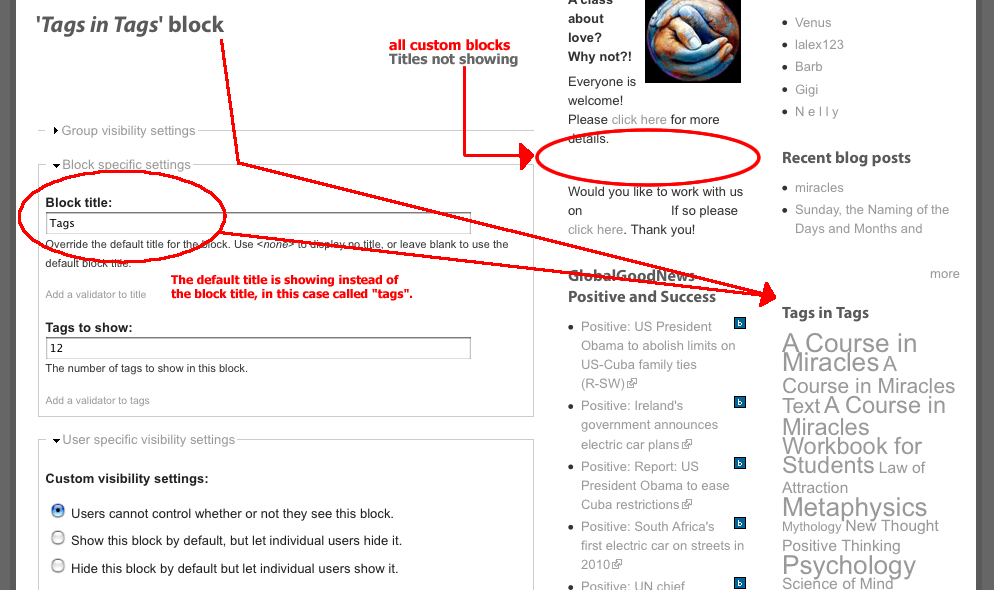
I have run into an issue that I can't seem to solve: When I create a new block, the block title is not displaying. Also, if I try and override the default title of a block with a custom (new) title, the custom title does not display, it reverts to the default block title.
The custom titles are showing correctly in other themes.
Thanks in advance for any insight you can give into this.
Scott
| Comment | File | Size | Author |
|---|---|---|---|
| #5 | simply-modern-firebug-tags.png | 8.64 KB | scott859 |
| #5 | simply-modern-firebug-tags-1.png | 6.9 KB | scott859 |
| #3 | Capture.PNG | 15.55 KB | Corey Smith |
| #2 | theme-issue.png | 51.99 KB | scott859 |


Comments
Comment #1
Corey Smith commentedI have tested custom titles in the blocks and they seem to work just fine. Perhaps you can give me more information about your setup or screen shots of what you are doing.
Comment #2
scott859 commentedCorey,
Thanks for your help on this.
I've attached a screen shot of the "tagadelic" block edit page to illustrate what is happening.
Thanks again,
Scott
Comment #3
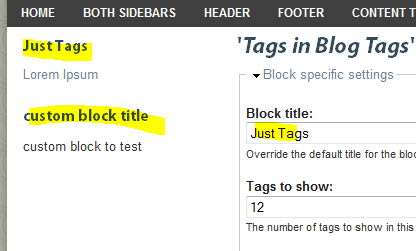
Corey Smith commentedI have tested this in our testing area and it works fine. I have included a screen shot for verification. There must be something else with your install that is conflicting. Perhaps a module that we don't have loaded.
I have tested this with tagadelic and a custom block as you can see from the screen shot attached.
sorry I can't be of more help.
Comment #4
scott859 commentedCorey,
Thanks for your efforts and looking into this.
I'm not sure if this will help lead to an identification of what may be happening but I thought I would post it.
I'm attaching two screen shots of Firebug output using the above "Tags" block title as an example.
In "simply-modern-firebug-tags.png" - that is what is produced in Firebug using a theme that is showing the custom titles correctly.
"simply-modern-firebug-tags-1.png" is Firebug output from the Simply Modern theme.
The difference seams to be the class attribute.
In the theme that is displaying correctly, the class code is:
In the Simply Modern theme, the code is:
Thanks again,
Scott
Comment #5
scott859 commentedOops - forgot to attach the screen shots, here they are.
Comment #6
scott859 commentedGreetings,
I was able to correct this. What I did was to change the title for the block titles that were not displaying and that fixed the issue. I then changed the title back the to original title and now everything is displaying properly. Somehow either the just the re-saving of the block, or the editing and then saving of the title (not sure which) solved this issue.
Thanks again for your help on this Corey.
Hope this helps someone that may be experiencing the same issue.
Scott
Comment #7
Corey Smith commentedI am glad you got this resolved.