

Active
Project:
Image Annotate
Version:
6.x-2.x-dev
Component:
Code
Priority:
Critical
Category:
Bug report
Assigned:
Unassigned
Reporter:
Created:
6 Apr 2009 at 15:26 UTC
Updated:
22 Jan 2012 at 19:16 UTC
Jump to comment: Most recent file

Comments
Comment #1
jjustman commentedI had to use 1.6, as stated in the jquery_ui readme:
http://drupal.org/node/424982
Comment #2
emilyf commentedi'm using jquery_ui 1.6, i applied the patch above, and i'm on the dev version of image annotate. i can move the box and i can click 'cancel', but i cannot type into the text box.
Comment #3
emilyf commentedAre there any suggestions on how to resolve this? It makes the module completely unusable in its current state.
Comment #4
hillmark commentedsame problem.
Comment #5
g99k commentedSame problem. Drupal 6.15 with Image Annotation 6.x-2.0 and 6.x-2.x-dev. I had to use the no-field-formatter.patch for non-dev, but that's most likely an unrelated issue.
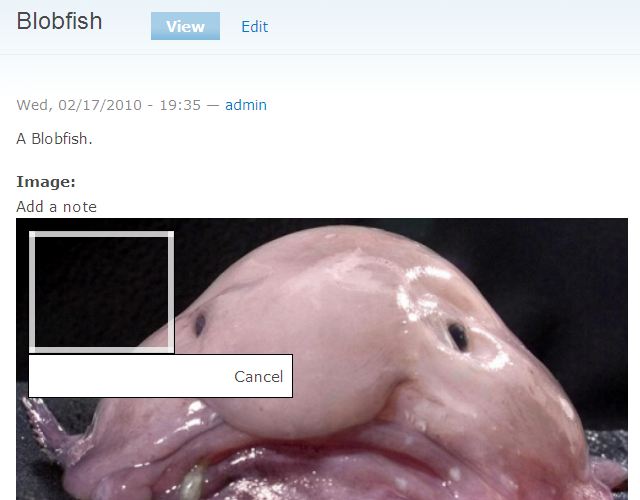
The "Add a note" link appears and produces the Image Annotation widgets, but they are incomplete: I can drag and resize the area box, which has a nice semi-transparent border, but the comment box below has no adornments, no textarea to input a comment, no OK button, and only a Cancel text link instead of a graphical Cancel button. So, I cannot actually annotate the image, but only cancel my attempt.
I suspect that my jQuery UI version is wrong, or that my jQuery UI theme is missing some styles or graphics, but I cannot figure out which version to use.
I downloaded 2 different jQuery UI 1.6 legacy distributions, the first from Google code, the second from jQueryUI.com. This first one partially works, with a Cancel link, but no textarea or OK button. The second one has no effect, i.e. as if the jquery.ui folder was not present. I also installed jQuery Update 6.x, and tried to use the jQuery UI 1.7 distributions, but there isn't any effect either.
Also, I cannot seem to find the part in the JavaScript code that actually produces the missing textarea or OK button.
Can someone who got this module to work give us a hint which jQuery UI version to use? There's this really nice demo at Separati, that I'd love to reproduce. What versions did you use to create that one?
Best regards,
Gerrit
Comment #6
hunvreus commentedI could not reproduce this bug: I am using the latest version of Image Annotate along with jQuery UI 1.6: http://code.google.com/p/jquery-ui/downloads/list?can=3&q=1.6.
Can one of you try one more time? I am trying to nail down these issues before I roll out a new version with several API changes.
Comment #7
g99k commentedThank you for your reply, and for the release.
I tried again, but again with no effect. Here are the steps I went through:
The textarea is still missing in Firefox 3.0.17 and IE 6.0.29 on Windows XP. I might want to test this with some newer browsers though. What versions are you using?
I'll attach a screenshot of the box without textarea that appears. To me, it looks as if some style images are missing, like the X-like cancel icon. There was a similar screenshot of this bug around somewhere, but I can't find it.
If you have some new ideas, I'd be happy to help.
Comment #8
hunvreus commentedHi g99k,
Could you set this up online, on something I can actually access and toy with. At the moment I am not able to reproduce this bug.
Comment #9
g99k commentedI've set up a site and a user. You should have gotten an account notification via your site's email address. (Can you actually PM someone here in the forums?)
If the setup works for you, then it must be my browser settings.
Regards,
Gerrit
Comment #10
hunvreus commentedCan you add me the permissions to administrate users and permissions?
Comment #11
g99k commentedYou should have these permissions now.
Comment #12
hunvreus commentedAlright, I know why: right now the module requires you have clean URLs installed AND does not handle properly the Drupal install in a subfolder...
I'll do some small modifications later on to handle these use cases.
Comment #13
jgdemat commentedHi hunvreus,
Thank you for the Image Annotate module. I would really like to use it. I have tried to run its latest version (2.1) on my local machine but I get the same issue: no way to enter text in the box or save. The rest works fine: I can move, resize, and cancel the annotation.
I see the TODO comment in the javascript edit method lines 225 & 226. Any thoughts on how to fix the path to work in all cases, or a suggestion on how I could modify your code to work in my case?
Comment #14
youkho commentedSubscribe
Comment #15
yannickooCan't add text too :(
Comment #16
emilyf commentedhave you guys tried the latest dev version? these issues appear to be fixed and entering text is smooth sailing for me. read all the instructions carefully and give it another go. you might even try uninstalling your other version and starting from scratch.
Comment #17
yannickooWhy it doesn't work in subfolder?
Comment #18
H3x commented+1
Have cleanURL but have my drupal site in subfolder... has this been fixed?
Comment #19
matt v. commentedI was having the same problem. I did have clean URLs enabled, but I also had Drupal installed in a subdirectory. I tried downloading the latest dev version, as suggested in comment #12 above, but that didn't seem to fix the issue. I then tried completely uninstalling and reinstalling the Image Annotate module and created a fresh content type with the newly re-enabled Image Annotate module, but neither attempt helped.
I then tried creating a vhost so that Drupal wouldn't appear to be installed in a subdirectory. That finally allowed me to be able to properly view the annotation widget. The default comment settings were forcing me to preview my comments which loaded a separate page. My "annotations" then just appeared as regular comments, below the image. I then set comment previewing to be optional. Subsequent comments I created appeared with a "View image note" link next to them, but clicking on that link doesn't appear to do anything.
As far as I can tell, I haven't changed anything, but now the annotation box is coming up again with just the cancel link, like before.
Any ideas?
Comment #20
imDhaval commentedhave the same issue...
Comment #21
gpiersol commentedI'm also interested in using this module and would like to know why it won't function with Drupal in a sub-directory. Is there no solution to this?
Comment #22
adik commentedhave the same issue...
Comment #23
drplThe problem was In subfolder
I tested it on
http://localhost/drupal and not working
and when I test it directly
http://localhost it's work fine!
Comment #24
joetsuihk commentedI created a patch to fix the sub folder problem, you may try (i have clean url on)
Comment #25
StudioARE commentedShoot me if I'm wrong, but the patch is removing "tag.js" and afterwords editing the same file just removed..?
Comment #26
joetsuihk commentedre @StudioARE
Oh, sorry, for debug, i used the unpacked one.
attached again
Comment #27
steeph commentedI have a newer version of JQuery because another site in the multisite installation needs it. Is there any way I can get this module to work?
Comment #28
Goblin-Knight commentedI see in the source code found that
why ur demo website can show the page like that http://studioare.com/semipublic/annotate1/image-annotate/create , but i dont??
are there missing 'file' attribute ?? that i reference to "comment.module" -> comment_menu()
but i had checked my db in menu_router table, where already exist
image-annotate/create
image-annotate/edit
Comment #29
Goblin-Knight commentedI have solve this problem
modules/image_annotate/tag.js
find
editable.note.load(Drupal.settings.basePath+'image-annotate/create/' + this.nid, {}, function() { //Drupal.settings.basePath+replace with
editable.note.load(Drupal.settings.basePath+'?q=image-annotate/create/' + this.nid, {}, function() { //Drupal.settings.basePath+i am using drupal 6.22 where the hook menu action must have '?q=' action tag, all ajax action must replace that and so on~
Comment #30
edsel commenteddoes it work with clean urls enabled?
Comment #31
StudioARE commentedIf you are asking if using "?q=" works with clean urls, it should, but I haven't tested.