

 Come together with the global Drupal community in Rotterdam, 28 Sept – 1 Oct 2026. Sessions, contribution, connection, and Early Bird savings until 8 June.
By inserting the following code into a form:
<script>alert('JS Injection');</script> or <script language="text/javascript">alert('JS Injection');</script>
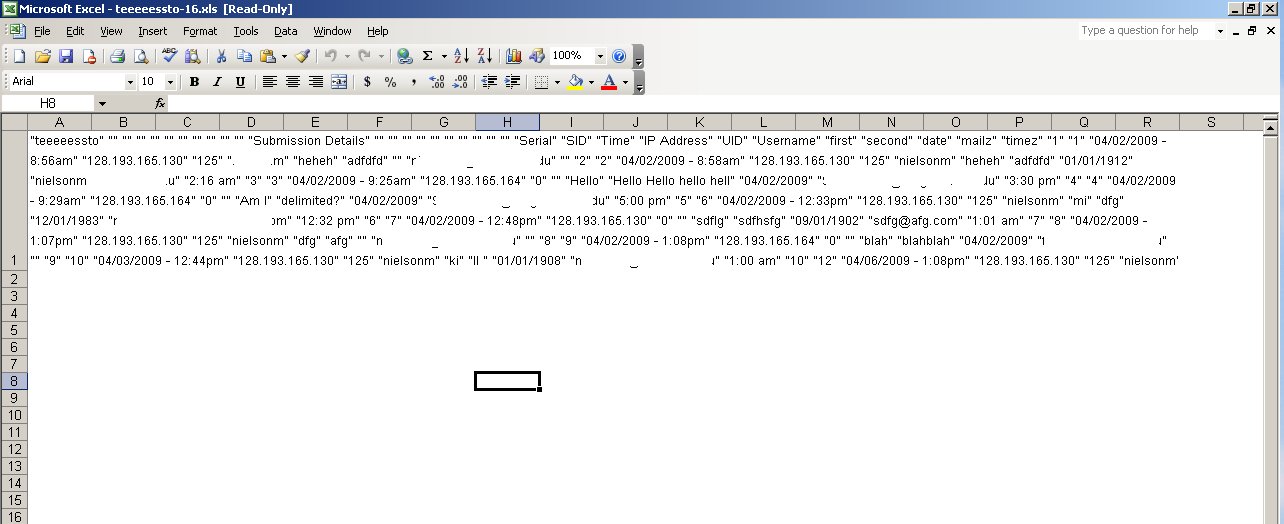
Submitting that code does nothing to the module until the download. The download function creates an .xls file that puts all the data into a single cell, the delimited output seems unaffected. But this could be a huge setback for someone that's only familiar with MSOffice products. The injection entry doesn't show up in the .xls file, only in the results tab or in the delimited output.
My setup:
Drupal 6.10
Advanced help 6.x-1.1
Cache Router 6.x-1.0-beta8
Content Construction Kit (CCK) 6.x-2.2
Date 6.x-2.1
Embedded Media Field 6.x-1.0-beta1
FileField 6.x-3.0-beta3
Gallerix 6.x-1.4
Glossary 6.x-1.6
ImageAPI 6.x-1.5
ImageField 6.x-3.0-beta3
IMCE 6.x-1.2
IMCE Wysiwyg API bridge 6.x-1.0
Link 6.x-2.5
Mibbit IRC 6.x-1.4
Path Redirect 6.x-1.0-beta3
Pathauto 6.x-1.1
Path Filter 6.x-1.0
Site map 6.x-1.0
Token 6.x-1.11
Views 6.x-2.3
Webform 6.x-2.6
Wysiwyg API 6.x-2.x-dev (2009-Mar-29)
| Comment | File | Size | Author |
|---|---|---|---|
| #2 | webform_export_script_tags.patch | 866 bytes | quicksketch |
| webform_excel_error.jpg | 105.97 KB | nielsonm |

Comments
Comment #1
quicksketchYeah I've seen this before previously. For some reason
<script></script>tags will totally break when imported into MS Excel. I don't think this is actually a "JS injection attack", since it's perfectly valid to have HTML and script tags inside of a CSV file. The problem is that MS Excel simply imports this data incorrectly somehow.If you know of any way to make Excel import the string
<script></script>without breaking the import I'd be interested. I've looked at this previously but I couldn't find any way to make it work. It's also something made a little more difficult because MS Excel is the only application that has this problem, OpenOffice and iWork can import the same CSV file fine.Comment #2
quicksketchI've committed this work-around in which we convert
<script>tags into[script], which is about as close as I can figure to maintaining the original content while allowing Excel to import. It should maintain any attributes on the script tags, so converting back into angle brackets should be possible if needed. I've only made this change to 3.x.