Using the 6.x-1.x-dev version, after reading this thread --> http://drupal.org/node/411234
I'm using Active Directory.
LDAP AUTH works just fine.
Trying to get Groups to map to roles.
In the interface for GROUPS, when I use the "Group by attribute" box, and enter the attribute "memberOf" that the groups are listed in, for each person record, it only creates a group for the *VERY FIRST* CN in the multi value list.
For example, I have....
"CN=groupname,OU=groups,DC=domain,dc=tld;CN=groupname2,OU=groups,DC=domain,dc=tld;CN=groupname3,OU=groups,DC=domain,dc=tld; ... ... ... CN=groupnameN,OU=groups,DC=domain,dc=tld"
(to indicate that many groups are listed under "memberOf".)
When I login with an AD account, and look at my roles screen, it *ONLY* creates a role for the FIRST CN entry.
... IF it created a role for every group the person was in... it would be annoying, but it would get me to the group I want to use, and I could go for that.... But it only makes the first one, which isn't useful...
I also get this error when I login for the first time as that test user.
warning: Illegal offset type in isset or empty in /var/www/html/electiontest/sites/all/modules/ldap_integration/ldapgroups.module on line 296.
warning: preg_match() expects parameter 2 to be string, array given in /var/www/html/electiontest/sites/all/modules/ldap_integration/ldapgroups.module on line 298.
When I try to use "LDAP group to Drupal role filtering", I disable the "Group by attribute" option, and I enter the CN's I care about, one per line...
CN=group1,OU=groups,DC=domain,dc=tld|group1
CN=group2,OU=groups,DC=domain,dc=tld|group2
CN=group3,OU=groups,DC=domain,dc=tld|group3
I hit the check box below this for "Use LDAP group to Drupal roles filtering".
I hit "Update"
I delete the user I had test with.
I delete the bad role made with the first experiment.
I re-login with the test user, and ... Nothing.
No roles are created.
I even experimented with clearing out everything.
Manually making a group called "group1"
then doing the mapping in the LDAP group to "group1".
Then logged the test user back in as a new user (having wiped his recored before), and still no roles were assigned to the user.
Am I doing this wrong? :)
Do I need to do a combination of options in the group - roles assignment?
Any help is appreciated.
Thanks.





Comments
Comment #1
alphex commentedMade some progress.... Kinda
But I might have made more work for the module maintainers...
Lets look at some screen shots.
Comment #2
alphex commentedMade some progress.... Kinda
But I might have made more work for the module maintainers...
Lets look at some screen shots.
Comment #3
alphex commentedAGH... my comment is being truncated for some reason...
One more try...
if it doesn't work, read the TXT file I've attached to this post.
Comment #4
alphex commentedONE MORE TRY.
If this truncates, I don't know what to say.
Please look at my text file I attached.
Made some progress.... Kinda
But I might have made more work for the module maintainers.
Lets look at some screen shots.
When I login, it gives me the error I mentioned above.
And Then I dig through the interface, and I find this.
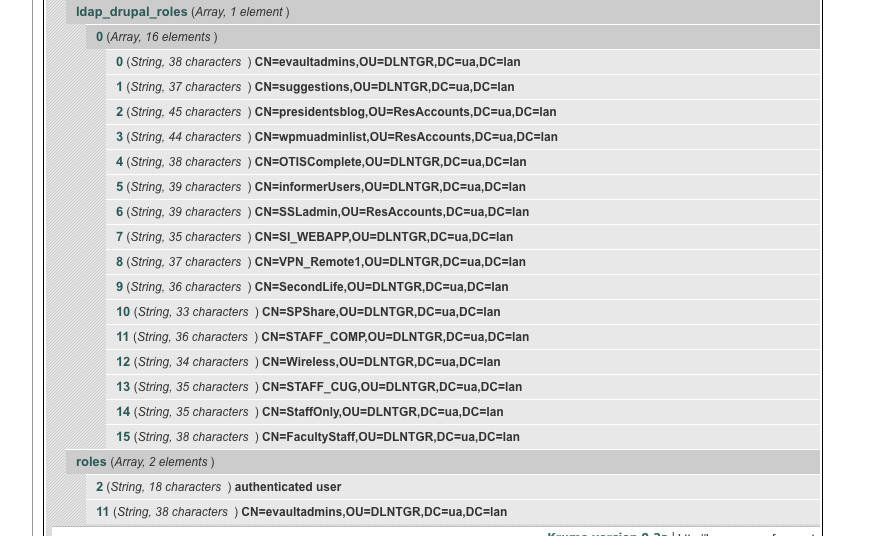
When I use the DEV LOAD tool to look at the $user;... I see this http://drupal.org/files/dev_load_roles.png
When I then look a the list of ROLES that have been created, and I see this http://drupal.org/files/roles_list.png
When I go to my other browser, and login as this test user, I see this http://drupal.org/files/account_view.png
What appears to be happening is that the LDAP GROUPS module *IS* getting the full list of everything thats in my "memberOf" attribute in Active Directory... But when it goes to make new roles out of them, it chokes on the semicolon that is the delimiter between the group names in my "memberOf" attribute field, which lists MANY groups, in the following format.
CN=evaultadmins,OU=DLNTGR,DC=ua,DC=lan;CN=suggestions,OU=DLNTGR,DC=ua,DC=lan;CN=presidentsblog,OU=ResAccounts,DC=ua,DC=lan;CN=wpmuadminlist,OU=ResAccounts,DC=ua,DC=lan;CN=OTISComplete,OU=DLNTGR,DC=ua,DC=lan;CN=informerUsers,OU=DLNTGR,DC=ua,DC=lan;CN=SSLadmin,OU=ResAccounts,DC=ua,DC=lan;CN=VPN_Remote1,OU=DLNTGR,DC=ua,DC=lan;CN=SecondLife,OU=DLNTGR,DC=ua,DC=lan;CN=SPShare,OU=DLNTGR,DC=ua,DC=lan;CN=Wireless,OU=DLNTGR,DC=ua,DC=lan;CN=STAFF_CUG,OU=DLNTGR,DC=ua,DC=lan;CN=StaffOnly,OU=DLNTGR,DC=ua,DC=lan;CN=FacultyStaff,OU=DLNTGR,DC=ua,DC=lan;CN=STAFF_COMP,OU=DLNTGR,DC=ua,DC=lanHopefully that didn't line wrap. But its one single line in AD, with semicolons (;) as the delimiter.
I *THINK* the module is choking on the semicolon, and I don't know a LICK of the REGEX thats on line 298 of "ldapgroups.module"
else if (preg_match('/^[^=]+=([^,]+),.*$/', $group, $matches))What could we add to that that would see semicolons as a delimiter?
Thanks. (I hope that makes sense)
Comment #5
miglius commentedFirst, thanks for your input. Since I don't have an AD in my possession I'm kind of shooting in blind. For instance, I did not know that the groups are put in one line separated by semicolons. Surely the code should be changed to reflect it. I will do that when the php error you mentioned is resolved.
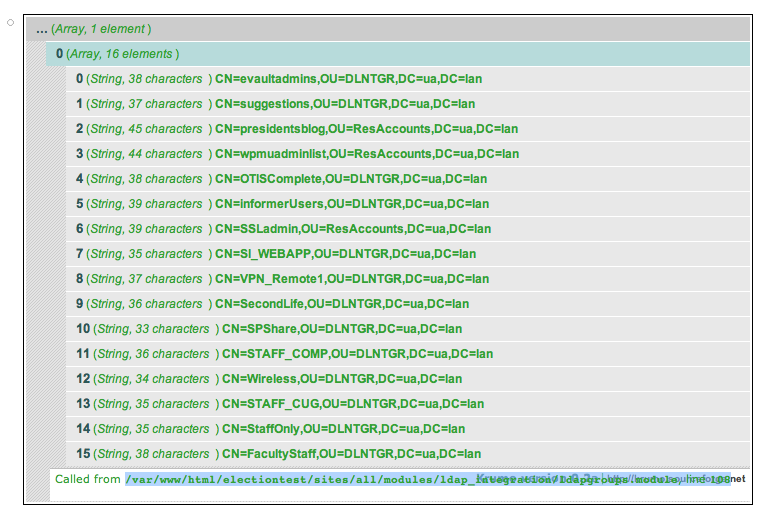
In the _ldapgroups_mapping($user, $group) function (line 294) I expect $group to be a string, but from the error it looks that the variable $group is not a string but most probably an array (with my setup using openLDAP it is always a string). I would appreciate if you could put a var_dump($group); as the first line in this function to see the structure of the $group variable.
Also if you could put a var_dump($groups); at line 107 and give me the output, I could see what is returned by the AD and that would really speed up the fix.
Comment #6
alphex commentedWhere am I supposed to find the results of the var_dump(...) ?
Do you want me to "print_r($group);" and ...$groups ? in the theme somewhere?
Would that help?
Comment #7
alphex commentedOk, here we go.
... (Array, 1 element)
0 (Array, 16 elements)
0 (String, 38 characters ) CN=evaultadmins,OU=DLNTGR,DC=ua,DC=lan
1 (String, 37 characters ) CN=suggestions,OU=DLNTGR,DC=ua,DC=lana
2 (String, 45 characters ) CN=presidentsblog,OU=ResAccounts,DC=ua,DC=lan
3 (String, 44 characters ) CN=wpmuadminlist,OU=ResAccounts,DC=ua,DC=lan
4 (String, 38 characters ) CN=OTISComplete,OU=DLNTGR,DC=ua,DC=lan
5 (String, 39 characters ) CN=informerUsers,OU=DLNTGR,DC=ua,DC=lan
6 (String, 39 characters ) CN=SSLadmin,OU=ResAccounts,DC=ua,DC=lan
7 (String, 35 characters ) CN=SI_WEBAPP,OU=DLNTGR,DC=ua,DC=lan
8 (String, 37 characters ) CN=VPN_Remote1,OU=DLNTGR,DC=ua,DC=lan
9 (String, 36 characters ) CN=SecondLife,OU=DLNTGR,DC=ua,DC=lan
10 (String, 33 characters ) CN=SPShare,OU=DLNTGR,DC=ua,DC=lan
11 (String, 36 characters ) CN=STAFF_COMP,OU=DLNTGR,DC=ua,DC=lan
12 (String, 34 characters ) CN=Wireless,OU=DLNTGR,DC=ua,DC=lan
13 (String, 35 characters ) CN=STAFF_CUG,OU=DLNTGR,DC=ua,DC=lan
14 (String, 35 characters ) CN=StaffOnly,OU=DLNTGR,DC=ua,DC=lan
15 (String, 38 characters ) CN=FacultyStaff,OU=DLNTGR,DC=ua,DC=lan
Called from /var/www/html/electiontest/sites/all/modules/ldap_integration/ldapgroups.module, line 108
... (Array, 16 elements)
0 (String, 38 characters ) CN=evaultadmins,OU=DLNTGR,DC=ua,DC=lan
1 (String, 37 characters ) CN=suggestions,OU=DLNTGR,DC=ua,DC=lan
2 (String, 45 characters ) CN=presidentsblog,OU=ResAccounts,DC=ua,DC=lan
3 (String, 44 characters ) CN=wpmuadminlist,OU=ResAccounts,DC=ua,DC=lan
4 (String, 38 characters ) CN=OTISComplete,OU=DLNTGR,DC=ua,DC=lan
5 (String, 39 characters ) CN=informerUsers,OU=DLNTGR,DC=ua,DC=lan
6 (String, 39 characters ) CN=SSLadmin,OU=ResAccounts,DC=ua,DC=lan
7 (String, 35 characters ) CN=SI_WEBAPP,OU=DLNTGR,DC=ua,DC=lan
8 (String, 37 characters ) CN=VPN_Remote1,OU=DLNTGR,DC=ua,DC=lan
9 (String, 36 characters ) CN=SecondLife,OU=DLNTGR,DC=ua,DC=lan
10 (String, 33 characters ) CN=SPShare,OU=DLNTGR,DC=ua,DC=lan
11 (String, 36 characters ) CN=STAFF_COMP,OU=DLNTGR,DC=ua,DC=lan
12 (String, 34 characters ) CN=Wireless,OU=DLNTGR,DC=ua,DC=lan
13 (String, 35 characters ) CN=STAFF_CUG,OU=DLNTGR,DC=ua,DC=lan
14 (String, 35 characters ) CN=StaffOnly,OU=DLNTGR,DC=ua,DC=lan
15 (String, 38 characters ) CN=FacultyStaff,OU=DLNTGR,DC=ua,DC=lan
Called from /var/www/html/electiontest/sites/all/modules/ldap_integration/ldapgroups.module, line 298
warning: Illegal offset type in isset or empty in /var/www/html/electiontest/sites/all/modules/ldap_integration/ldapgroups.module on line 300.
warning: preg_match() expects parameter 2 to be string, array given in /var/www/html/electiontest/sites/all/modules/ldap_integration/ldapgroups.module on line 302.
I used "dpm($groups); on line 107
and "dpm($group); on line 296.
var_dump wasn't giving me anything.
I'm available to work on this trouble shooting. feel free to send an Gtalk/IM to duran.goodyear@gmail.com if you want... (I kinda need this to work next week :)) Thanks for your time.
Comment #8
miglius commentedvar_dump() is very similar to print_r(), but it prints out slightly more information (empty strings).
Those calls should be placed directly in the ldapgroups.module file (don't do that on the production server). Then login to the drupal and those functions will print the output directly in the browser screen (top area).
Comment #9
alphex commentedfigured it out. do you see the data I just shared?
to be clear, "var_dump($group);" and "var_dump($groups);" in the exact same place as I put "dpm($group);" and "dpm($groups);" wasn't showing anything when I logged on with my AD test user.
Comment #10
miglius commentedThanks for you input. I just committed a code change to the cvs which I think should fix it. Could you test it?
Comment #11
alphex commentedVictory!
I uninstalled the old version, and installed HEAD via ...
cvs -z6 -d:pserver:anonymous:anonymous@cvs.drupal.org:/cvs/drupal-contrib checkout -d ldap_integration-HEAD contributions/modules/ldap_integration/reinstalled, reapplied my settings, and everything works with my test user.
I no longer receive the error message.
When I first tested, I only used the "Group by attribute" setting, and it automatically created every ROLE from every GROUP that my test person is in.
And added him to each role.
I then deleted that test name, and each role that was created.
I then used "Group by attribute" and "LDAP group to Drupal role filtering" to get just one group, and it works as expected.
It creates ONE role, and puts the person in that role.
I will continue to test, but I think it works!
Thanks!!!
Comment #12
miglius commentedCool. Closing this issue. Please reopen it if you find any odd behavior.