

Closed (fixed)
Project:
Views (for Drupal 7)
Version:
6.x-2.3
Component:
User interface
Priority:
Normal
Category:
Support request
Assigned:
Unassigned
Issue tags:
Reporter:
Created:
13 Apr 2009 at 09:22 UTC
Updated:
12 Aug 2013 at 15:06 UTC
Jump to comment: Most recent file

Comments
Comment #1
dawehnercan you please export your view? its easier to test then.
Comment #2
dresde commentedSure, sorry, I didn't think about that. In the attached file is the block view. I'm sure it has to be something I'm missing, but I can't find it.
Thanks.
Comment #3
rameshrr commentedWith views to see the more link there should be a page view as well, having a block view alone is not sufficient, you must have a block and page view to see the more link on the block view. Hope this helps
-Ramesh
Comment #4
jgottshall commentedI'm seeing the same problem in views 2.4 and 2.5, but only with views that having a grouping field. Here's an example:
Comment #5
jgottshall commentedI'm seeing the same problem in views 2.4 and 2.5, but only with views that having a grouping field. Here's an example:
Comment #6
no2e commentedI've got the same problem with Views 6.x-2.5.
I created a page and a block display. I set More link: Yes in the block display. But the "More" link is not shown (whether in preview mode nor on the site).
I don't use any kind of "Grouping". Which might be other settings that could influence it?
(The "More" link works at other View on the same installation, though)
Comment #7
rameshrr commenteddo you have the page view link to an actual page?
Comment #8
dresde commentedmmm may be my problem is that the PAGE view is created with a diferent view, since I wanted it like the default page... is it posible to have a views block liking with the "readmore" to a diferent viewspage?
Comment #9
osopolarsubscribing! I need this too.
edit: You may use the footer text for this purpose.
Comment #10
lindsayo commentedHow would I make this link to the particular blog entry, as that is dynamic? I can make it link to the blog rather easily.
Comment #11
liquidcms commentedi have the same issue as #8, my page views are different than my block views.
i guess i need to move all my page displays into same view as my block displays.. hmm.. cool if we could export/import displays.. maybe with a little cut/paste??
Comment #12
mortenson commentedsubscribing...
Comment #13
dawehnerWhy do you not use another page display, for displaying the full page?
I suggets you to try to set $view->override_path = 'pagepath';
I didn't tryed it out, but I think its worth to try out.
Comment #14
dawehnerI think this is fixed then.
Comment #16
brianhinkley commentedI was having trouble with my more link.
Do I have a Page View? Of course I don't. I do now. Works like a charm.
Exactly what I needed.
Thanks.
Comment #17
DEWELK commentedHi,
I'm using bluemasters as theme and wonders me how I can show up the read more buttons in the blocks.
Can someone please put me on track ?
Regards,
Kris.
Comment #18
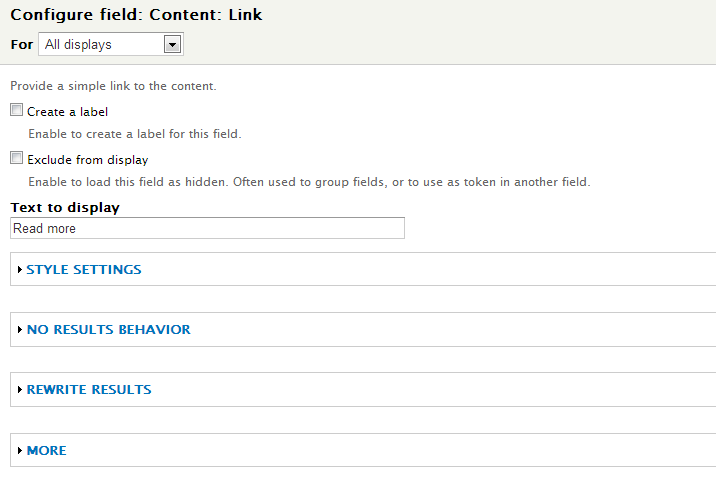
jkingsnorth commentedI'm assuming you are using Fields in the View that creates your block. Add a 'Content: Link' field to the View that is producing you block. Turn off the label and set the 'Text to display' to be 'Read more' - as per the attached screenshot.
Also the original issue isn't really related to your question, so it would have been better to start a new support request I think - so I'm marking this as closed (fixed) again.