

Needs work
Project:
Ubercart Discounts (Alternative)
Version:
6.x-1.0-beta28
Component:
User interface
Priority:
Normal
Category:
Bug report
Assigned:
Reporter:
Created:
14 Apr 2009 at 02:03 UTC
Updated:
7 Aug 2012 at 03:02 UTC
Jump to comment: Most recent file












Comments
Comment #1
ryangroe commentedThe discounted price in the product page is a good idea. I'll think about how to show that.
Showing discounts in the shopping cart is also requested here: http://drupal.org/node/431808
Comment #2
jrust commentedVery cool. I'd definitely be willing to sponsor you to develop this feature. PM me if you're interested.
Comment #3
ryangroe commentedThe following is available in beta 14:
1. Discounts are now shown on the cart page underneath the current subtotal along with an updated subtotal including discounts. This is part of the base uc_discounts module.
2. To show the discounted price in the product page there is a new sub module, product_price_alterer_field. When this field is added to products it strikes (using ) the current price and adds the discounted price in red (in product_price_alterer_field.css, use CSS to change). The discounted price shows up only if there are discounts that are codeless and would be qualified for if the user checked out with 1 or less of the current product). See README.txt for installation information.
These new features require testing. Please download beta 14 and test it out.
Comment #4
gtfourdreams commentedUsing Beta14, when I enable the 'Product Price Alterer', I get a host disconnect on the products pages. But all other pages that don't show products work.
I get this for headers:
(site, user and server masked for privacy)
Apache logs the visit in access.log, but generates nothing in error.log
once I remove the custom field, the products work again. I wish I had more information... anybody know where else I can look for an error msg? anybody else getting this problem?
Comment #5
ryangroe commentedI had that problem initially but I thought I got it worked out. Sorry about that. I will investigate this tonight.
Comment #6
gtfourdreams commentedany idea where to look? i can help debug if you like.
Comment #7
ryangroe commentedThe field uses javascript to change the price field. It was the easiest way to implement it and it was the easiest for people to integrate. The problem may be related to this (or could just be another bug in my code). I will send out some info to help debug this in an hour or so. Thanks for your help.
Comment #8
ryangroe commentedSorry, I got held up at work. Now I'm home and can help debug this. First try replacing your product_price_alterer_field.module with the attached file.
Comment #9
ryangroe commentedIf that doesn't fix the problem try this file. This will write to your PHP error log file. So please post the results here. This file won't fix the problem but will help us debug the problem.
Comment #10
adrianmak commentedI got the same issue after added the two fields. i attached my php error log
Comment #11
adrianmak commentedI got the same issue after added the two fields. i attached my php error log
Comment #12
ryangroe commentedThank you, adrianmak. I have another update to gather more information (please clear your error log first). Sorry for the roundabout method. I've tried to get this to fail locally but have been unsuccessful.
Comment #13
ryangroe commentedHold up on that test. I think I figured out the problem. I realized that my site had the product nodes cached and that's why I wasn't getting the error (my site wasn't entering the load case as your site was). Please download and try beta 18. If that still gives you a problem then download product_price_alterer_field_3.zip and send me the log. Thanks.
Comment #14
adrianmak commentedI updated to beta18 of this module and the mentioned problem fixed.
But why I cannot see the added the two cck field in node edit ?
and cannot see any below mentioned on another issue thread
2. To show the discounted price in the product page there is a new sub module, product_price_alterer_field. When this field is added to products it strikes (using ) the current price and adds the discounted price in red (in product_price_alterer_field.css, use CSS to change). The discounted price shows up only if there are discounts that are codeless and would be qualified for if the user checked out with 1 or less of the current product). See README.txt for installation information.
Comment #15
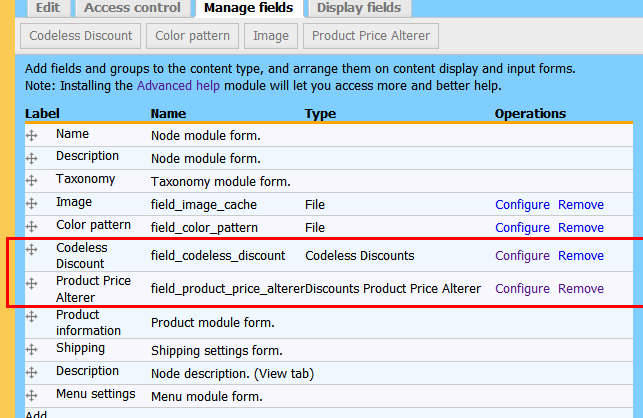
adrianmak commentedI attached my screen below.
Comment #16
ryangroe commentedI'm sorry, beta 18 didn't contain all the files. Please try beta 19.
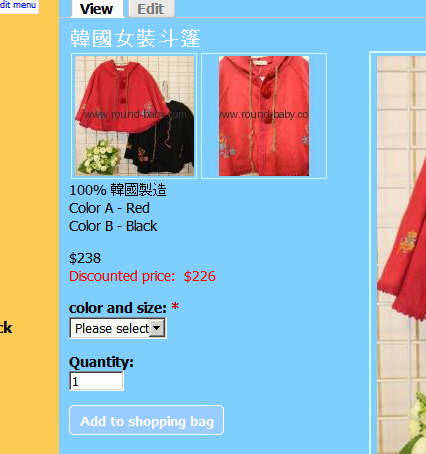
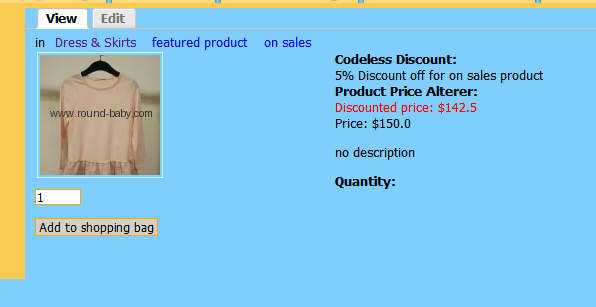
The fields won't show up on the edit page because the information they display is always generated, so it can't be edited manually. The values only show up when viewing the product. I have attached a screenshot of how it looks on my site (it's just the part showing the two CCK fields).
Comment #17
gtfourdreams commentedhmm.. doesn't work for me (in the customer view mode).
i installed the beta19 version. uninstalled the fields modules and re-installed. it looks like the module is being called.. because it's attaching the css file.
but the following javascript isn't being generated anywhere on the pages.
HTML Generated equiv of attachment, if it helps
Comment #18
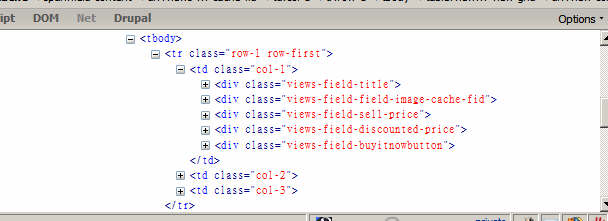
ryangroe commentedDarn. It must be generating a different type of field event on your site (a different $op value in product_price_alterer_field_field). I will do a little more research and get back to you.
Comment #19
gtfourdreams commentedlemme know if there's anything you want me to run to help you debug.
Comment #20
adrianmak commentedI installed beta19 and execute the update.php script and then disabled the two cck field module and enabled again.
However those configured discount product did not show the price strike thru on product view.
I look into the generated html and cannot found and additional html of product price alter similar as gtfourdreams
My problem is same as gtfourdreams . ><
Comment #21
ryangroe commentedplease grab beta 20.
I changed the way the CCK modules work. Unfortunately this change breaks any existing theming people have done to codeless_discounts_field_get_codeless_discount_html_for_product (see theme_codeless_discounts_field_get_codeless_discount_html_for_product in codeless_discounts_field.module for new format)
I appreciate your patience. The CCK module hooks aren't particularly well documented.
Comment #22
adrianmak commentedgrabbed beta20 and replaced existing folder.
updated.php script performed.
disable and enable two cck fields.
clear clear data.
But this time, even worse.
Nothing html generated in the product view
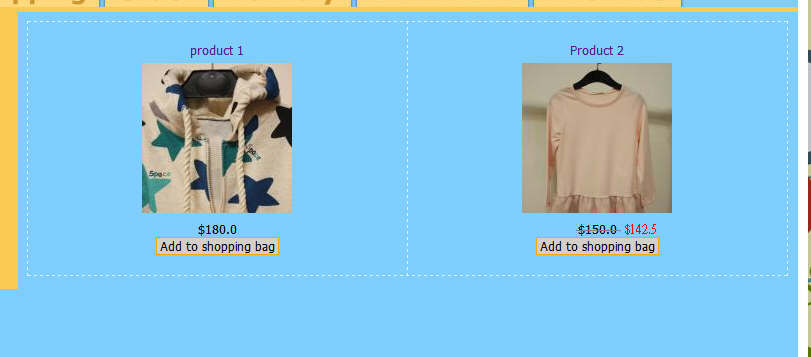
ps I'm using CCK 2.2 version.
Comment #23
ryangroe commentedThe product_price_alterer_field module does not write any HTML. Instead it uses javascript to alter the field. This javascript only gets loaded once and then is cached. The codeless_discounts_field produces HTML but is also only loaded once and cached. So please flush all your caches and reload the product page. I think you did this but please try it again.
Comment #24
ryangroe commentedBy "try again" I mean just load a product page again.
Comment #25
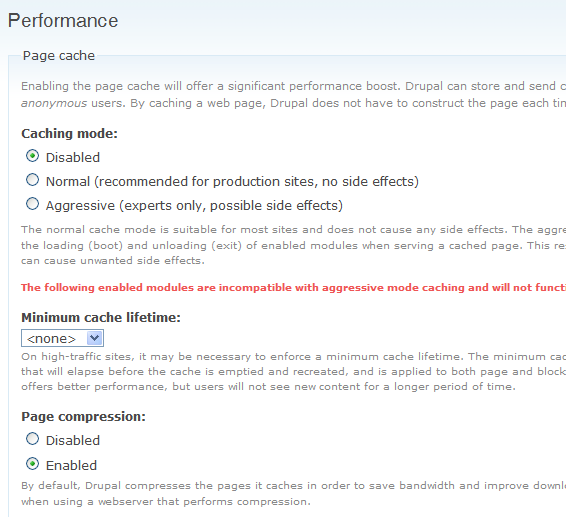
adrianmak commentedI cleared cache data at admin/settings/performance. The right place ?
I even though cleared all web browser cache too and cleared cache again and does not help.
---------updated----------
I found that I get into a product node edit page, and click save, the discount information shown (but still no price strike)
However I refresh the page by clicking F5 key , the discount information will disappear
Comment #26
ryangroe commentedThank you for your patience. We'll get this figured out soon.
That's the correct place to clear the cache, but after the problems you've had I am going to move away from caching data for now. It's a little less efficient but I think it's good enough for now.
I've attached a zip containing a test version of the entire uc_discounts_alt module. It changes the way I generate the CCK fields. It also writes to the error log. So let me know what your visible display is and what your error log says. Thanks again.
Comment #27
adrianmak commentedComment #28
ryangroe commentedOK, so everything is there except the javascript isn't working. My site had a "product-info" class on my sell price div. I removed this from the javascript. Give the attached file a try. If it still doesn't work please ensure the javascript is getting added to the page by searching for the following:
$(".sell-price:not(.product_price_alterer_field-processed):first")
Thanks.
Comment #29
adrianmak commentedI replaced mine by your attachment and now price striking is shown properly.
ryangroe thanks ~~~
Comment #30
ryangroe commentedThat's great. I'm glad we got this worked out. Thanks for your help. I will release a new beta.
Comment #31
adrianmak commentedone more minor question, I have a product node theming template,
Which field should I print out this information ?
I tried following code
but still cannot print out right stuff.
Comment #32
ryangroe commentedI don't think I am setting the field up entirely right for you to do that yet. I'll look into it.
Comment #33
adrianmak commentedwaiting for you~~~~
Comment #34
gtfourdreams commentedit's still not showing for me. i disabled and uninstalled both field modules. i cleared the cache, although my caching is turned off. i updated my php.ini to enable error_log. i restarted apache2. doesn't work. so i tried the module file from 'product_price_alterer_field.zip'. it still doesn't work.
same problem as before. css gets loaded on product pages.
but no javascript and no html generated.
error log is blank
files are attached.
Comment #35
gtfourdreams commentedhere's my crude debugging method. i added the following code:
and it generated this everytime i load up a product page:
$op is: sanitizeComment #36
jrust commentedVery cool! This really makes for a nice discount system.
I am trying to add the field just as a CCK field. I think Javascript is a great idea so that it works for default installs, but I want the actual HTML to show the discounted price so that it's picked up by people without javascript and by bots like Google that search for the price.
Perhaps, there could be two CCK Display values for the field: Javascript and HTML? Anyhow, I tried just putting this into my node template (field_price is the name of the CCK field):
print $node->content['field_price']['#children'];And it almost did exactly what I want, with one caveat: The original price was empty, both for products that are on sale and for products not on sale. This is the HTML that is generated:
<div class="field field-type-product-price-alterer field-field-price"> <div class="field-label">Price: </div> <div class="field-items"> <div class="field-item odd"> <div class='product-price-alterer-field-discounted-price'>Discounted price: $17.00</div> </div> </div> </div>Comment #37
jrust commentedAlso, to allow styling of the label we should wrap Discounted Price in a
<div class="field-label">Comment #38
ryangroe commentedI definitely agree the all javascript idea wasn't the best :)
I initially went with all javascript but now it generates the discounted price with standard HTML and uses javascript to strike the original price and move the discounted price to always be under the original price. This went into beta 21.
I think I know why the original price is empty. I'll look into this tonight. I'll also wrap the discounted price in a field-label div.
Thanks for the help.
Comment #39
adrianmak commentedUnder beta21, can i print two fields value in node template ?
Comment #40
ryangroe commentedjrust, please try the attached file and tell me if the original price is still blank.
adrianmak, I am not sure what you mean by "two fields value in node template". Can you please explain this more. Thanks!
Comment #41
adrianmak commentedAs I said in previous reply, my product node page is themed node-product.tpl.php
I printed each fields as desired but now I have no idea which object or array to print the
strike price, discount text string on the product page.
Comment #42
jrust commentedUnfortunately, it is still blank :(
Also, the field-label is now there, but it should only wrap around the label (the words Discounted Price) instead of both the label and price.
Comment #43
adrianmak commentedryangroe,
Do you understand what I mean ?
Most people would like to have their own product node theming i.e. node-product.tpl.php
printing field by field for theming is necessary so how to print the strike thru text, the discount information on the product view ?
I cannot figured out which field under object $node is relevant to this piece of information.
Comment #44
ryangroe commentedSorry, most of my theming is done in a bit of a hack way on my site. I will attempt to create a test file with the appropriate field information by tomorrow.
Comment #45
ryangroe commentedA quick update: I am going to rewrite the CCK modules this weekend so they work properly with theming. I appreciate your patience on this.
Comment #46
gooddesignusa commentedGood work ryangroe I've been working hard and haven't had time to check up on this module. I'm excited its becoming so popular. Hopefully more people are donating to you :) I can maybe talk my boss into throwing you another donation b/c of this cool feature. Keep up the good work.
Comment #47
ryangroe commentedThank you, gooddesignusa. I am trying hard to get this feature right for everyone. Unfortunately I didn't realize until now that I had been missing a theme function required to render the field properly.
I think I have this problem figured out. Please download beta 22. If upgrading you will need to delete your exist field and add a new one. Also, please read README.txt for additional theming information (such as removing the javascript this module adds that moves the discounted price field).
Using a custom node-product.tpl.php file I confirmed the following have values (assumes you named your field 'field_discounted_price'):
$node->content["sell_price"]["#value"]
$node->content["field_discounted_price"]["#children"]
jrust and adrianmak, I am happy to keep working on this until it's right.
Comment #48
adrianmak commentedDoes the strike thru css effect shown on product catalog page or a views (I cannot find such field under view panel)?
I am not sure this should be handled by your module or other kinds
Comment #49
adrianmak commentedA photoshop modified catalog product view I expected.
Comment #50
ryangroe commentedI agree this is probably not the greatest way to do the strike but I wanted to have a single solution for users less advanced as you guys.
Just override the CSS and add a theme function to not add the javascript. Something like:
function phptemplate_add_product_price_altering_javascript($product)
{
//Do not add javascript
}
Comment #51
gooddesignusa commentedI never noticed any theme problems b/c i must of been doing it wrong. I use firebug with drupal plugin and just find the field with the info i need. i was using
Prob end up still doing that b/c i'm already using the stike for MSRP vs our price.
ex: http://snoutsdirect.com/products/12f-snout-scratchdent
Comment #52
adrianmak commentedThen how do I able to show the product discount alter price under catalog product page or on a view ?
Comment #53
ryangroe commentedadrianmak, I've actually never looked into how the catalog page views are created. I'll take a look at that but it probably won't be until Wednesday. I'm swamped at work.
Comment #54
jrust commentedWow, really nice! Works like a charm! For those wondering how you might add the strikethrough on the original price without javascript, it would be something like this:
And then of course you'd want to theme the javascript function that Ryan mentioned in #50 so that the JS is not outputted. Thanks again for all your work, this really makes Ubercart top notch.
Comment #55
jrust commentedOk, sorry, one more thing that I just noticed. Is it possible to have the field show up in Views like other CCK fields? Neither the Codeless Discounts field or the Product Price alterer show up in views with the other CCK fields which makes it difficult to create custom store catalogs. According to this, the field should automatically be exposed to views, so I'm not sure why it's not. However, looking at another custom CCK module, colorpicker, it looks like it would just be a 5 line implementation of hook_field_settings(). Here's how colorpicker does it:
One other thing. Could you make the javascript that you run onload into a named function? I'd like to be able to call the javascript myself manually, but currently cannot because it's an anonymous function. Plus, if it was named and its own file it could be cached and minimized as an added bonus.
Comment #56
ryangroe commentedI think that's exactly what adrianmak wants to. I imagine there is just another notification mechanism I need to trigger to make that happen. I'll hopefully have that working by Wednesday.
Comment #57
adrianmak commentedryangroe,
any good news regarding showing strikethru pricing under catalog product listing or in a views
Comment #58
ryangroe commentedStill working on it. I have a demo to get done at my day job that's keeping me from doing any uc_discounts_alt work.
Comment #59
adrianmak commentedAny update ?
Comment #60
ryangroe commentedSorry, I've been working pretty late at the day job so I haven't been able to figure this out yet.
Comment #61
jrust commentedI looked into this a little bit more and the reason it doesn't show up in views is because it isn't a straight database column. It appears the module will have to implement hook_views_data() to expose the sell price. uc_products provides an example of how to show a virtual field (i.e. the addtocartlink field) that isn't a straight database field.
Comment #62
ryangroe commentedYep, hook_views_data was needed. I finally got to this last night after a hellish week working on a demo at my day job. I created a hook_views_data(), changed the theming slightly and will have a new release out for you tonight.
Comment #63
jrust commentedVery nice -- thanks. Ok, now don't shoot the idea man, but I was thinking about this on the way home and was wondering why use CCK to implement this field? It doesn't seem to add a lot of functionality, but does make it more complicated for new users. Would it make more sense to use the new uc_price() stuff that came out in rc1? See this commit and this one as an example of how the uc_discount() module did it. Now, if it works, don't fix it, right? But, thought I'd throw it out there as an idea while we're still in beta.
Comment #64
ryangroe commentedYa, that would be much easier. We might switch to that eventually but for now let's just say we're trying to backwards compatible with Ubercart versions :)
Beta 25 is available. Try it out.
Comment #65
jrust commentedWorks great. I dare say this issue can be closed now... Thanks again for your great work!
Comment #66
ryangroe commentedI'm glad you are happy with the results. It was a little tricky to created a generated field for a view because I couldn't find an example where someone was doing the same thing. As usually is the case the code is pretty simple but figuring out what to change and how was the problem.
adrianmak, have you tried out this new version? Let me know what you think.
Comment #67
adrianmak commentedToday, I just got it has an update. I will try it and get back to you later.
Comment #68
adrianmak commentedTested beta25 with some issues
I added discount price field in my views and it shown properly in product views page. But the original price will not strike thru.
The discount price will not show on catalog product list (i.e. not using views to product listing)
Comment #69
adrianmak commentedIt seems that the javascript cannot alter the views-field-sell-price element to add a class on it.
I think the the if statement inside the selection of .views.field-sell-price is return FALSE, so addClass is not performed .
Comment #70
adrianmak commentedPlease discard this reply.
Comment #71
adrianmak commentedMy product views settings
Comment #72
ryangroe commentedTry changing:
if (this.tagName.toUpperCase() == \"TD\")
to:
if (this.tagName.toUpperCase() != \"TH\")
in product_price_alterer_field.module around line 198.
This if statement is just trying to avoid striking the table header text that says "Sell price".
To put the discounted price on the catalog page you'll need to override theme_uc_catalog_product_grid (see uc_catalog/uc_catalog.module).
Comment #73
adrianmak commentedAs your suggestion, it works. But it also strike-through all non-discount product
Comment #74
ryangroe commentedI added better handling for view styling. I'm not sure it will cover every case but it should be close. Try out beta 26 coming out shortly.
Comment #75
adrianmak commentedI'm feel sorry. After updated to beta27, price for non discount product still be strike through on product views
Comment #76
adrianmak commentedThis is html output for an non discount product.
Because when .views-field-discounted-price class exist , the if statement will be true and it will add class to original price no matter whether the product has a discount or not.
I guess not to output the the div .views-field-discounted-price ...... if a product doesn't not apply an discount.
Then the javascript will work properly.
update.....
For quick & dirty method, I used views's row theming template to check discount price is exist or not.
If exist, output those div element otherwise none.
This is what I added in view row template. I added $field->content to check content
It seems work fine
Comment #77
ryangroe commentedThis is a bit tricky but the following should handle most cases (replace your entire existing js block in product_price_alterer_field.module with this). Let me know if this works for you:
//Alter price using javascript
drupal_add_js("$(document).ready(function()
{
$(\".views-field-discounted-price\").each(function()
{
var self = $(this);
var content = self.find(\".field-content:first\");
if ( (content.size() > 0) && ($.trim( content.html() ).length == 0) )
return true;
else if ($.trim( self.html() ).length == 0)
return true;
self.parent().find(\".views-field-sell-price:not(th)\")
.addClass(\"original-sell-price\");
});
$(\".sell-price:not(.original-sell-price):first\").each(function()
{
self.addClass(\"original-sell-price\")
.after( $(\".field-type-discounted-price:first\") );
});
});", "inline");
Comment #78
recrit commentedI am using beta28 and the original sell-price was not getting a strike through... I believe the bug lies on line 210 of product_price_alterer_field.module.
210: self.addClass(\"original-sell-price\")
should be:
210: $(this).addClass(\"original-sell-price\")
since self is not defined for the query $(".sell-price:not(.original-sell-price):first")
Comment #79
ryangroe commentedThanks, recrit. I've changed this code so many times and made several mistakes. I'll fix this tonight (PDT).
Comment #80
recrit commentedfurther refining my previous fix for use in lists since the original query used :first sell-price, which would only add a class to the first item on the page.
product_price_alterer_field.module:
208: $(\".sell-price:not(.original-sell-price)\").each(function()
209: {
210: var self = $(this);
211: self.addClass(\"original-sell-price\")
212: .after( $(\".field-type-discounted-price:first\", self.parent()) );
213: });
line 212 query ensures the element is added after within in context of the sell-price's parent. I haven't fully tested this, but it worked on my example.
Comment #81
adrianmak commentedAccording to recrit's post #78, should I replace all self. to $(this). before my testing ?
Comment #82
ryangroe commentedHere's what I put in and tested:
var self = $(this);
$(this).addClass(\"original-sell-price\")
.after( self.parent().find(\".field-type-discounted-price\") );
Basically what recrit suggested except I'm using self.parent().find instead of passing self.parent() into the selector. I'm not sure which faster but this way looks a little more readable...to me at least :)
This will be part of beta 29 to be released shortly.
Comment #83
ryangroe commentedSorry, that should be:
var self = $(this);
self.addClass(\"original-sell-price\")
.after( self.parent().find(\".field-type-discounted-price\") );
Comment #84
recrit commentedthanks for the quick response!
line 208 without the ':first' is what fixed my issue with it only adding to the first sell-price in a node list, will you be adding this to beta29?
.find() or context passing to jquery - I'm not sure which is faster either. I had passed the self.parent() as a context to jquery since depending on the specific situation if there is no parent() then the expression degrades to $(".field-type-discounted-price:first").
However, forcing an empty parent is producing the same result as with a real parent.... confusing to me. But if you remove any parent consideration, whether context or find(), then things get confused
test case with empty parent: results in same as actually finding a parent
$(\".sell-price:not(.original-sell-price)\").each(function()
{
var self = $(this);
var dbg = $(\".nothing\");
self.addClass(\"original-sell-price\")
.after( $(\".field-type-discounted-price:first\", dbg) );
});
test case with no parent: results in very confused random placement of original sell-prices
$(\".sell-price:not(.original-sell-price)\").each(function()
{
var self = $(this);
self.addClass(\"original-sell-price\")
.after( $(\".field-type-discounted-price:first\") );
});
on a side note..
This is a great module! It's a much better implementation and flexibility than the uc_coupon module. It has everything I need to meet all my client's requirements.
Comment #85
ryangroe commentedThanks, recrit! That's more testing and experimentation than I can do on my current schedule. I'll change the block to be exactly like you posted in comment 80:
$(\".sell-price:not(.original-sell-price)\").each(function()
{
var self = $(this);
self.addClass(\"original-sell-price\")
.after( $( \".field-type-discounted-price:first\", self.parent() ) );
});
Comment #86
Zalatar commentedJust a quick question on this thread. Did this get fixed in the latest release? I can't seem to get it to show up on the products page.
Thx,
Z
Comment #87
ryangroe commentedIt's broken in beta 32- but should be fixed in beta 33+
Comment #88
Zalatar commentedHmm..I am running beta 33 but no discount price on products page. I see it on the product page but not on the products page. Not sure if I am using the right terminology or not. Hopefully you get the meaning. See photos.
Let me know what I can do to help.
Thx,
Z
Comment #89
ryangroe commentedSorry, I misread that. The product page works. I believe the products page is a view and you'll need to add the discounted price field to that view.
/admin/build/views/edit/uc_products
+Field
Field name: Add "Product: Discounted price"
I'm unable to check the code right now so please let me know if this is correct. If not I can go over this more with you tonight (PDT).
Comment #90
Zalatar commentedI had already added the field to the view but I still does not show. If you have time tonight that would be great, if not I will keep my eye out for your post.
Z
Comment #91
ryangroe commentedThat's a catalog page, right (the URL is something like /catalog/13)? To put the discounted price on the catalog page I believe you'll need to override theme_uc_catalog_product_grid (see uc_catalog/uc_catalog.module).
From comment #47:
Using a custom node-product.tpl.php file I confirmed the following have values (assumes you named your field 'field_discounted_price'):
$node->content["sell_price"]["#value"]
$node->content["field_discounted_price"]["#children"]
There may be a better way. I haven't been keeping up with Ubercart theming changes.
Comment #92
duckzland commentedHi, Ryan,
How do you exactly override theme_uc_catalog_product_grid? I got the node-product.tpl.php to show the strike through price both using $node->content["field_discounted_price"]["#children"] and custom php :
if ( $node->field_discountprice[0]['view'] != NULL ) :print uc_currency_format($node->sell_price);else:print uc_currency_format($node->sell_price);endif;but no luck in views and product catalog.
Just upgrade to beta33, still no strike through in views. and views is showing the discounted label although there is no discount value.
BTW, great module though...
Duckz
Comment #93
duckzland commentedJust see the http://drupal.org/node/466472 and modified the catalog page with
and
now the catalog page is working with slash price and discounted price showing correctly.
But no clue for page with views enabled, ryan is there any solution for views?
Thanks
duckz
EDIT : Update the following line:
now paypal is broken.....
Fatal error: Unsupported operand types in /sites/all/modules/ubercart/uc_store/includes/uc_price.inc on line 89
Comment #94
jrust commentedWith views you may be better off using one of the theme preprocess functions for the view. I took a look at the javascript being produced and it's just not particularly easy to figure out a one-size-fits-all solution considering how flexible views is. With a theme_preprocess_view function you could easily run through the rows and check to see if a discounted price is present and modify the sell price accordingly.
Comment #96
tahiticlic commentedWell, if you want to do the same without making the template, you have to put the "Discounted price" in the content type used as products, not in the product content type.
I guess for the product content type, UC controls which fields are displayed ,with none by default. So the right solution would be to add a "Discount price" checkbox in the admin/store/settings/products/edit/fields checklist.
Moreover, with this solution, you have to display the sell price in order to have the discount price displayed, but only the sell price is biffed, not the "master" price (he big one).
By the way, perhaps your test should lead to :
Comment #97
mrwhizkid commented@cfab,
For me, this seems like the best solution. I need my main catalog page and the associated product pages (catalog/13, for example) to display the sell price and the discounted price.
How would I go about adding this discounted_price checkbox to the product settings page so that if I ever need to turn this off for some reason, I don't have to go into the module and 'unhack' a bunch of stuff?
It would be nice to be able to just have it as a product field...
Thanks in advance for your help!
Comment #98
RachelNY commented@ryangroe from comment #91
I put
print $node->content['field_discounted_price']['#children'];
in a custom node-product.tpl.php file.
It displays both the regular price and discounted price in Firefox, but only the regular price in MSIE.
Firefox: Regular Price with strike-through and discounted price shown
MSIE: Regular Price shown with no strike-through, no discounted price
Chrome, Safari, Opera: Regular Price shown with strike-through, no discounted price
Can you tell me what I have to do to get this to show properly on all (especially MSIE)?
Thanks,
Rachel
Comment #99
ezra-g commentedBased on the reviews in this issue, it seems like this needs work.
Comment #100
Zalatar commentedDoes anyone have the discounted price working on the product grid page yet?
It looks to me that this is still an issue.
If it is fixed, post a link to please.
Thx,
Z
Comment #101
msumme commentedI did something like this for a site I built recently. http://www.freelakotasilver.com/content/soto-nation-turtle-island
I just made a little module that would calculate the total price off for price tiers based on quantity discounts and then automatically display a small table with the actual price of the product at different tiers.
If anybody thinks they can use this, message me, and I'll upload the code back here. It's not super elegant, but it works.
I realize that's not exactly what everybody is saying here, but this is just for a very special use case. If anyone's interested, I'll write up what it's good for. It's just a cck field you add to the product.
P.S. If anyone can tell me why the discounts show up on the cart page, but not the cart/checkout or cart/review page, I would be very grateful.
Comment #102
redhatmatt commentedI would like the code msumme, as we use the grid. please post.
Comment #103
jmuessig commentedsubscribe
Comment #104
jagpreet08 commentedI have installed the uc_discounted module and it's working fine for the authenticated users but for anonymous users discounted price is not visible, however it shows him the current price with strike. Can anybody have any idea about how to make discounted price visible to anonymous user.
One more thing does anybody have any idea about hoe to show the discounted prices in the catalogue?
Comment #105
tacoma commentedAre there plans to have a build with the discounted price on product grid available soon?
Comment #106
grub3 commented+1 Tacoma. This would be very needed. People who buy do not only think in %, they need real figures to compare.
Comment #107
grub3 commentedmsumme, we would love to have your code.
Comment #108
trofiarik commentedPlease Help!
I can't get the discounted price to show in my product detail page!
I am working with content template to modify the theme.
I tried a lot. I found that the discounted price is calculated if the conditions are true and so if I set a discount for quantity that get activated if you buy 2 or more items i can see the discount only in my cart, if otherwise I 'enable' the discount for 1 item or more, the module calculate the discount and I can get the value displayed already in my product detail.
How the hell to get and show the value even if discount is for 2 or more items?
There is a way to call and insert in my template the us_discount_alt module function that calculate the discounted price?
Or anybody know ho to write and insert in template a db query to get the 'discount_amount' value, so that with php I can easily recalculate and print out the discounted price??
Or other solutions/ideas?
Thanks everybody
Comment #109
trofiarik commentedAn Update.
Succeded in showing the discounted price trough the codeless discount description field ...
but would be nice to find a way to directly insert the right function to calculate the discounted price, like said above. Would be better and more dynamic. In this way I have to compile the codeless discount field for each product category, and there are a lot of them.
thank again
Riccardo
Comment #110
ColinMctavish commentedStill trying to make this work on my site. Price Alterer doesn't seem to do anything and I have no need for the codeless discount.
Comment #111
msumme commentedThis is really weird. I could swear I posted the code for this about a month ago, but it's not showing up.
It's basically a modification of one of the other modules already included in discounts_alt. It's not very polished, but hopefully it will benefit someone. It only works in a limited case where there are codeless discounts that stack on top of one another, so 50 cents off the first tier, 50 cents off the next tier, etc., and it displays like on freelakotasilver.com