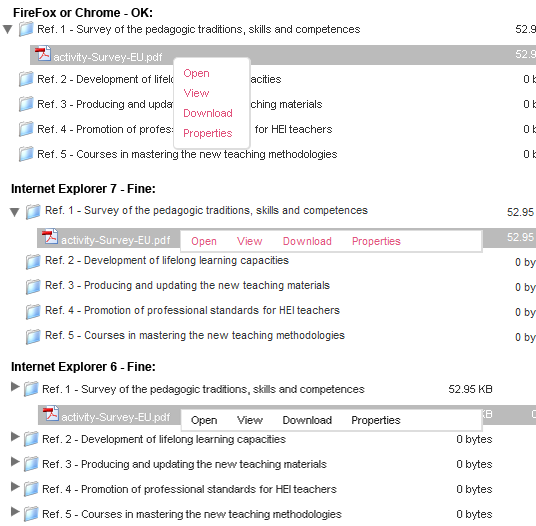
While browsing files with "File browser" on IE there is a problem with a pop-up menu. That pop-up menu which appears near clicked item with menu items: 'Open', 'Previw', 'View', 'Download', 'Properties' on file or item 'Show' on folder.
So the problem is that it goes under the folder names (z-index does not work). I can not change position: absolute - it's obligatory.
Well it's difficult to describe the problem so I attach an image which shows it really clearly...
I spent hours on this problem, tried a lot of thigs and tricks with ccs and javascript - non helped!
So maybe someone could tell me solution?



Comments
Comment #1
Daugilas commentedWell, since nobody replied to this for one day and it's urgent for me I found one interesting solution.
I changed only css for Internet Explorers.
First I have special files in my theme for both IE7 and IE6; they are loaded in header like this:
In those files I added few lines:
Code values should be adjusted to all themes separately depending on font style and other style parameters.
And you can the result in an attachment!
Comment #2
bakyt commentedI've patched the bug by comletly changing the pop-up menu appearance.
For more deitails about the problem pls see the link: http://paper.isotoma.com/examples/_test-position.html
Files has been changed:
Comment #4
Daugilas commentedJust tested http://paper.isotoma.com/examples/_test-position.html
Works on FireFox, Chrome, Safari, IE8;
Doesn't work on IE7...
Sorry I don't have time to look at the code..
Comment #5
miglius commentedIt looks that we bumped into a IE relative position and z-index bug http://therealcrisp.xs4all.nl/meuk/IE-zindexbug.html
Comment #6
johanneshahn commentedmove 1 level up
Comment #7
johanneshahn commentedIe7
Closing support