

 Come together with the global Drupal community in Rotterdam, 28 Sept – 1 Oct 2026. Sessions, contribution, connection, and Early Bird savings until 8 June.
Hi there!
I'm going to be short: ProsePoint 0.18 installation does *not* finish on the above configuration, at least on mine. Which is:
- Apache HTTPD 2.2.11
- MySQL 5.1.33
- PHP 5.2.9
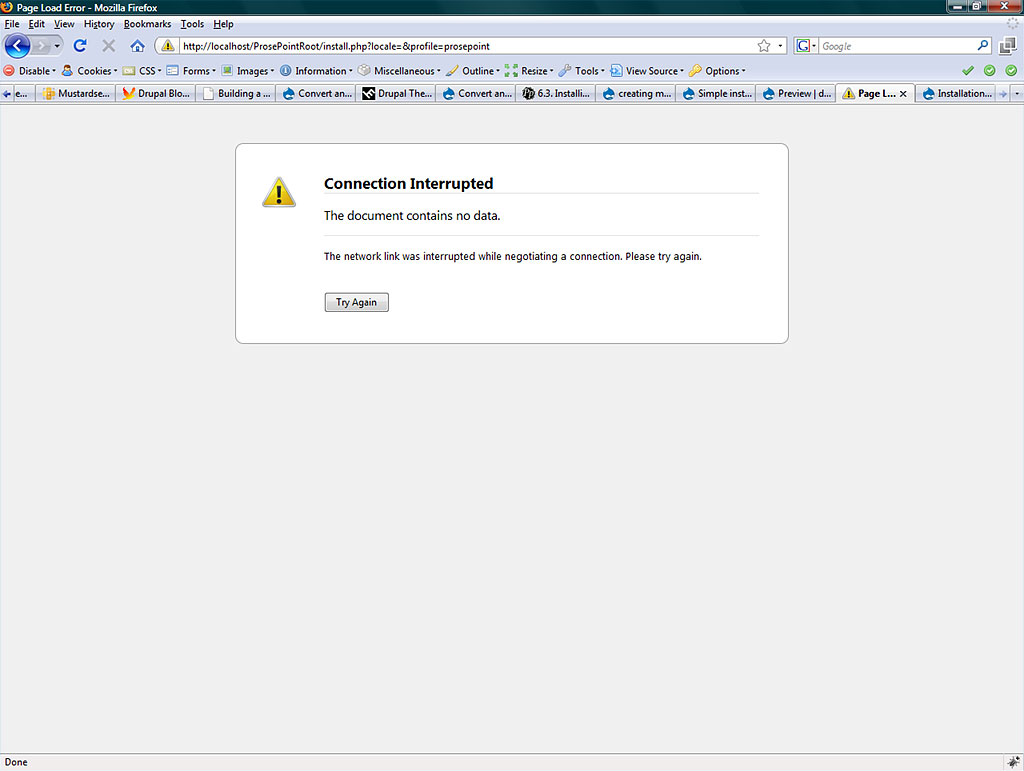
It keeps failing every single time at the very last step (error message: "connection interrupted" - doesn't make too much sense). See attached screenshot. Btw, the whole procedure works until that step (which comes like after an hour!!). When I press the "Try again" button, it promptly says "ProsePoint already installed" - and what is worse when I click on "View your existing site" I am presented with a big fat network timeout. Consequently, after 1+ hour installation I cannot even access the page. Oh yes, I chose the minimal site not the demo purpose site.
So...
No, there is no error in the apache and mysql logs.
Yes, I tried it many times (actually I spent the last 18+ hours to figure it out) - always from scratch, empty DB and so on.
Yes, Drupal 6.x installation works on the same rig (as a matter of fact, always has been).
Yes, I tried without XAMPP, i.e. manual Apache+PHP+MySQL install (tested successfully with Drupal) to no avail.
Yes, I made the 10 minutes patch (max_execution_time = 600) in php.ini. Memory => 256mb (no, 128 was NOT enough!).
Yes, I followed the PP install guide word-by-word (so e.g. settings.php is as supposed to be, etc.).
Here is the content of my ./sites/default folder when I start:
Directory of C:\xampp\htdocs\ProsePointRoot\sites\default

2009.04.18.  17:49    <DIR>          .
2009.04.18.  17:49    <DIR>          ..
2008.08.13.  08:52             8 917 default.settings.php
2009.04.19.  18:01             8 917 settings.php
Now I could rumble on but you've got the point, I'm pretty sure. So, I am really pissed off right now - PP looks really a gem (absolutely great work, Beng!).
So please advise before I combine a loaded gun with my temple.
Thanks.
Loránd
| Comment | File | Size | Author |
|---|---|---|---|
| #2 | apacheError.jpg | 25.13 KB | lorand |
| installError.jpg | 69.65 KB | lorand |

Comments
Comment #1
lorand commentedOkay, it's me again.
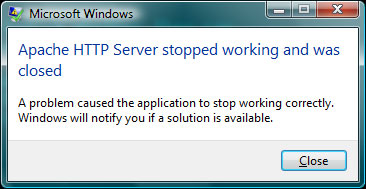
I have just noticed a really interesting Windows dialogue window (screenshot). "Apache HTTP Server stopped working and was closed"
Which is very interesting since the XAMPP status window is happy about Apache. And no sign of any restart in the Apache log.
So now we have the reason of the network failure. But what kills Apache? Seemingly? PHP bug?
L
Comment #2
lorand commented...and the screenshot, sorry.
Comment #3
lorand commentedHi!
Eventually I pulled the trigger and switched to Windows XP (and the same software packages).
Works like a charm.
Buena Vista, eh?
Cheers,
Loránd
Comment #4
lorand commentedComment #5
bengtan commentedHi,
So, shall we say the cause is a XAMPP issue with Vista then?
Comment #6
lorand commentedNah, XAMPP is okay, Vista is also okay. It must be some PHP bug, at least this is my current stand so far after extensive "googling" (many people has this problem when there is a bug in the PHP code).
All the more, because as I mentioned there was the same issue without XAMPP (that is, when manually installing the development environment).
So... here is the deal:
XAMPP + Vista + Drupal = Check
XAMPP + Vista + ProsePoint = Fail
XAMPP + XP + ProsePoint = Check
Obviously you can substitute XAMPP with individual Apache+MySQL+PHP installations.
For my part I will reinstall my Vista in the near future and give it another try to exclude a potentially isolated problem. I will report back my findings.
Thank you for the quick reply, btw! :)
P.S. One more thing. Compared to Vista, ProsePoint speed on XP is mega-turbo-hyper-fast! :)
Comment #7
bengtan commentedHi,
No problem. It's always much easier dealing with someone who knows what they're talking about.
> Compared to Vista, ProsePoint speed on XP is mega-turbo-hyper-fast! :)
ProsePoint isn't anything much more than Drupal with a lot of modules (and a few custom written ones), so all the compliments should go to Drupal :)
Good luck and let me know how you go. Personally, I've never used Vista, and don't have any plans to do so. Any insights you can give me are much appreciated.
Comment #8
lorand commentedOkay, will do. I mean the Vista part.
One more thing though.
I have just enabled ProsePoint Channel module and got this warning:
warning: Invalid argument supplied for foreach() in C:\xampp\htdocs\tigerProse\profiles\prosepoint\modules\prosepoint\prosepoint_channel\pp_ch.module on line 218.Which line is literally:
foreach ($terms as $term) {Any idea, why? Path problems? I'm testing with a custom path (tigerProse). Or so much for I know what I'm talking about... :)
Comment #9
bengtan commentedIt wouldn't be a path related issue.
Can you check .../admin/content/channels/settings on your site? For 'Please select the vocabulary to use as your channel hierarchy:' it should say 'Channel'
Comment #10
lorand commentedHi Beng,
there is no 'Channel' but 3 others:
besides 'none' of course which was the default setting. Guess I haven't set something?
Comment #11
bengtan commented> Guess I haven't set something?
It's not something you didn't do. The installation script is supposed to create a vocabulary called channels for you and then set it for .../admin/content/channels/settings. And then some of the views configurations are supposed to utilise this vocabulary as well.
Comment #12
lorand commented"Supposed to"? Erm, then how can I make up for it manually?
Maybe for similar reasons I am unable to publish when I enable the "Prosepoint" module (all the other PP mods are enabled) - even if the system says it "has been updated" (e.g. a story) when pressing 'save' (= publish).
I mean when I create a story and publish it, it still remains unpublished (no error message is given). But as soon as I disable the PP mod (just that one) and do the same thing everything is normal. I checked and set the appropriate permissions of course... weird.
Comment #13
bengtan commentedIf you create a vocabulary called Channels, assign it at .../admin/content/channels/settings, and then clear your site's cache, that should be sufficient. Also, some views need to be updated, so if you have edited any of them, please revert the view (and edit your changes again).
The base ProsePoint module implements the workflow functionality which is tied to field_extended_status. Perhaps something is wrong there.
Hmmm... given there are issues with your installation so far, and they "shouldn't be" happening, you might want to consider a full reinstall.
Comment #14
lorand commentedOkay, I created the 'Channels' vocab (with the same channels settings of your demo site) and the "invalid argument" warning has just gone away. Thank you very much!
In light of these possible installation issues I may reinstall the whole site.
Thanks again, Beng, you were very helpful! :)
Comment #15
bengtan commentedNo problem. I presume fixed (at least, for now). Good luck.
Comment #16
lorand commentedHi Beng,
bad news.
I completely reinstalled my Vista system but the problem persists. No solution.
Apache + ProsePoint + Vista = does not work. (The install dies after the "Choose PP variant" step - Apache stops working... ;()
The weird thing is that Drupal works on the very same box. That's why I gave this thread a "bug" classification. I also asked one of my developer friends to give it a try in Vista to be on the safe side. Same result...
So I must go back to XP as for PP.
PS. Is there any other way to build up your PP modules on an existing Drupal config? One by one? I mean after installing a common Drupal installation can I install PP modules upon it?
Comment #17
bengtan commented> The weird thing is that Drupal works on the very same box.
Actually, that was quite common for early versions of ProsePoint. It's because ProsePoint is doing much more than Drupal during installation ie. more modules and executes more configuration code.
If Drupal core was ever changed to include CCK, Views, Imagefield etc. as standard, it would start running into the same installation issues as ProsePoint does.
> That's why I gave this thread a "bug" classification.
No problem.
> PS. Is there any other way to build up your PP modules on an existing Drupal config?
Theoretically, yes. All you should have to do is duplicate, by hand, the configuration that is executed by .../profiles/prosepoint/prosepoint.profile.
Practically, it's not straightforward because there's a lot of configuration and many details to take care of. So much so that it's not a supported way of installing ProsePoint because I don't think I will have the resources to answer all the help requests I'd expect from people trying to do it this way.
But if you know what you're doing, and don't mind peering deep into the code, you can certainly give it a try.
Comment #18
lorand commentedOK, I will try it that way and see what happens.
Anyway, Beng, keep up the good work! ProsePoint is a wonderful project! And thank you again for your responsiveness, I really appreciate it!
Cheers,
Loránd
Comment #19
vegantriathleteArrgh!
I am running into the same issue. Vista + XAMPP 1.7.1 + PP0.31 = NO GO when attempting to install the variant, with the same error dialog from Windows and the same status that Apache seems to be happily purring away. Also, the same SLOOOOOOOOOOW install. So, I guess there has been no fix to this. I can't switch my machine to XP, nor do I want to. I would really prefer not to run WAMPP instead of XAMPP. So, maybe I will have to try the manual route of "upgrading" a Drupal 6.16 install to do PP.
And now to head over to the PP site and reply to my own question in the forums.
Sigh ...
Comment #20
paskainos commentedHaving the same issue, but in Win XP SP3 environment. Referring to Loránd's initial remarks - been there, done that (over, and over...). This is my first go at PP and I was really looking forward to it (have built a couple on OP already and wanted to compare). I'll probably have to come back to it at some point, hopefully soon. Any helpful thoughts are much appreciated.
Comment #21
paskainos commentedoops.
Comment #22
bengtan commentedUnfortunately, there was no clear resolution and I don't know what the culprit is :(
However, if you're interested ... I have a hosting service that I wouldn't mind getting some very-unofficial-beta testers for. You can run ProsePoint on that for your testing and comparison purposes.
Please contact me through http://drupal.org/user/132729/contact or http://www.prosepoint.org/contact if you'd like me to set you up.