

 Come together with the global Drupal community in Rotterdam, 28 Sept – 1 Oct 2026. Sessions, contribution, connection, and Early Bird savings until 8 June.
Sorry for posting again but after some hours of trying, i still am getting some odd behaviour.
Subdomain settings:
Creat domains for OG and group content.
Using the name of OG
Pathauto settings:
Node path settings for groupnodes: content/[title-raw] for default for blank patterns
[subdomain]/content for groupnodes and groupcontent
After creation of group node i get a page not found. url:subdomain/mysite.com or subdomain/mysite.com/content
I've tried different combinations in the node path pathauto settings such as:
[subdomain]
[subdomain]content/[title-raw]
But got directed to a page not found or a totally different page.
My prerequisites are all marked green see attachment.
I have placed tilde to 'no action'.
Suggestions appreciated
Thanks
| Comment | File | Size | Author |
|---|---|---|---|
| #16 | og_user_test.zip | 2.75 KB | held69 |
| #16 | aliases.JPG | 59.52 KB | held69 |
| #15 | 1.OGUR and Subdomain installed.JPG | 56.46 KB | held69 |
| #15 | 2.Subdomain without OGUR.JPG | 59.46 KB | held69 |
| #15 | homepage.JPG | 55.2 KB | held69 |



Comments
Comment #1
held69 commentedBut got directed to a page not found or a totally different page.
I have now noticed that when i place just [subdomain] under node path settings in path auto, i will not get a 404, (placing [subdomain]/content/[title-raw] resulted in 404's )
Instead of that i get directed to the frontpage of my site. The subdomain in the url is well created.
For example:
1.I create groupnode with title:'test'
2.drupal confirms that the node is created.
3.Instead of displaying the created groupnode 'test', the default frontpage is displayed.
4.The url of this page is the url that should have been given to the created groupnode namely
test/mysite.com
Comment #2
setvik commentedIf you want your Group URLs to look like this:
mygroup.mysite.com
myothergroup.mysite.com
You'll want to set the pathauto node settings path for your Group node-type to [subdomain]
is that what you've done?
Also, if you created the groups before setting the tilde to "no action", you need to edit and re-save those groups so the correct url can be generated.
Comment #3
held69 commentedThanks for reacting
Yes, in the pathauto node settings for my group node-type i have placed [subdomain]
I created my groupnodes after setting tilde to "no action" to get the right url.
Actually the right url is being created for example: newnode.mysite.com
But right after node creation i get directed to the frontpage of my site while seeing newnode.mysite.com
in the browsers adress field.
When i want to open (not edit) the node under administer/content the same thing happens, i get directed to the frontpage of my site while seeing newnode.mysite.com in my adress field
Despite the fact that my prerequisites are all green, could the cause of this problem be at my host?
Comment #4
setvik commentedhmm... if all the prerequisite lights are green, i'm not sure the problem could be...
Are you on shared hosting?
Do you have a default Drupal .htaccess file or have you made any changes to it (esp. rewrite rules)?
Are you running other modules on your site that could conflict with the subdomain module (i.e. global redirect or domain access)
To debug:
I'd look at the url_alias table & look for the node of the group you created.
the path alias should be "~[group name]"
Try entering that in the url bar of your browser and see if you get taken to the group homepage:
e.g. "http://example.com/~[group name]" should take you to [group name]'s front page on your site.
If that works, then I'd start debugging the $_SERVER & $_GET variables in php to see what's going on...
Comment #5
held69 commented- Yes i am on shared hosting.
Here a copy of my ht access file.
- No I dont have either of the two modules installed.
Modules installed:
-OG
-OG user roles
-date
-calendar
-cck
-views
-notifications
-message
In the url alias list i looked up the groupnode i created.
The path alias is ~[groupname]
pasting http://mysite.coml/~groupname in my url bar brings me indeed to the group homepage.
However clicking on this node itself under administer/content gives me the following url:
http://groupname.mysite.com/
The page i now see is the default frontpage of my site, set under 'siteconfiguration-site information'.
To test i have changed the url (under 'siteconfiguration-site information') with url's of different pages in my site.
When i click on my new groupnode it will lead to the page stated under siteconfiguration-siteinformation.
"If that works, then I'd start debugging the $_SERVER & $_GET variables in php to see what's going on..."
Mmmmmm, i hardly have any php knowledge .
Thanks sofar
Comment #6
held69 commentedOk i did some solid testing and discovered the following.
On a fresh drupal 6.12 install subdomain just works fine
Modules:
OG
Vieuws
Subdomain
pathauto
Token
As soon as i enable OG user role the problem occures as mentioned under #3 and #5.
Taking this to OG user roles.
Comment #7
held69 commentedI have been trying to test again but got confused because of different results.
Again on a fresh drupal install i have the following modules:
OG
OGUR
Subdomain
Pathauto
Token
If i install all modules accept OGUR everything seems right.
Note: for installing the subdomain i had to apply some adjustments to my settings.php file.
Once i enable OGUR i get a fatal error:
Fatal error: Call to undefined function subdomain_url_rewrite_inbound() in /home/mysite/domains/mysite.com/public_html/sites/default/settings.php on line 241Once i get rid of the code i had to add in my settings.php file i have access to my site again.
Comment #8
held69 commentedI was able to solve this one by applying a (function_exists)
http://drupal.org/node/326499#comment-1659096
However problem as mentioned under #6 still occurs....
Comment #9
somebodysysop commentedOGUR is not re-directing your group home page. It only re-directs on /node/add in group context.
However, from your explanation, it would appear that OGUR could be doing something which causes the re-direction.
I, however, can not think of any reason why OGUR itself would prevent Subdomain from doing it's thing.
So, I would suggest posting the relevant output from the debug table (og_user_test) and let's see what's showing up there.
Comment #10
held69 commentedThanks for posting.
As far as i understand i need to use the Database Administration module.
http://www.drupal.org/project/dba
However i can't find a version which runs on drupal 6.
Are there alternatives?
Comment #11
somebodysysop commentedInstall phpmyadmin: http://www.phpmyadmin.net/home_page/index.php
Then point it to your Drupal database. You can then use sql to display the contents of any Drupal table in your site.
Comment #12
somebodysysop commentedAlso, I have another test which might more quickly determine the culprit here.
Uninstall Subdomain module. Leave OGUR installed.
Then, see if the pathalias works:
http://mysite.coml/~groupname
Then, uninstall OGUR, and see if it works.
Comment #13
held69 commentedIn my host package Phpmyadmin is by default included together with my database.
However i´m not quit familiar with it.
Which table and its content do you need?
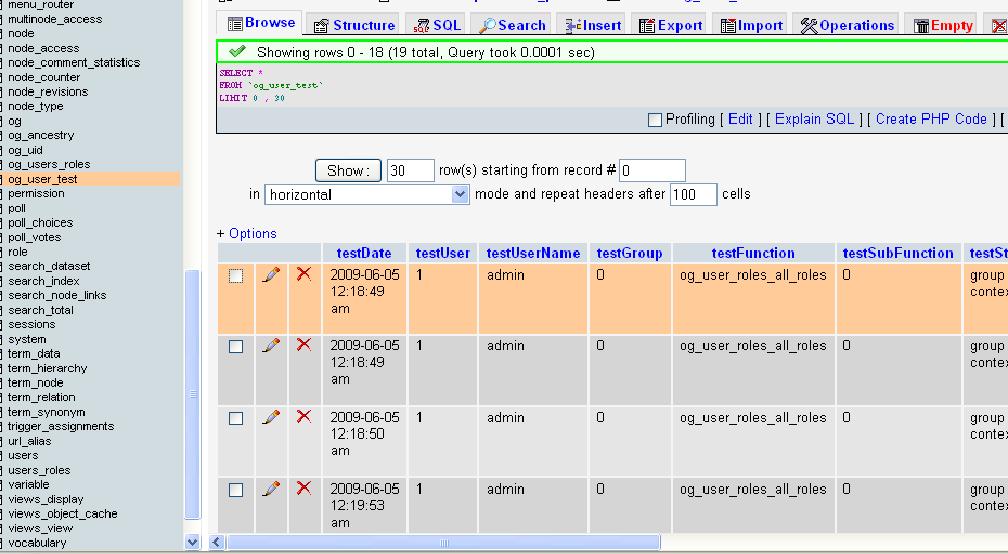
There is a table called og_user_test. see screenshot.
There is a tab called 'Export'. Do you want me to export this table,
as i dont know how to show content of a table using SQL.
As for the second alternative.....
With Subdomain uninstalled and OGUR installed:
Alias is http://mysite.com/content/groupname
With OGUR uninstalled and Subdomain installed:
the alias is http://mysite.com/~groupname
With OGUR installed and Subdomain installed:
the alias is http://mysite.com/~groupname
Thanks
Byron
Comment #14
somebodysysop commentedYes, you should export the table so we can see the entire reults. The screenshot doesn't show much.
You say you are re-directed when you try to edit the page: http://mysite.com/~groupname
What is the url to edit this page?
It may be that ogur won't work with subdomain because this is the first time I've ever seen a url like this: http://mysite.com/~groupname
Is this tilde character a requirement of subdomain?
Comment #15
held69 commentedTo set up a clear example for you, i created 4 nodes with the following node titles.
1. OGUR and Subdomain installed (see screenshot)
2. Subdomain without OGUR (see screenshot)
3. OGUR without Subdomain
4. This another page node (just to show another node on the homepage see screenshot)
Each title suggests the situation whether if OGUR and/or Subdomain is installed.
On each screenshot you can see the url in combination with the created node.
On screenshot 'OGUR and Subdomain' you can see the URL of the created node in
combination with the redirected homepage.
The screenshot 'aliases' shows you the aliases of these nodes.
"What is the url to edit this page?"
Note that i only get redirected when i click the title of the node.
When i want to edit the node i just go to the node. URL:
http://mysite.com/node/16/edit?destination=admin%2Fcontent%2Fnode
"Is this tilde character a requirement of subdomain?"
I think the tilde is a result of a for Subdomain required setting in pathauto, under 'punctuation settings'.
Tilde ~ should be set to No action (do not replace)
Comment #16
held69 commentedAttached are og_user_test database export file.
Screenshot 'aliases'
Thanks
Byron
Comment #17
somebodysysop commentedCan you use Subdomain module without the "~"?
Comment #18
held69 commentedThe subdomain module will not work properly without the "~".
It will generate the url mysite.com/groupname when i set it to 'replace by seperator' or 'remove'.
Whereas i set it to the required setting, that is 'no action do not replace', the module works properly and generates the url groupname/mysite.com
From Subdomain readme file:
STEP 6: Configure Pathauto (URL aliases -> Automated alias settings):
1) Go to "Punctuation Settings" and set "Tilde ~:" to "No action"
2) Place [subdomain] at the *start* of all paths whose content you
want placed on a subdomain
Comment #20
held69 commentedThe last news i heard from the maintainer is, that he is working on it.
The issue you described is indeed the same as i have experienced.
I'm still hoping for a solution.....
Comment #22
held69 commentedTested and works!
thanks very much for sharing.