Active
Project:
Picasa
Version:
6.x-1.x-dev
Component:
Code
Priority:
Normal
Category:
Bug report
Assigned:
Unassigned
Reporter:
Created:
22 Apr 2009 at 15:40 UTC
Updated:
26 Feb 2010 at 18:34 UTC
Jump to comment: Most recent file


I did a removal of all nodes/modules related to picasa because I had an issue with the pictures not showing up in my album node after adding the Google Auth module...
Well so I reinstalled the modules and was about to ad an new Picasa Album node and I get this message:
The page you have requested cannot be displayed. Another site was requesting access to your Google Account, but sent a malformed request. Please contact the site that you were trying to use when you received this message to inform them of the error. A detailed error message follows:
The "scope" parameter was bad or missing.
I also get the same message when I try to ad photo nodes...
Here is the url I get directed to that Googles API doesn't like:
http s://www.google.com/accounts/AuthSubRequest?next=http "my-site" node/add/picasa-photo&scope=&session=1
As you can see the scope parameter is empty, what should it contain?
| Comment | File | Size | Author |
|---|---|---|---|
| #11 | API-Key-Config.png | 58.79 KB | francewhoa |
| #13 | works-with-latest-dev.png | 21.78 KB | francewhoa |
| #13 | create-picasa-photo.png | 389.45 KB | francewhoa |
| #12 | error-screenshot.png | 22.12 KB | francewhoa |



Comments
Comment #1
cyberswat commentedhmmm ... Are you using the latest dev release of the google_auth module and the latest dev release of the picasa module? Your description implies this is so but I need to make sure.
Comment #2
Jacxz commentedWell that was the problem...
I was using the Google_Auth stable release.
All is fine with importing albums now and the album-thumbnail also works under the user album list, but the pictures wont show.
Picasa Phot node: The link in source is fine, points to the correct image but it ends with this ?imgmax=Array
trying to go to the link with the extra imgmax preference wont work, maybe it shouldn't without embedding I don't know...
Any ideas?
http://www.hd.chalmers.se/~Jacxz/?q=node/50
Comment #3
cyberswat commentedThe imgmax stuff is the last thing I was working on and it's quite possible I committed broken code. There is now an admin area that will let you select default image sizes for thumbnail and full size images. Try setting values in the admin and see if maybe that helps ... In the meantime I'll have to take a look and finish up that piece. Sorry for the inconvenience.
Comment #4
cstreit commentedI run into the same situation.
Any tips on solving that issue?
See also: http://drupal.org/node/479318
Comment #5
hixster commentedI am running dev version of google auth and picassa, but don't get any options to create a Guser in my create content menu? Any help much appreciated
Comment #6
ldcastanheira commentedHi cyberswat, I'm experiencing the same problem described in comment #2. You told about an admin area, but I couldn't find it. Where can I find this area to set default image sizes? Thanks
Comment #7
cyberswat commentedThe admin area should be at admin/settings/picasa
Comment #8
ldcastanheira commentedI don't know D5, but in D6 seems to dont have this path. After login as admin I have this options in my menu.
* My account
* Create content
* Administer
o Content management
o Site building
o Site configuration
o User management
o Reports
o Help
* Log out
I choose Administer, after I don't have any options like "Picasa". I can choose to see this configure options separeted by Module, but I still seen no options to configure Picasa, only things related to permissions. Sorry for my basic question but, today is the first time I'm using Drupal. If everything goes right I will change my site to drupal. Thanks a lot.
Comment #9
ldcastanheira commentedComment #10
ldcastanheira commentedOh, ok... I should use this path directly on url. Something like this...
http://127.0.0.1/drupal-6.13/?q=admin/settings/picasa
I just not understand why this path was not added on administer page.
Thanks cyberswat.
Comment #11
francewhoaSteps to fix this
Make sure you have install the latest google_auth dev. Otherwise it won't work. The current latest dev is google_auth-6.x-1.x-dev.tar.gz (2009-Jun-29). It can be download at http://drupal.org/project/google_auth
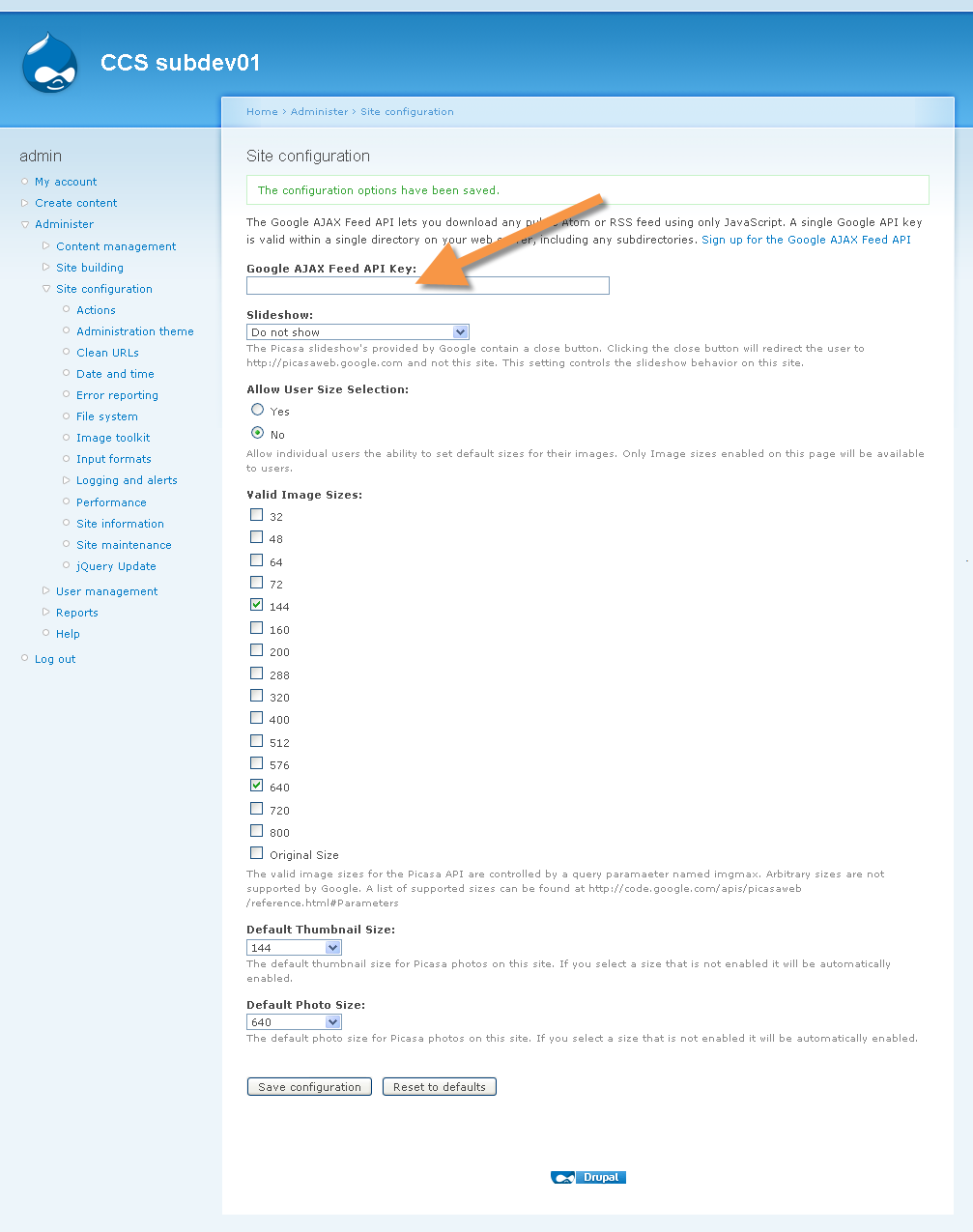
Go to admin/settings/picasa
Type in your 'Google AJAX Feed API Key:'
Click on SAVE CONFIGURATION button.
Go to node/add try again to create a new Picasa Photo or Album.
Find below attached screenshot to clarify.
Comment #12
francewhoaSame thing here. Google returns the following error message.
Steps to reproduce this issue.
Install both
--google_auth-6.x-1.0.tar.gz (2009-Apr-09)
--picasa-6.x-1.x-dev.tar.gz (2009-Apr-17)
Go to admin/settings/picasa Type in your 'Google AJAX Feed API Key:'
Go to node/add/picasa-photo or node/add/picasa-album
Google will return the error. Find below attached screenshot to clarify.
Using:
google_auth-6.x-1.0.tar.gz (2009-Apr-09)
picasa-6.x-1.x-dev.tar.gz (2009-Apr-17)
I'll try with the latest dev.
Comment #13
francewhoaIt works with the latest google_auth dev. google_auth-6.x-1.x-dev.tar.gz (2009-Jun-29)
Find below attached screenshots to clarify.
Using:
google_auth-6.x-1.x-dev.tar.gz (2009-Jun-29)
picasa-6.x-1.x-dev.tar.gz (2009-Apr-17)
Comment #15
alex.cunha commentedHi,
I got the same error message as posted by Jacxz - April 22, 2009 .
My config:
- drupal 6.13 (my test environment)
- Picasa 6.x-1.x-dev
- Google Auth 6.x-1.0
There is no Guser as described on instructions (node/add). Only the new "Picasa Album" and "Picasa Photo" content types.
Is there any fix to avoid this 'The "scope" parameter was bad or missing'?
Could I manually set a value for "scope" on the URL?
thanks
Comment #16
Erikpost commented