Image import doesn't show the gallery categories. So, I can't assign images to the gallery even though the entire image module is installed and up-to-date. I have up-to-date Drupal + latest image module from: http://drupal.org/handbook/modules/image
Image importing worked previously though. It just seemed to stop at one day and I don't know of any particular change that would have affected it.
I know it's something in the MySQL database. I did a test where I made a backup of files and database and updated another Drupal installation, and the new files didn't remove the gallery field in image import, but the new MySQL database did. I don't even know where the information is stored in MySQL for this image import part of the module.
Any ideas?



Comments
Comment #1
trentmu commentedNevermind. I uninstalled the module, then re-activated, then ran update.php and I have the categories back!
Comment #2
StefanT commentedLucky you. I did the same without success :-(
Comment #3
joachim commentedDo you have image_gallery installed, and does that gallery option show when you try to create a single image node?
Comment #4
steff2009 commentedHi, I have the same problem described above. To answer latest Joachim's question, I do have image_gallery installed and, when I add a single node image, the gallery category list shows in a drop-down.
I select the gallery where I want the image to be uploaded (Products), I bowse for the file, save the node but still the image does not appear in the selected gallery. When I go to the Products gallery page, it says "There are 0 images in this gallery".
Same thing when I try the import image function, where I do not see any drop-down gallery list.
Please help, I've been striving to create a simple image gallery for months: I tried G2 but it's far too complicated, then node_gallery but it doesn't show images but only blank boxes and "alt" text...
I do want to use image module pleeeeeaaase :-(
Comment #5
joachim commentedOkay, it seems we have a general problem with images and the gallery taxonomy, whether on import or just node creation.
Let's move this to the image_gallery component and fix that first -- maybe that will fix importing too :)
So:
- are you using any other taxonomy-related modules? Which ones?
- install devel module. What is the value of the variable that holds the gallery vocab id -- image_gallery_nav_vocabulary? Is the value correct?
- have you changed the gallery vocab settings? if so, what?
- do you actually get the gallery taxo drop-down on the image node edit form?
- does the gallery term show on the image node?
- does the term appear in the $node object correctly? (Do dsm($node) in your node.tpl to see this)
- are you able to set a taxonomy term from another vocabulary on image nodes?
- if you go to the usual taxonomy term page for the gallery term, ie taxonomy/term/$tid, what do you get?
Comment #6
steff2009 commentedHi, thank you for your interest. I will try to answer your questions, although I'm not a developer so there might be things I don't know/understand.
- are you using any other taxonomy-related modules? Which ones? NO, ONLY CORE DRUPAL TAXONOMY AVAILABLE IN ADMIN > CONTENT MGT > TAXONOMY
- install devel module. What is the value of the variable that holds the gallery vocab id -- image_gallery_nav_vocabulary? Is the value correct? WHAT MODULE IS THIS? WILL I BE ABLE TO USE IT NOT BEING A DEVELOPER?
- have you changed the gallery vocab settings? if so, what? NO, ONLY CHECKED TWO MORE CONTENT TYPES IN ADDITION TO "IMAGE" THAT WAS ALREADY SET: GALLERY AND NODE GALLERY (DERIVING FROM NODE GALLERY MODULE I INSTALLED TRYING TO HAVE A PROPER GALLERY FINALLY WORKING)
- do you actually get the gallery taxo drop-down on the image node edit form? NO, I DON'T SEE ANY TAXONOMY FIELD IN ANY CONTENT TYPE. NEITHER IMAGE NODE NOR PAGE NODE SHOW A TAXONOMY DROP-DOWN. I'VE NEVER USED TAX BEFORE, ALTHOUGH THE MODULE EXISTS AND IT'S CORRECTLY ENABLED
- does the gallery term show on the image node? HOW CAN I SEE THIS? LOOKING AT THE IMAGE NODE, I WOULD ANSWER NO, CAUSE I CAN'T SEE TAXONOMY ANYWHERE
- does the term appear in the $node object correctly? (Do dsm($node) in your node.tpl to see this) HOW CAN I DO THIS?
- are you able to set a taxonomy term from another vocabulary on image nodes? NO TAXONOMY FIELD ON IMAGE NODES
- if you go to the usual taxonomy term page for the gallery term, ie taxonomy/term/$tid, what do you get? IF I GO TO ADMINISTER > CONTENT MGT > TAXONOMY, I HAVE TWO VOCABULAIRES: ONE FOR FORUMS AND ONE FOR IMAGE GALLERIES. IF I CLICK ON LIST OF TERMS FOR IMAGE GALLERIES, I GET A LIST OF GALLERIES THAT I CREATED (ONLY "PRODUCTS" IS THERE). CLICKING ON "PRODUCTS" (WHICH IS THE GALLERY I CAN'T USE), IT SAYS THAT THIS CATEGORY DOESN'T CONTAIN ANY ELEMENTS.
Comment #7
joachim commentedOk, try:
- uninstalling node gallery module if you can. Maybe there's a clash there.
- create a new vocab, assign it to page or story. Does that work?
- assign this new vocab to image too. Does that work?
Comment #8
joachim commentedActually, could you just try visiting admin/content/image and then see if that fixes it?
I've just found on a fresh install of image that the gallery vocab doesn't get created automatically until I go there, which is rubbish.
Comment #9
steff2009 commentedHi, sorry for my late reply. I first tried to visit admin > content types > image as you suggested, but nothing changed: still the taxonomy field did not appear in any image edit node.
Then I created a new vocabulary and assigned it to page content type. I created a new page and the vocabulary field correctly appeared below title. As I had created the vocabulary in tagging mode, while editing the new page I typed in a term and the word was correctly added to the corresponding vocabulary.
Finally, I assigned the new vocabulary to image content type too, and the vocabulary field appears when editing images. It's below Vocabularies and, in the same box, also a galleries drop-down is included (this drop-down existed also before, but without the vocabulary field).
However, if I assign a term from the vocabulary and also choose the corresponding gallery for this image, when I go to that gallery it still says that there are no elements in that category. Why does not vocabulary work with images? Shall I proceed with uninstalling node gallery module or it has nothing to do with it?
Thank you.
Comment #10
joachim commented> also a galleries drop-down is included (this drop-down existed also before, but without the vocabulary field).
I don't understand what you mean by this. Could you explain please?
Does the image node get the gallery term applied? What I mean is:
- does 'my gallery name' show on the image node?
- is the gallery selected when you edit the node again?
What if you go to the plain taxonomy page for that term, at taxonomy/term/[your gallery's term ID]
Comment #11
steff2009 commented>> also a galleries drop-down is included (this drop-down existed also before, but without the vocabulary field).
> I don't understand what you mean by this. Could you explain please?
You asked if, after creating myself a vocabulary and applying it to image content type, the taxonomy worked. Yes, it does: the image edit node now shows:
1) the new vocabulary that I have just created where I can both type or select a tag and
2) a drop-down list with all existing gallery names from which I can choose. This field existed also before creating the new vocabulary, but although I selected the gallery name, the image would not go into that gallery. Also now it's the same.
> Does the image node get the gallery term applied? What I mean is:
> - does 'my gallery name' show on the image node?
Yes, the gallery name shows on the image node, but when I click on it and go to the gallery, it says "there are 0 images in this gallery".
> - is the gallery selected when you edit the node again?
Yes, the selected gallery appears in the "Image Galleries" field when I edit the node.
Comment #12
joachim commentedRight, so there's nothing at /image/tid/2, and I checked /taxonomy/term/2 as well.
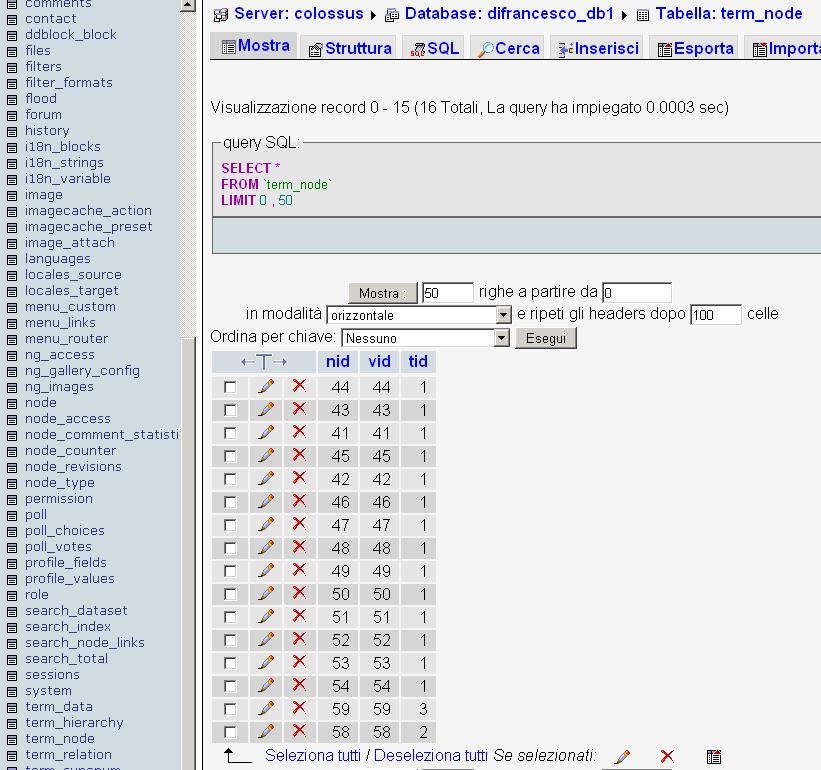
Could you look in your database? What do you see in the table term_node?
That matches up nodes to terms, so you should see a row:
If the node is getting the gallery term when displayed, then surely that row is in there.
The only thing that could be wrong is the vid. But the taxonomy page doesn't use the vid to generate the taxonomy list. Something weird is going on!
Could you try installing devel module (http://drupal.org/project/devel) and check the value of that variable?
(BTW: I'll come and fix your site myself in exchange for a free holiday in Italy :p)
Comment #13
steff2009 commentedHi, I went to the DB and chose to show table term_node. Attached is what I see, not sure whether the row you mention is there.
I am going to install devel module and let you know further.
Comment #14
joachim commentedWell that says that node 58 has term 2. (Ignore the vid -- I got it wrong, it's version id not vocab id, doh!!)
I've just checked that node 59 is correctly showing in term 3, so I'm absolutely baffled why node 58 doesn't show in term 2.
Are you using revisions?
Comment #15
steff2009 commented>I've just checked that node 59 is correctly showing in term 3, so I'm absolutely baffled why node 58 doesn't show in term 2.
My answer is that node 59 is a page that I created after manually adding a vocabulary and assigning it to page content type, while node 58 is an image that was created and tagged using image module.
> Are you using revisions?
When I create or edit a node, I see a field below the content body: "Information on revisions" but I never fill it in and never select "Create new revision". Is this what you mean?
Thanks and - as soon as you come to Italy.. you'll have a friend showing you around! :-)
steff
Comment #16
joachim commentedAre you definitely using version 6 and not 5?
Crazy thought, but we had a problem on 5.
Hmm, though it can't be that as your taxo page isn't working.
It shouldn't make a difference how you created the vocab -- the data in that table that says which node has which term is the same no matter what.
Can you try some SQL on your database?
"SELECT n.nid FROM term_node t INNER JOIN node n ON t.nid = n.nid WHERE n.status = 1 AND n.type = 'image' AND t.tid = 2"
That should get you node 58, according to that table.
"SELECT n.nid FROM term_node t INNER JOIN node n ON t.nid = n.nid WHERE n.status = 1 AND n.type = 'image' AND t.tid = 3"
should get you node 59.
If those work, I would then turn to the code.
Install devel module, and in the bit of image gallery where it says:
stick a dsm($images) after that loop. See what you get.
Comment #17
steff2009 commentedHi, yes I confirm that my Drupal is 6.9 but... I'm too a simple minded web master to do what you describe :-)
I'll give a try: are you sure I'm not breaking anything using the devel_module?
Meantime, I noticed a difference between manually created vocabs and the one created by image_module: it must be something to do with multilanguage options.
When I create a new vocabulary, I'm allowed to specify a language (italian/english), while in the image gallery vocabulary the option is grayed out and can't be modified.
I will keep insisting....
Comment #18
joachim commentedAhhhh multilanguage options!
That could well be the problem.
I know NOTHING about multilanguage or how it works, but it sounds like we could be onto something!
Can you try switching the site into English, or viewing it in English, and seeing what happens?
Also, which modules are you using for multilingual support?
Comment #19
steff2009 commentedEUREKAAAAAA!!!!! Joachim I've found out what it was!!!
It was the multilanguage options!! My site is in IT and EN and mutlilanguage support was not enabled for Image content type. As soon as I enabled it and chose "Italian" in each image, all images immediately came up in the selected gallery and nested galleries!!!
I'm not sure whether it will work when I import batch of images, but in that case I will only have to edit them one by one and assign the language. Also I have to check what happens to the multilanguage site when I assign "English" to images.
In any case I think most of the work is done!!! Thank you for your friendly support.
steff
Comment #20
joachim commentedCool!
Glad it's finally sorted. So it was just a settings problem with your multilingual stuff, and nothing to do with image gallery module?
There might be batch change modules that can change the language on all your nodes -- eg views batch operations.
Comment #21
steff2009 commentedHi Joachim, yes we worked it out and brainstorming with you was very useful! I'm going to post a note on this in the multilingual project for other dummy users like me :D
Keep up with the good work, thanks again.
Comment #22
joachim commentedYou're welcome.
Closing this issue now :)