Closed (fixed)
Project:
Acquia Marina
Version:
6.x-1.x-dev
Component:
Code
Priority:
Normal
Category:
Support request
Assigned:
Unassigned
Reporter:
Created:
26 Apr 2009 at 21:00 UTC
Updated:
17 May 2009 at 15:00 UTC


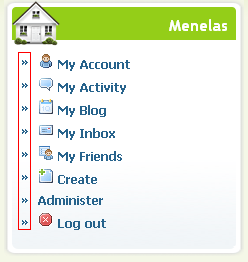
I have attached an image.
| Comment | File | Size | Author |
|---|---|---|---|
| untitled.PNG | 16.09 KB | vmenelas |

Comments
Comment #1
jwolf commentedThe name of that image is raquo.png
On or around line number 155 of style.css you'll find:
You'll need to change the background to transparent:
The above will remove the image for all list items. If you wish to just remove the image for the sidebar menu items you'll need to target those specifically: