

Closed (outdated)
Project:
Event
Version:
6.x-2.x-dev
Component:
User interface
Priority:
Normal
Category:
Bug report
Assigned:
Unassigned
Reporter:
Created:
28 Apr 2009 at 16:20 UTC
Updated:
13 Apr 2018 at 21:01 UTC
Jump to comment: Most recent, Most recent file



Comments
Comment #1
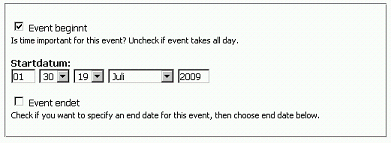
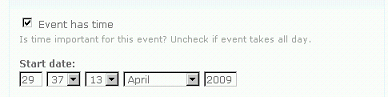
frank ralf commentedI can confirm this bug with Drupal 6.10, Event 6.x-2.x-dev (2009-Mar-16), see screenshot. The theme is out of the box Garland .
Frank
Comment #2
killes@www.drop.org commentedevent.module uses date_format_short for formatting the select box.
on admin/settings/date-time, which option did you chose for "short time format"?
If I use "28.06.2009 18:44" then I get the boxes in this order.
Comment #3
killes@www.drop.org commentedchanging status
Comment #4
jurgenhaasThanks for your response.
I had "2009-06-29 7:45" as the date-time-format which resulted in the reported field sequence.
Now I changed it to "29.06.2009 7:45" and the fields in the event edit are in the same and expected order as the date-time-format.
Thanks, for me the issue is solved but it feels as if in general this is not quite solved for every format.
Comment #5
killes@www.drop.org commentedI have now set my short date format to what you describe and it works as expected for me.
Not sure what to do about this.
Comment #6
frank ralf commentedI use the user defined date format "d.m.Y" and the input fields get still mangled (see screenshots, the date is 1 July 2009, 19:30 h). Pre-defined formats seem to work, though.
Comment #7
jurgenhaasYes, I can confirm that it must have to do with custom date formats. All others I've tried seem to work correctly.
And I get the same wrong event_input_fields as displayed in #6 attachment #1 when using custom date format.
Comment #8
killes@www.drop.org commentedI think the problem is that you did not specify hour and minutes in your format. THis confuses my "algorithm". I will try to fix this.
Comment #9
frank ralf commentedThanks!
Comment #10
killes@www.drop.org commentedAfter thinking about this a bit: Does that mean you never use the hour:minute fields in the event form? If yes, I could just omit them.
Comment #11
frank ralf commentedNo, not at all! I certainly need hour/minutes settings for events. I only set the short date format to not using them because Drupal also uses the short date format for the publishing date of nodes. _There_ I don't want hours/minutes.
So it comes down to the short date format being used as default format at different places in a Drupal installation. Preferably the Event module wouldn't rely on such a site wide setting.
Thanks for your efforts!
Frank
Comment #12
killes@www.drop.org commentedHere is a patch that would not show the hour and minute fields if they are not in the format.
The time will be saved as 12:00 in the database.
Please try it.
Comment #13
killes@www.drop.org commentedah, darn, I hadn't read your answer before rolling this nice patch. :p
I am not sure about not using a site-wide setting. In my opinion, dates and times (or other similar things like usernames) should be displayed in the same way everywhere on a site. Hence my attempt to use this format to determine the order of the input boxes.
However, see the issue at #395952: Date display on event node page where I will allow users to chose which time format to chose.
Comment #14
killes@www.drop.org commentedActually, I've reconsidered what I wrote above. I guess it is the cleanest solution to introduce an event specific input format _and_ apply this patch.
Comment #15
nzcodarnoc commentedSubscribing
Comment #16
Matt Hampel commentedHas this issue been addressed? I am having this exact problem with the current posted version of Event for 6 (6.x-2.x-dev).
Comment #17
achtonSubscribing.
Comment #18
nicolasg commentedWhat I did to solve the usability was to add the text field data type as the title of the field.
event.module
Comment #19
frank ralf commentedThat's a nice workaround. Thanks!
Comment #20
japerryEvent for Drupal 8 is unrelated to older versions. If an issue similar to this one exists, please open a new issue with the 8.x branch.