

 Come together with the global Drupal community in Rotterdam, 28 Sept – 1 Oct 2026. Sessions, contribution, connection, and Early Bird savings until 8 June.
Hi,
I am not sure where I should ask this. But still....
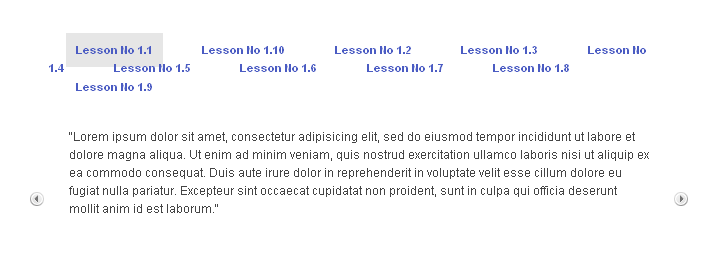
I have installed the Slider and configured it and it works fine. Now I am facing issue when I add 10 or more pages to the slider. I have removed the sidebars but still the tabs are not neatly organized and they come in 2 or 3 lines. I would like them all to come in the same line and even if they can all not be displayed, I would like to have something like a >> to navigate to the next set of slides. Could you please let me know how I can do this? Theming or another alternative?
Thanks in advance. Attaching a screenshot of how it looks right now.....
| Comment | File | Size | Author |
|---|---|---|---|
| slider.PNG | 11.41 KB | rsomaskandan |

Comments
Comment #1
Mark Theunissen commentedYou use CSS to do this. You can add an overflow:auto to the nav bar div, this will give you a basic scroll bar to move left and right over the tabs.
What I think you're asking for though, is a Slider for the tabs of a Slider, which is a bit beyond project scope ! ;)
Comment #2
rsomaskandan commentedThanks Mark! Will try CSS...
Comment #3
rsomaskandan commentedAnother quick qn....I know i can position the horizontal tabs either above or below the node. Is there a way I can change them into tabs arranged vertically on either side of the node?
Comment #4
Mark Theunissen commentedNot in the code, but you could try with CSS...
Comment #5
Mark Theunissen commented