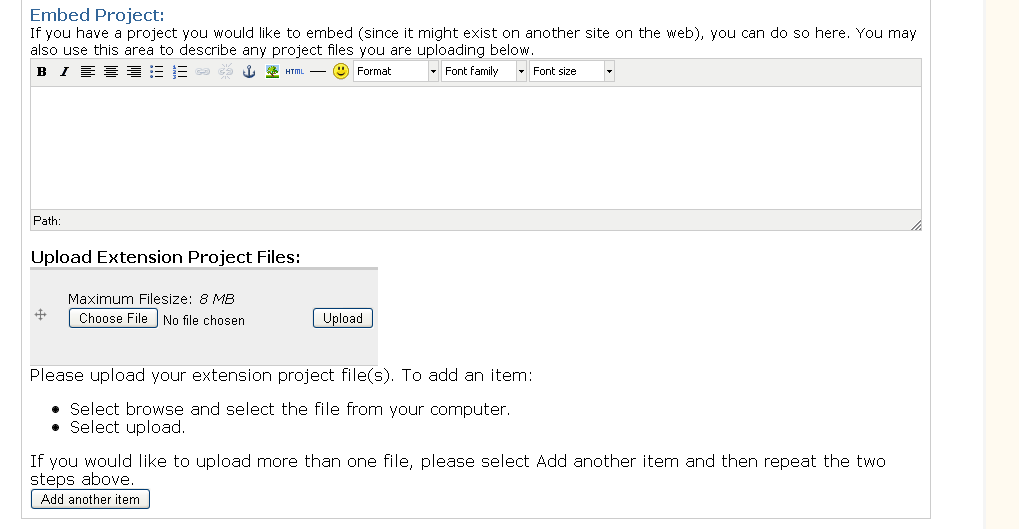
The following link describes a snippet so that CCK node forms can use to make help text appear above the field rather than below. This works with other cck fields, but doesn't seem to work properly with a filefield cck field. That attached file shows a text field with the help field above and the file field help below. I used the snippet below:

http://drupal.org/node/178247#comment-1449806

CommentFileSizeAuthor
issue_problem.png29.99 KBhintbw

Comments

quicksketch’s picture

Category: bug » support

Out of date code not working from some random forum post does not indicate a bug in the module. I think to make the change you are wanting, you should override the theme_filefield_widget_item() function.

quicksketch’s picture

Status: Active » Closed (fixed)
mthomas’s picture

Status: Closed (fixed) » Needs review

I have the same problem, but it seems to only occur when a CCK filefield has more than one allowed value. All other CCK fields have help text placed above the field and CCK filefields with only one value have the help text placed above the field. The following code in template.php accomplishes this action:

function mytheme_form_element($element, $value) {
  $output  = '<div class="form-item"';
  if (!empty($element['#id'])) {
    $output .= ' id="'. $element['#id'] .'-wrapper"';
  }
  $output .= ">\n";
  $required = !empty($element['#required']) ? '<span class="form-required" title="'. t('This field is required.') .'">*</span>' : '';

  if (!empty($element['#title'])) {
    $title = $element['#title'];
    if (!empty($element['#id'])) {
      $output .= ' <label for="'. $element['#id'] .'">'. t('!title: !required', array('!title' => filter_xss_admin($title), '!required' => $required)) ."</label>\n";
    }
    else {
      $output .= ' <label>'. t('!title: !required', array('!title' => filter_xss_admin($title), '!required' => $required)) ."</label>\n";
    }
  }

  if (!empty($element['#description'])) {
    $output .= ' <div class="description">'. $element['#description'] ."</div>\n";
  }

  $output .= " $value\n";

  $output .= "</div>\n";

  return $output;
}

I tried overriding filefield_widget_item() with a variety of solutions. For example:

function mytheme_filefield_widget_item($element) {

  // Put the upload button directly after the upload field.
  $element['upload']['#field_suffix'] = drupal_render($element['filefield_upload']);
  $element['upload']['#theme'] = 'filefield_widget_file';

  $output = '';

  $output .= '<div class="filefield-element clear-block">';
  

  if (!empty($element['#description'])) {
    $output .= ' <div class="description">';
    $output .= $element['#description'];
    $output .= "</div>\n";
  }


  if ($element['fid']['#value'] != 0) {
    $output .= '<div class="widget-preview">';
    $output .= drupal_render($element['preview']);
    $output .= '</div>';
  }

  $output .= '<div class="widget-edit">';
  $output .=  drupal_render($element);
  $output .= '</div>';
  $output .= '</div>';

  return $output;
}

This is successful in moving the help text above the field for filefields with one allowed value, but for multiple values it doesn't work. I believe there is an issue with the HTML table output associated with the tabledrag for multiple uploads. Any idea what's going on?

quicksketch’s picture

Yes, if there are multiple values, then FileField is no longer responsible for outputting it's own help text. The help text is actually extracted from the widget, and then inserted by CCK.

    $output .= theme('table', $header, $rows, array('id' => $table_id, 'class' => 'content-multiple-table'));
    $output .= $element['#description'] ? '<div class="description">'. $element['#description'] .'</div>' : '';
    $output .= drupal_render($element[$element['#field_name'] .'_add_more']);

You can change this display by overriding theme_content_multiple_values(), which is in content.module.

quicksketch’s picture

Status: Needs review » Fixed

Status: Fixed » Closed (fixed)

Automatically closed -- issue fixed for 2 weeks with no activity.