

 Come together with the global Drupal community in Rotterdam, 28 Sept – 1 Oct 2026. Sessions, contribution, connection, and Early Bird savings until 8 June.
When trying to create or edit a node with Firefox 1.5 the fields are all in a jumble at the top. Screenshot attached tells the story. I can look into it tomorrow, just wondering if there's a quick answer.
| Comment | File | Size | Author |
|---|---|---|---|
| spreadfirefox problem.png | 21.53 KB | Timotheos |

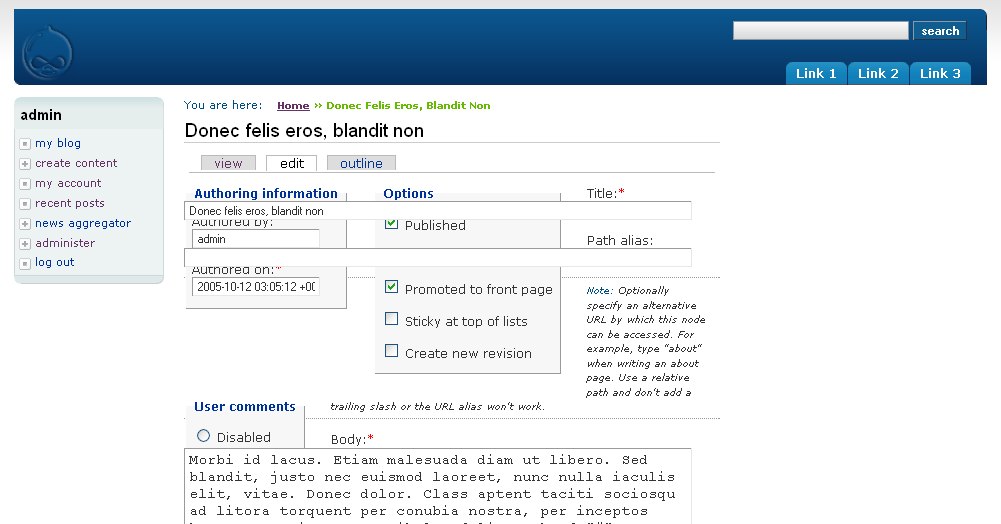
Comments
Comment #1
nonsieIt looks like you better check your CSS - that's all.
Comment #2
Mad Maks commentedThe new lines in the css for solving the white space issues are causing it. You can solve this by removing (line 489)
and (line 822)
this results in a big white space. I am looking for the solution for that.
Comment #3
Mad Maks commentedIn combination with the beta version of drupal 4.7, there is no problem.
Comment #4
davemybes commentedJust come across the same problem with overlapping inputs. I followed the instructions to remove the clear:none's, which left the big white space. So, after some playing around, I finally have a solution that works for me (so far). Add the following style to Layout.css (you can leave or delete the clear:none definitions, I have left mine in):
This works in Firefox 1.5.0.1 with no problems. I'm running Linux, so can't test in IE. The only problem is if you resize your default text size, then the boxes will eventually overlap. You can simply increase your top setting to fix it.
This is probably not the best solution, but it works for now :)
Comment #5
Mad Maks commented