

 The 2026 Drupal Business Survey is open. Your response will help shape the future of the Drupal business ecosystem.
I've opened this thread in place of this one since that posted to a fixed issue, and one that was different to this.
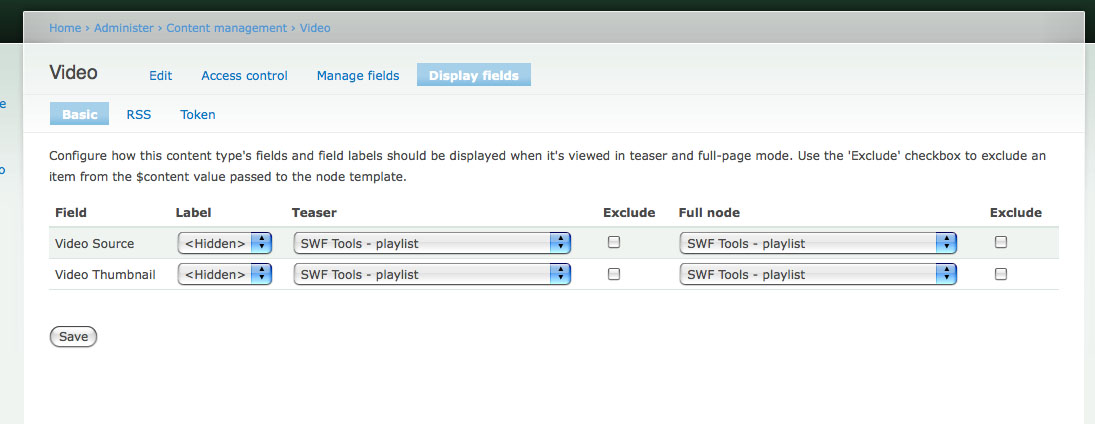
How do you setup the Display Fields so that the an image that has been uploaded using FileField can be pass the thumbnail to the JW Media Player 4?
I've got the FLV and skin working great, but can't seem to pass the thumbnail correctly.
There was also a screenshot with that post.

Comments
Comment #1
Stuart Greenfield commentedIf I read your screenshot right you have created two filefields? The first one "Video source" is intended to be the video, while the second "Video Thumbnail" you'd like to be the video thumbs?
I can see this being an issue / common request now we have the FileField formatter in place.
However, it was a (periodically) recurring question for input filters and
swf()calls too.I think I'd like to propose a different solution - to make SWF Tools "intelligent" when it comes to playlists that are mixtures of images and video and/or audio.
I think it would be fairly easy to make a default behavior that if a playlist starts with an image, or alternates image/{video|audio}/image/{video|audio} then we assume the images are thumbs, and construct the playlist accordingly.
This could be toggled on the settings page in case you really do want a mixed media list, but I'd imagine this would be the preferred behavior in >90% of cases.
Then you only need one filefield, and SWF Tools doesn't need to work out which is the "source" and which is the "thumb" (this matters for FileField as each element would be rendered separately, so linking the two would be complicated).
Using the "single field" approach you simply build the list as a single sequence of files.
Would that work for you?
Comment #2
jreashor commentedI was able to achieve this with a template file.
1. Create a content type "video" with a field for your thumb - "video_thumb", and one for your flv - "video".
2. Copy the "content-field.tpl.php" template from the CCK theme folder into your theme folder.
3. Make a duplicate of "content-field.tpl.php" and rename it "content-field-field_video-video.tpl.php", so it will only apply to the FLV field within the video content type.
4. Within this new template, replace the line
print $item['view']withprint swf($item['filepath'], array('flashvars' => array('image' => $node->field_video_thumb['0']['filename'])))When setting up your content type, under the display setting for your fields, be sure to hide the thumbnail from being displayed.
And done :)
Comment #3
gwen commentedI attempted to use the solution described in comment 2 above and couldn't get it working. After some digging, I discovered it was happening b/c I needed to pass the thumbnail into "othervars" rather than "flashvars". So rather than this:
I did something like this (changes on line 5):
Not sure if this is a versioning issue with flowplayer, but I'm using flowplayer 3.1.1 so if the code in comment 2 doesn't work for you, try what I described above.
Comment #4
djudd commentedThis is a pretty cool solution. I have two questions that hopefully someone can clarify for me...
First, I'm not very good with PHP at all.Is there a way to upload the image file, pass it on to the video as a thumb, and then not have the image repeat below it? I'm getting the image showing up in the node as well below the video.
Second, is there a way to pass additional arguments to the player from here? For example, is there a way to pass along height and width arguments as well? Probably not, but I thought I'd ask.
Comment #5
mark lacroix commentedI'm trying to get this to work, and I'm running into trouble getting my theme to recognize my customized tpl.php file, which is "content-field-field_project_video-project.tpl.php" (field: project_video, type: project). No matter how I edit it (even if I make it an empty file), the display doesn't change. I know 100% that I have the filename correct. Any advice?
EDIT: Ug... I had to put a copy of the original "content-field.tpl.php" file in my theme folder, too. All is well... Thanks for the solution, BTW!
Comment #6
marie70 commentedI was able to change the height and width of the player like this:
print swf($item['filepath'], array('params' => array('width' => '175', 'height' => '30')))Comment #7
Anonymous (not verified) commentedHas anyone successfully made this work with the video displayed in a lightbox2?
Comment #8
rodibox commentedBoth solutions work well for me individually.
The proposed jreashor and gwen to show thumbail and marie70 proposal to change the size.
Someone could suggest how to combine the two things that bring them together That is one sentence that brings the thumbnail and also resize.
Sforgiveness for my English and my ignorance
Thanks
Comment #9
rodibox commentedSorry
After half an hour more testing, it achieved, the sentence is
I do not achievement it´s get change the is high ControlBar .-
Comment #10
martinvandiest commentedSolution #2 passed the thumb to the media player but it made my 'SWFTools - with download link' link for the video file vanish. Any ideas?
Comment #11
doors commentedI have a template for my swf tools video field.
I want to resize the player. How do I do it?
The template is: views-view-field--multimedia--block-3--field-flash-file-fid.tpl.php
and the contents of the file which doesn't work:
How do I get this working. I just the latest video to play on the front page and I have to customize the size but the player just shows but it cannot find the video file.
Comment #12
nyleve101 commentedIn case anyone else like me failed to find this without help: http://drupal.org/node/305225
Comment #13
nyleve101 commentedDoors, I'm having the same problem. Any luck?
Comment #14
japanitrat commentedsubscribe
Comment #15
Stuart Greenfield commentedI'm changing this to a duplicate of #558338: Pass thumbnails to media players via cck formatters as the two basically describe the same requirement - how to pass a thumbnail easily via CCK.
The linked thread contains the more up to discussion on this topic.
Work is well under way to implement this feature much more neatly using a combination of two fields. It's all described at the linked post.
Comment #16
bryanb229 commentedThanks to everyone for the input on this.
Wondering if there is a different way to do this for a views block?
Thumbnail is showing up fine in my full nodes, not so much in the block though.
Does anyone have any insight?
Comment #17
Stuart Greenfield commentedWatch this space for proper views support which should make this work really easily...
Comment #18
bryanb229 commented@rodibox
Thank you!