

Closed (outdated)
Project:
Drupal core
Version:
7.x-dev
Component:
field_ui.module
Priority:
Normal
Category:
Bug report
Assigned:
Unassigned
Issue tags:
Reporter:
Created:
7 May 2009 at 18:48 UTC
Updated:
2 Dec 2010 at 15:03 UTC
Jump to comment: Most recent, Most recent file


Comments
Comment #1
moshe weitzman commentedI think the issue is that I blew through the allowed values section. Could we add some defaults there like
0|No
1|Yes
That would be nice hint for the user as well.
Comment #2
alanburke commentedNot sure if this is the right place for this comment, but anyway...
Just taking Drupal 7 for a spin, and tried out the Boolean field.
I was a bit surprised to see "Allowed values list", and even "Number of values".
Its Boolean, right?
On or Off, that should be it?
On installing a Boolean field, I'm not sure what I expected, but two fields,
one which describes the 'Off" state, and one for the 'On' state should do it.
Eg Field instance name: Over 18?
'Off' Value : I am under 18
'On' Value: I am over 18
Either way - Great to see it in core!
Comment #3
alanburke commentedI guess this is a core issue now.
Comment #4
alanburke commentedAdding tag
Comment #5
moshe weitzman commentedIMO is critical UX problem
Comment #6
theunraveler commented+1
Comment #7
jide commentedI agree, particularly if the chosen widget is "Single on/off checkbox".
Comment #8
tstoecklerI agree that this should be fixed.
For me it's a bug that a boolean field can have multiple values. I was also surprised to have the field data of a boolean field stored in an INTEGER column instead of a BOOLEAN. I would consider that a bug as well.
The original bug is fixed by now, because you cannot submit the "Add field" form without entering the allowed values. The current is very limiting, still.
When you leave it empty, you get:
When you type in two random words, you get:
Note that it's still possible to submit more than 2 keys or key-value pairs, but then only the last '0' and the last '1' are used.
Anyway, we're throwing red into the faces of our users 2 times, and forcing them to do stuff, we could do internally in the submit function just as well.
I propose modifying the user interface, so that you get 2 textfields, one for off, one for on, and if you leave them empty you get the keys '0' and '1'. There's nothing you can do wrong, and no red error messages. Working on a patch now.
Also, I noticed that you can choose a select list as a widget for the boolean field type. For me, that's a bug. By definition, you can have two values for a boolean. Therefore the correct form element is either a simple checkbox or 2 radio buttons. That's it.
Comment #9
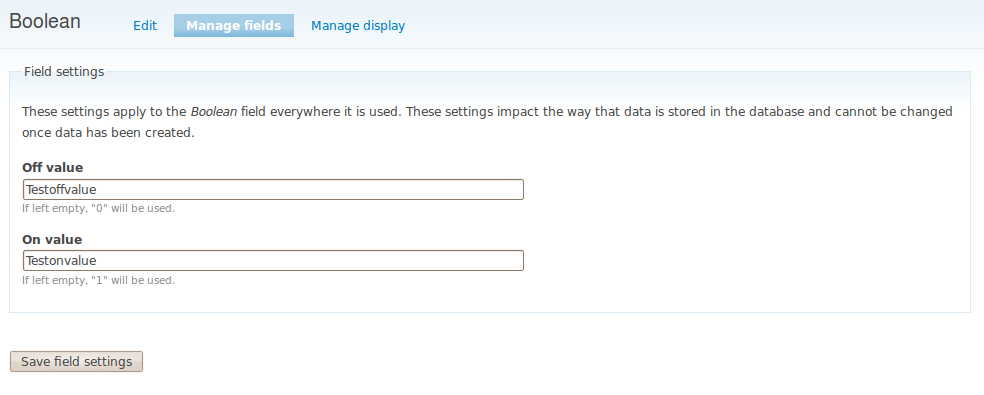
tstoecklerWell, here's a screenshot, of how that would look.
If it's agreed that that's the way to go, I'll try to roll a patch.
I've actually got the form appearing consistently now, but submitting doesn't yet work.
Comment #10
yched commentedField cardinality is a field-type-agnostic property. Field API has nothing wired to allow some field types to opt-out of 'can be single / can have multiple values' property. Besides, I couldn't really ensure there wouldn't be any use case.
To my knowledge, that's how core stores any of its boolean properties (node.status, user.blocked, system.status...)
Agreed, and patch welcome :-)
Comment #11
yched commentedCrosspost with #9.
Screenshot in #9 looks good to me, but the current UI lets you specify an alias for the values (0|Nope / 1|Yup)
Comment #12
yched commentedFor the record, I think the ideal UI for "allowed values" on all 'list' field types, not only 'boolean', would be table-based instead of a large textarea with pipes and carriage returns:
'+' being tabledrag handles ;-).
Comment #13
tstoeckler#12 sounds great, but if that's the plan I'm definitely out. I'm going to have a hard enough time trying to make #9 work properly.
Also:
That's what the textfields are for. Because you can't have the keys be anything other than "0" and "1" anyway.
Comment #14
Bojhan commentedWhoooa I have no idea, what interface #9 is doing. Can anyone try to explain me the design constraints and current ideas, in non-developer language?
Comment #15
tstoecklerRe #14: Yeah, I had to stare at various field modules for an hour to really get what's going on. I shouldn't have assumed that's what normal people do...
Let me try:
When you add a boolean field to your content type (or whereever else you want to have it), whenever you are going to create a node (...) of that type, you can choose between two values. That's why it's called boolean. So you get either a checkbox (On/Off kind of things) or radio buttons. (Or a select list, but I think that's a bug, because it doesn't really make sense UI-wise). When creating the field you get to choose what your options for that field are going to be, that you (or whoever else will create that node) will get to choose from when creating a node of that type. So if you type in e.g. "Funny node" and "Boring node" in the two textfields in the screenshot in #9, then you will get to choose from exactly those to options.
They are called allowed values, because in the end, they are the only ones you are allowed (=able) to enter. What happens behind the scenes (as soon I have written that intimidating patch) is that Drupal matches what you typed for the 'on' value ("Funny node") to the key "1" and what you typed for the 'off' value ("Boring node") to the key "0".
Currently you have to do all that youself.
Instead of just typing in the "name"/"value" for 'on' and 'off' in the textbox, you have to write something like this in a big textfield:
where the stuff before the '|' (the keys) would always have to be 0 and 1. And if you tried to do something else, you would get error messages in your face.
So #9 tries to improve that by just letting you fill in what you actually need. Also, before you had to enter something and got an error message if you didn't, and with #9 lazy people can just leave it empty, because then you will just see the keys '0' and '1'.
Phew. Hope that made sense.
So much for the idea in #9.
Constraints:
Currently Boolean fields can have any cardinality, that means you can have a boolean field which allows you to enter 10 values. That kind of defeats the purpose of a boolean. But as @yched said, Field API does not allow to restrict this per field type. So we can either leave that as is, and let probably a lot of people wonder why on earth they see a select list, when all they wanted was a boolean = checkbox, or we could somehow hack Cardinality stuff out of the UI, which would be kind of weird. Also kind of weird is that even if you choose Checkboxes as your widget, you can have any number of values, which is kind of paradox, but I think (?) that is a different issue. At least not related directly to Boolean fields.
Other ideas:
@yched in #12 proposes a kick-ass UI for setting the allowed values in general. The approach taken in #9 really only makes sense for boolean fields, because there you need those 2 values. But in other situations, for instance when building large select lists, you would still have to write those
key|valuepairs, as described above, into a giant textbox. And that's really 20th century.
It's pretty late here, and I like to hear myself speak (yes, virtually too), so sorry if that was a little verbose.
Comment #17
tstoecklerAm working on a patch to implement #9 now.
Comment #18
tstoecklerHere's a patch that lets field modules define additional submit callback in their field settings form via:
I've attached a patch which implements this. The list module submit handler is just a stub for now.
I will work on this now.
I just wanted to put this up, for review of the concept.
It somehow feels pretty hacky, but I just couldn't get it to work in any other way. I'm not really that into the depths of Form API though, so suggestions are more than welcome.
Comment #19
yched commentedHackish indeed - why do you need a separate #submit function ?
Comment #20
tstoecklerNote: I just the found the mysterious "allowed_values_function".
I haven't quite understood how to implement that, but judging by the name, it seems, as though it could make this a lot less (maybe not at all?!) hacky.
Comment #21
yched commentedforgot to add - thanks for taking a stab at this, tstoeckler.
I do agree that #9 is right for the boolean field. #12 wasn't meant to scare you away :-)
Comment #22
tstoecklerRe #19:
Because somehow I need to translate the values of "off" and "on" into an array such as
and then pass that to the real submit function.
Comment #23
tstoecklerYeah, it seems that the allowed values function is exactly what we need here. Can't get it to work, though. I give up for today. Maybe I'll try again tomorrow =)
Comment #24
yched commentedThe 'allowed values' setting is not what you're after. It allows custom fields to use a list of values returned by a function - eg for large lists (zipcodes, countries, states...)
It's not exposed in the UI, only available for programmatically defined fields.
Translating the entries from separate form inputs in to the expected format for 'allowed_values' : Ah, sure.
But additional submit handlers is not the way. You want to put a '#value_callback' property on $form['allowed_values'] :
Something like (untested, written in the browser) :
and
Comment #25
tstoecklerOh man, I love that Forms API. :)
I looked through every single thing in the Drupal Forms API Reference if it could be of use in this situation. Sad thing '#value_callback' isn't documented there...
Optimistically re-assigning for when I wake up again, but feel free to go for it first!
Comment #26
sun.core commented#15 is most probably the most awesome explanation I've ever seen on a specific bit of field UI :)
Let's keep this going. Not totally critical, but still critical, because it seems to hi-jack store
Shouldn't there be a #type somewhere?
?
Missing quotes.
Powered by Dreditor.
Comment #27
tstoecklerYeah, that drupal_set_message was just for debugging to see if the submit function was actually being called.
I'm having some problems installing Drupal 7 on my localhost, that's why I haven't been on this issue, but once I got that running I'll post a new patch.
Again, if anyone's quicker than me, feel free.
With the #value_callback thing yched pointed out, it should be a lot less messy than my previous patch.
Comment #28
tstoecklerWork in progress patch.
Basically just copy pasted yched's code and it pretty much works (how does he do that??...)
To be done:
* Default values for the forms.
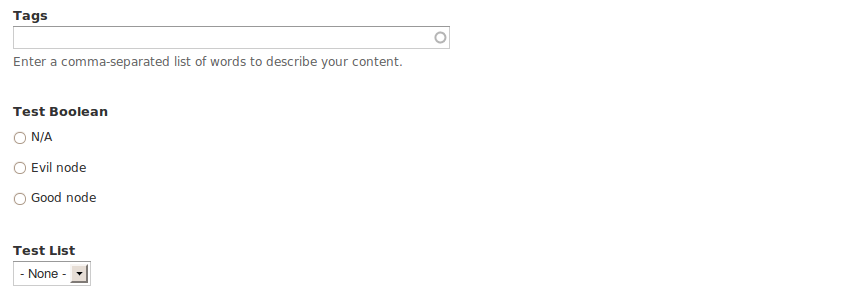
* There's this weird "N/A" thing that comes up, that's really not nice. See screenshot.
Just something that popped into my mind:
The proposed UI really only makes sense for radios as widget. For a single checkbox really just the title of that checkbox is of importance, so we should implement a similar form, except with just one textfield where you can enter that title.
Oh and I really need to open an issue about not allowing select lists for boolean fields.
Comment #29
tstoecklerI wanted to get back to this, but it seems, this is tougher than I thought.
I have absolutely no clue, where that N/A is coming from, but it appears, whatever I put in the value callback. I also don't really know how to debug this, so I guess I kind of have to give up. Maybe I'll give it another try in a few days, but I can't guarantee finding out anything useful.
So, you heard it, Drupal heros: Go for it!
Comment #30
heivoll commentedI'm not sure how helpful it is, but the N/A is there because the field is a non-required single value options list. I guess it is to make sure you can change your choice back to an empty if you've already chosen one radio button.
As defined in _options_properties(...), this means the $properties['empty_value'] is set, and because of this an extra empty option is added via theme('options_none',[...]) in _options_get_options(...). I'm afraid I'm not a "Drupal hero" enough to provide any kind of solution as of now though.
Comment #31
tstoecklerWow, that's actually a very interesting UX issue. Now that N/A clearly needs to go, because it is a major WTF, but then, how *do* you unset your value on radios?
Maybe we should just turn that N/A into a "Neither" to make it more clear? Still weird...
Comment #32
yched commentedThat 'N/A' with radios is a separate issue. Ideally, we should be able to turn this into a widget setting ('text to display for the 'none' choice'). Patch welcome ;-)
Updated patch
- adds the missing bit (fill in current values when the 'field settings' form comes in),
- removes the now pointless checks in list_allowed_values_setting_validate() and the related tests.
@tstoeckler : can I leave it to you to post before / after screenshots for reviewers ? I'm on the road on an unfamiliar config ;-).
Comment #33
tstoecklerThanks for the help.
Will upload screenshots and open a new issue for the N/A thing.
Comment #34
tstoeckler#742708: N/A shown for non-required boolean field us the N/A issue.
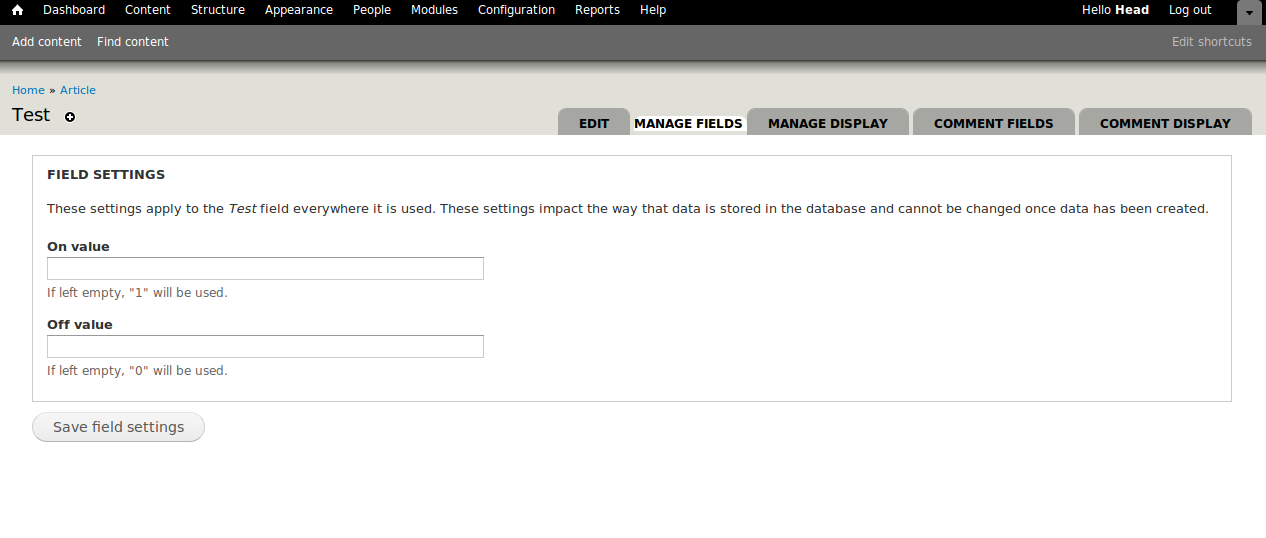
I made new screenshots. They are the same, though, as the ones above.
Comment #35
tstoecklerJust a note: I would *really* like to set this RTBC, but since I wrote most of the code with yched's help I guess that wouldn't be fair.
I did test it again, and it works perfectly, including the default values. Also, this change only affects Field UI administrators, not end-users.
Comment #36
alanburke commentedCan't test right now,
but the UI shown in #34 is exactly what I would expect for a Boolean value.
I don't really know anything about the Field API, so this question might make no sense.
What are you storing anything other than 0 or 1?
If that is all that is stored, the labels can be changed after the field has been in use.
Regards
Alan
Comment #37
tstoecklerThey can be changed. 0 and 1 are stored. Everything is exactly as you propose.
Comment #38
cosmicdreams commentedWorks for me : Tested with Chrome 5 (beta) (didn't consider testing other browsers since this is a server-side thing)
Comment #39
dries commented1. It seems like this patch removes tests, but that it didn't add tests. Can you confirm that this functionality is still tested?
2. I'd change the order of the fields to be "On - Off" instead of "Off - On". The former feels slightly more natural to me.
Comment #40
yched commented@Dries : yes, the tests were checking malformed input in the previous UI, that cannot happen in the new, more 'guiding', UI.
Attached patch puts the 'On' input first.
Comment #41
yoroy commentedAgreed with Dries. First the "yes", then the "no". It's simply friendlier :)
Looking at http://drupal.org/files/issues/boolean-after.png, I would want to tighten up the interface texts:
(The descriptions could even be dropped if we would put 1 and 0 as the default in the textfields themselves :)
Needs work for:
- the re-ordering of the fields.
- clarification on what's up with the tests.
Comment #42
yoroy commentedOops. Taking too long writing my comment :) Thanks yched
Comment #43
robloachRemoving tests is the equivalent of cheating the testing bot.
Comment #44
yched commentedAgain, no. The new shape of the UI ensures those illegal inputs cannot happen anymore. Those tests just don't have equivalents anymore..
Back to CNR, but I'm not sure exactly what is left to review here.
Comment #45
moshe weitzman commentedback to prior status
Comment #46
dries commentedCommitted to CVS HEAD. Thanks.
Comment #47
yched commented(committed along with #735894: fields with unlimited maximum length cause DB errors : http://drupal.org/cvs?commit=347024)
Comment #48
tstoecklerRe-opening for yoroy's text changes in #41.
Comment #49
les limMarking #952034: Checkbox widget uses "on value" as label on form instead of label. as a duplicate of this issue.
Comment #50
les limSee also #841266: Missing label for boolean fields when adding content, which may render this moot.