

 The 2026 Drupal Business Survey is open. Your response will help shape the future of the Drupal business ecosystem.
I've installed v 1.20.2.45.2.47 2009/05/09 22:26:41 of xmlsitemap on my dev box.
Everything works really well (rebuild script is brilliant, addition of CSS to the sitemap is a great addition) but ...
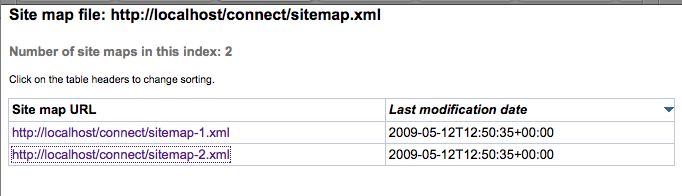
I can open sitemap.xml but it refers (links) to two other files, sitemap-1.xml and sitemap-2.xml that cannot be found using the link in sitemap.xml
I've verified that the files do exist but we're running a psuedo multi-site setup so maybe sitemap.xml is assuming an incorrect URL?
In our scheme, sitemap files are located at sites/default/files/sitemaps/sitemap-1.xml
http://localhost/connect/sitemap.xml - resolves fine
http://localhost/connect/sitemap-1.xml - doesn't resolve
http://localhost/connect/sitemap-2.xml - doesn't resolve
Thanks for your help.
Kevin
| Comment | File | Size | Author |
|---|---|---|---|
| sitemap.png | 34.36 KB | kmillecam |

Comments
Comment #1
dave reidIn what regards do you mean psuedo multi-site setup? Do you have xmlsitemap enabled on more than one of the sites that share the sites/default/files/sitemaps folder?
Comment #2
kmillecam commentedThe client had us set up the site similar to a multi-site configuration so they could, if they wanted to, add other sites in the future. To answer your question, no, there are no other sites running on this server.
I mentioned this because the files folder is not in the traditional /files location but is at /sites/default/files
The xmlsitemap code appears to know about the location because it successfully created the /xmlsitemaps folder at /sites/default/files/xmlsitemaps
Comment #3
avpadernoThat is the directory normally used in Drupal 6, which doesn't use the /files directory anymore.
Comment #4
kmillecam commentedOh, okay. Thanks for the clarification Kiam.
I guess that brings us back to square 1:
http://localhost/connect/sitemap.xml - resolves fine
http://localhost/connect/sitemap-1.xml - doesn't resolve
http://localhost/connect/sitemap-2.xml - doesn't resolve
sitemap-1.xml and sitemap-2.xml were properly created and do exist but the link to them (from sitemap.xml) results in a page not found error.
Comment #5
dave reidCan you try visiting your admin/build/modules page and then seeing if the sitemap-1.xml and sitemap-2.xml pages resolve?
Comment #6
avpadernoClick also on the Save configuration button at the bottom of the form.
Comment #7
kmillecam commentedWooHoo!
That did the trick.
Thanks for your help!
Comment #8
kmillecam commentedComment #9
avpaderno