

 The 2026 Drupal Business Survey is open. Your response will help shape the future of the Drupal business ecosystem.
Hello,
Drupal Version: 6.12
Mediawiki Version: 1.14
I've been having some problems getting this module to work properly using this module and the Mediawiki files from https://svn.koumbit.net/koumbit/trunk/patches/AuthDrupal/.Drupal module installed in sites/all/modules/mediawikiauth and Mediawiki extension installed in wiki/extensions/AuthDrupal/.
I've added the following into my LocalSettings.php
######################################################################
# User authentication via Drupal using AuthDrupal
# AuthDrupal v 0.6, 2008-0620

// disable registration and sign-in from the wiki front page
$wgGroupPermissions['*']['edit'] = false; // MediaWiki 1.5+ Settings
$wgGroupPermissions['*']['createaccount'] = false; // MediaWiki 1.5+ Settings

$wgCookieDomain = '.rpgcrisis.net';

//
// Replace this key string with something non-trivial to prevent
// user login spoofing. Make it hardto guess, as if it is a password.
//
// YOU MUST CHANGE THIS to something unique to your site and it must
// match this setting in Mediawiki.module
$wgAuthDrupal_security_key = '2wdfg678';

// is Drupal in a different database than Mediawiki?
$wgAuthDrupal_UseExtDatabase = true;

//NOTE: You only need the next four settings if you set $wgAuthDrupal_UseExtDatabase to true.
$wgAuthDrupal_MySQL_Host     = $wgDBserver;      // Drupal MySQL Host Name.
$wgAuthDrupal_MySQL_Username = $wgDBuser;        // Drupal MySQL Username.
$wgAuthDrupal_MySQL_Password = $wgDBpassword;    // Drupal MySQL Password.
$wgAuthDrupal_MySQL_Database = 'rickyvh_forums';           // Drupal MySQL Database Name.

$wgAuthDrupal_TablePrefix      = "";
$wgAuthDrupal_UserTable     = 'users';        // name of drupal user table without prefix; normally 'users'
$wgAuthDrupal_RolesTable     	= 'role';       // Name of your Drupal user table. (normally 'role')
$wgAuthDrupal_UsersRolesTable	= 'users_roles'; // Name of your Drupal user table. (normally 'users_roles')


// $wgAuthDrupal_GetRealNames :
// Drupal's default user table schema does not include a field for real names
// If you use Drupal's profile.module and add fields profile_first_name and
// profile_last_name, the Auth Module can copy the names into the user's
// wiki profile
$wgAuthDrupal_GetRealNames = false;

// $wgAuthDrupal_PropagateRoles :
// Set this to true if you want Drupal user roles to be turned into Mediawiki
// group membership. If you want ALL roles to be turned into groups, leave
// $wgAuthDrupal_Roles empty. You can limit the roles that should be propagated
// by setting $wgAuthDrupal_Roles to an array containing names of roles to be
// propagated, like $wgAuthDrupal_Roles = array( 'staff', 'member' );
$wgAuthDrupal_PropagateRoles = false;
$wgAuthDrupal_Roles = null;  // null means propagate all roles

// You probably do not need to change these
// $wgAuthDrupal_RealNames_fields_table; // set if different than 'profile_fields'
// $wgAuthDrupal_RealNames_values_table; // set if different than 'profile_values'

// $wgAuthDrupal_RealNames_first_name_field; // set if different than 'profile_first_name'
// $wgAuthDrupal_RealNames_last_name_field;  // set if different than 'profile_last_name'

// set to false to retain wiki's own login/logout
$wgAuthDrupal_ReplaceLogin = true;

// if ReplaceLogin is true, set these URLs to appropriate targets:
$wgAuthDrupal_LoginURL = 'http://rpgcrisis.net/drupal/';
$wgAuthDrupal_LogoutURL = 'http://rpgcrisis.net/drupal/?q=logout';

// Do you want status messages in your Drupal watchdog log?
$wgAuthDrupal_LogMessages = false;

require_once 'extensions/AuthDrupal/AuthDrupal.php';
SetupAuthDrupal();
and in mediawikauth.module...
$GLOBALS['wgAuthDrupal_security_key'] = '2wdfg678';

/* For each wiki that shares the Drupal login front end, create a set
 * of settings here that matches what you have in LocalSettings.php for
 * the same variable FOR THAT WIKI.
 */
$GLOBALS['wgAuthDrupal_wiki_settings'] = array (

		// settings for wiki 1  (i.e. copy values from wiki1/LocalSettings.php)
		array(
			'wgCookieDomain' 	=> '.rpgcrisis.net',
			'wgDBname' 			=> 'rickyvh_forums',
			'wgDBprefix' 		=> 'mw_',

			// **IF** you set wgCookiePath in wiki/LocalSettings, set it to
			// the same thing here; if don't see it in wiki/LocalSettings.php,
			// leave it alone.
			'wgCookiePath' 		=> '/'
		)
	);
I also have AuthDrupalEncode.php in both locations as well.
I've tried numerous times to get this to work properly but I havent had any success. It wont log me in on the wiki. I've deleted my entire browsing history, cookies, active logins and web cache but I've had no success.
The Log in / create account link does link back to my Drupal site where it shows I'm logged in. I've also noticed the following cookie is made by MediaWiki when I visit the page after logging into Drupal.
http://drupal.org/files/cookie.PNG
Hopefully your able to help me out!
Thank You
| Comment | File | Size | Author |
|---|---|---|---|
| cookie.PNG | 18.41 KB | Elemental Crisis |


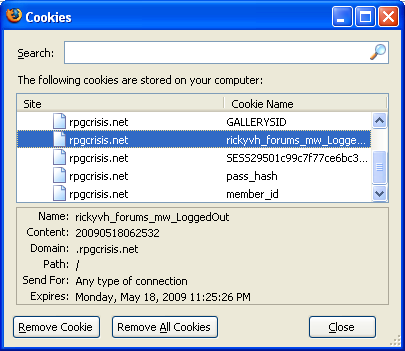
Comments
Comment #1
Elemental Crisis commentedJust wanted to point out.
https://svn.koumbit.net/koumbit/trunk/patches/AuthDrupal/.Drupal is supposed to be https://svn.koumbit.net/koumbit/trunk/patches/AuthDrupal/
and
$wgAuthDrupal_UseExtDatabase is set to FALSE not TRUE.
Comment #2
anarcat commentedI don't actually know what the problem could be here. If you can log into the Drupal and it properly creates the cookies, then the problem is most likely on Mediawiki's side.
I'm not sure you should put your settings in the .module. If I remember properly, I made it so you can add those in your settings.php which is much cleaner.
Comment #3
homoludens commentedi'm also trying to get it to work. for now main problem is that users aren't created in mediawiki database.
Comment #4
homoludens commentedi have solved mine problem, not very good solution but it works.
mine site is still in development and domain is "localhost", for some reason setcookie ( http://www.php.net/setcookie ) didn't wont to set cookie
$vals['wgCookieDomain'] = ".localhost"so...i removed all
, $vals['wgCookieDomain'], $GLOBALS['wgCookieSecure']from the code, it is working now. all cookies have set domain localhost, i hope on the live site with real address it will be fine.
basically, drupal module couldn't set cookie, for MW module to check and decide which user to create and log in.
Comment #5
homoludens commentedi would say that, without further info, issue is fixed.
Comment #7
bryzo commentedI am having problems like no other getting MediaWiki to integrate with Drupal.
I appear to be having a problem similar to what is described, except that I am using 2 subdomains for my website and wiki (www1 and wiki respectively) and can not get it to work at all. I went through the .module file and removed the wgCookieDomain and now I have 2 cookies being generated for www1.mysite.com (both subdomains ARE on the same server). Both cookies are called DXRtrArg and DXRtrArg2. The first has my username as the contents and the second has a long jumped hex-like code. Any ideas?
Comment #8
thinkling commentedDon't remove the wgCookieDomain settings--make sure it's set to ".mysite.com" on both ends. I've had installs work across subdomains by using the main domain as the cookie domain.
Please don't re-open old issues, please start a new issue for a new problem.
Comment #9
bryzo commentedWell I do apologize, but this thing has been riddling my mind for the past two hours.
I reinstalled everything and started from scratch again with no luck. (Meaning that the wgCookieDomain settings are back in place). I did notice a change, now when I access MediaWiki it has my IP Address, Talk for this IP and a Login and Logout links, and if I click the Logout, it does log me out of Drupal. This wasn't appearing before, just the basic Login/Create Account which redirects to Drupal. There is a new cookie being created, by mediawiki called mediawiki_session.
Also, users are not being created in MediaWiki....
Comment #10
thinkling commentedWhy don't you post your settings from both sides like the original issue, and I'll take a look? (Be sure not to post your DB password or other sensitive bits.)
Comment #11
bryzo commentedThank You for helping me out thinkling!!!
The
mediawikiauth.info in the Drupal Modules section
/*--------------------------------------------------------------*/
/*
* Replace this key string with something non-trivial to prevent
* user login spoofing. Make it hardto guess, as if it is a password.
*
* YOU MUST CHANGE THIS to something unique to your site.
*/
$GLOBALS['wgAuthDrupal_security_key'] = 'correctKey';
/* For each wiki that shares the Drupal login front end, create a set
* of settings here that matches what you have in LocalSettings.php for
* the same variable FOR THAT WIKI.
*/
$GLOBALS['wgAuthDrupal_wiki_settings'] = array (
// settings for wiki 1 (i.e. copy values from wiki1/LocalSettings.php)
array(
'wgCookieDomain' => '.mydomain.com',
'wgDBname' => 'mediawiki',
'wgDBprefix' => '',
// **IF** you set wgCookiePath in wiki/LocalSettings, set it to
// the same thing here; if don't see it in wiki/LocalSettings.php,
// leave it alone.
'wgCookiePath' => '/'
)
/***
// settings for wiki 2 (i.e. copy values from wiki2/LocalSettings.php)
// DELETE if you only have 1 wiki.
, array(
'wgCookieDomain' => '.yourotherdomain.com',
'wgDBname' => 'wiki2',
'wgDBprefix' => 'wiki_',
'wgCookiePath' => '/'
)
***/
// NOTE: to add wikis, copy #2 and modify to suit
);
----------------------------------------------------------------------
The LocalSettings.php Part in MediaWiki
######################################################################
# User authentication via Drupal using AuthDrupal
# AuthDrupal v 0.7, 2010-03-01
// disable registration and sign-in from the wiki front page
$wgGroupPermissions['*']['edit'] = false; // MediaWiki 1.5+ Settings
$wgGroupPermissions['*']['createaccount'] = false; // MediaWiki 1.5+ Settings
$wgCookieDomain = '.mydomain.com';
//
// Replace this key string with something non-trivial to prevent
// user login spoofing. Make it hardto guess, as if it is a password.
//
// YOU MUST CHANGE THIS to something unique to your site and it must
// match this setting in Mediawiki.module
$wgAuthDrupal_security_key = 'correctKey';
// is Drupal in a different database than Mediawiki?
$wgAuthDrupal_UseExtDatabase = true;
//NOTE: You only need the next four settings if you set $wgAuthDrupal_UseExtDatabase to true.
$wgAuthDrupal_MySQL_Host = 'localhost'; // Drupal MySQL Host Name.
$wgAuthDrupal_MySQL_Username = 'correctUser'; // Drupal MySQL Username.
$wgAuthDrupal_MySQL_Password = 'correctPassword'; // Drupal MySQL Password.
$wgAuthDrupal_MySQL_Database = 'correctDatabase'; // Drupal MySQL Database Name.
$wgAuthDrupal_TablePrefix = "";
$wgAuthDrupal_UserTable = 'users'; // name of drupal user table without prefix; normally 'users'
$wgAuthDrupal_RolesTable = 'role'; // Name of your Drupal user table. (normally 'role')
$wgAuthDrupal_UsersRolesTable = 'users_roles'; // Name of your Drupal user table. (normally 'users_roles')
// $wgAuthDrupal_GetRealNames :
// Drupal's default user table schema does not include a field for real names
// If you use Drupal's profile.module and add fields profile_first_name and
// profile_last_name, the Auth Module can copy the names into the user's
// wiki profile
$wgAuthDrupal_GetRealNames = false;
// $wgAuthDrupal_PropagateRoles :
// Set this to true if you want Drupal user roles to be turned into Mediawiki
// group membership. If you want ALL roles to be turned into groups, leave
// $wgAuthDrupal_Roles empty. You can limit the roles that should be propagated
// by setting $wgAuthDrupal_Roles to an array containing names of roles to be
// propagated, like $wgAuthDrupal_Roles = array( 'staff', 'member' );
$wgAuthDrupal_PropagateRoles = false;
$wgAuthDrupal_Roles = null; // null means propagate all roles
// You probably do not need to change these
// $wgAuthDrupal_RealNames_fields_table; // set if different than 'profile_fields'
// $wgAuthDrupal_RealNames_values_table; // set if different than 'profile_values'
// $wgAuthDrupal_RealNames_first_name_field; // set if different than 'profile_first_name'
// $wgAuthDrupal_RealNames_last_name_field; // set if different than 'profile_last_name'
// set to false to retain wiki's own login/logout
$wgAuthDrupal_ReplaceLogin = true;
// if ReplaceLogin is true, set these URLs to appropriate targets:
$wgAuthDrupal_LoginURL = 'http://www1.mydomain.com/';
$wgAuthDrupal_LogoutURL = 'http://www1.mydomain.com/?q=logout';
// Do you want status messages in your Drupal watchdog log?
$wgAuthDrupal_LogMessages = false;
require_once 'extensions/AuthDrupal/AuthDrupal.php';
SetupAuthDrupal();
Comment #12
thinkling commentedHi, I apologize for being really slow in following up.
I don't offhand see the problem here, but you've replaced enough details that it's hard to be sure. I assume 'mediawiki' is the actual database name of your MW DB and that in place of correctDatabase you have the actual name of the Drupal DB.
If you downloaded the code from Drupal.org, you may want to get both parts from http://www.mediawiki.org/wiki/Extension:AuthDrupal and do a diff on the code to see if there are changes that would make a difference.
Comment #13
anarcat commented