

 Come together with the global Drupal community in Rotterdam, 28 Sept – 1 Oct 2026. Sessions, contribution, connection, and Early Bird savings until 8 June.
Invalid argument supplied for foreach() in /is/htdocs/wp1141249_Q7UT4FKE6D/www/drupal6/sites/all/modules/composite/modules/content/composite_cck.module on line 194.
I get this error even when I only visit the zones administration of a node. When I change some of the zones I get some more of this kind.
However all changes are applied correctly.
The errors occured after upgrading to D6.12.
| Comment | File | Size | Author |
|---|---|---|---|
| #3 | fields misbehaviour.png | 16.89 KB | dddave |

Comments
Comment #1
bengtan commentedThis is a benign error, in the sense that it's a warning, but otherwise the module will still work.
Looking through the code ... it looks like the Composite Fields module is encountering a CCK field which doesn't have any formatters. Do you have a CCK field where you can't set it's display options, or anything else weird like that?
Comment #2
dddave commentedI'll look into it tonight.
Comment #3
dddave commentedOk, I figured it out. The error only occurs when some empty, unused fields are within the layout. When I delete them all is back to normal.
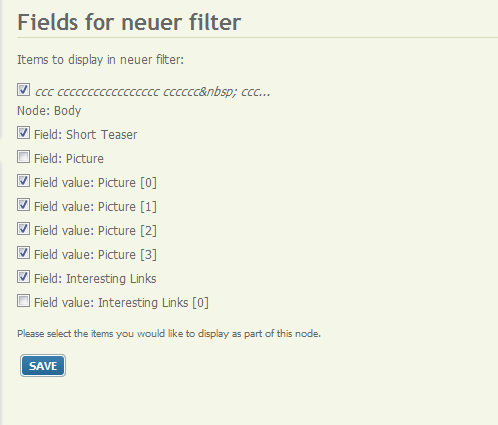
The fields that caused the problem were additional fields coming with the use of multivalue cck-fields. E.g.: I have a imagefield that allows users to add up to 4 images but none is required. I placed all 4 fields into zones. No problem here even when some of the "Values" are empty. The problem comes with an additional field called "Field:Picture". I only use the four fields "Field value:Picture [#]".
I attached a screenshot of the Fields-UI to demonstrate which fields are available.
I checked it and I can either use the "Value" fields or the original field. Using them both (and placing one under "Disabled") throws the error. Obviously using the "Value" fields gives me a more fine grained control about where to place the pics. However if I use a multivalue imagefield with unlimited input the original field has to be used if for example I want to use a layout set.
As far as I can see this is only a matter of proper documentation so that nobody gets irritated by the different types of fields and no real issue.
Note: Only the use of "Field:Picture" alongside with "Field value:picture[#]" throws the error. Using the same combo for a "Link"-field doesn't create the error.
Comment #4
bengtan commentedHi,
Tried reproducing this issue using your description, but no luck. Like you say, the message doesn't impact the operation of the module, but it shouldn't be flagging false positives.
Here's some code for you to try:
In the file composite/modules/content/composite_cck.module, lines 194 to 198 (approximately) read:
Change this to:
In other words, just copy-and-paste the entire paragraph of code. Then see if you still get the messages.
Thanks.
Comment #5
dddave commentedThat worked. I applied the code and tested it: No more watchdog entries.
By the way I checked this scenario on a second install and this behaviour never occured. The content type used was not quite the same and the setup somewhat different but basically comparable. Oddly I wasn't able to reproduce this issue. Strange.
However your code solved the problem on my remote site. Thanks!
Comment #6
bengtan commentedCommitted to CVS. Thanks.