

Closed (works as designed)
Project:
ImageCache Actions
Version:
5.x-3.1
Component:
Canvas Actions Module
Priority:
Normal
Category:
Bug report
Assigned:
Unassigned
Reporter:
Created:
19 May 2009 at 15:10 UTC
Updated:
21 May 2012 at 17:38 UTC
Jump to comment: Most recent, Most recent file


Comments
Comment #1
dman commentedSounds like something we went through in #355230: Support transparent background for imagecache rotate

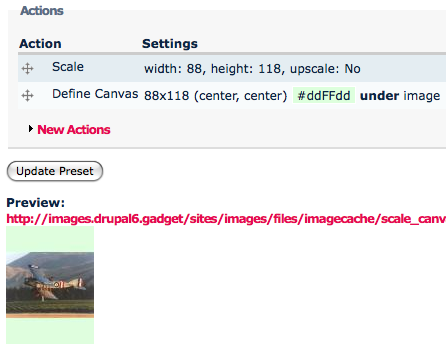
But why are you using crop there? That's the one that is creating that blank block.
(Note, I did also find a validation error within canvasactions UI that was breaking the alignment but not the fill - a fix for that is in the dev version)
... OH. You are still on Drupal 5... Um..
Comment #2
dman commented... yeah it's the same problem and the same fix in D5.
imagecache (proper, not imagecache_actions) creates those blocks when cropping to a larger size.
Comment #3
bobooon commentedIt works properly when using ImageAPI version 1.4 but using 1.5 it no longer works properly. I tried 1.5 with all the different version of imagecache_actions and none of them work properly. So right now I'm stuck using ImageAPI 1.4 and imagecache 2.x.
Comment #4
dman commentedHow about you just don't crop?
As I demonstrated above.
Resizing and then setting canvas is the effect you want?
Cropping an already resized image is not helping do anything except destroy your transparency.
Yes, if you 'crop' a small image to a larger size, the sides get filled in with black. that would make it an imagecache 'crop' problem, not a define-canvas one, right?
Comment #5
bobooon commentedI'll give it a try tomorrow, I only had time to skim it and missed that vital piece of information. Thanks for the help so far.
Comment #6
dman commentedThey are looking at this over in #437702: Separate background color and transparency options, add them to crops that enlarge the canvas
Comment #7
fietserwinI guess this one is not relevant anymore.