

 The 2026 Drupal Business Survey is open. Your response will help shape the future of the Drupal business ecosystem.
The Basic Configuration page of the Cookbook http://drupal.org/node/120614 is currently one person's sort of random collection of thoughts on what he/she likes to do at first for all sites.
It needs to be reviewed, edited, and expanded. Are all of those steps really good ideas? Can they be organized better? Are there other things someone should do that are missing?
This suggestion came from John McSweeney in the Galway session - see #449924: Notes regarding Getting Started and Cookbook docs
| Comment | File | Size | Author |
|---|---|---|---|
| #8 | welcome-tcdocsprint09-400-294.png | 31.01 KB | samirnassar |
| #7 | welcome-tcdocsprint09.png | 70.81 KB | samirnassar |


Comments
Comment #1
jhodgdon"dcor" from the same Galway session mentioned above also had some things to say about the Basic Configuration page:
FIRST ITEM:
"Whether you run one site or several, there are some basic things you should do right now. Here's what I do right off the bat; the advantage to doing it in the "root" database is that when I make copies for my other sites this has already been done. I'd give you a link to something on the Drupal site, but I never found anything like this."
WHAT?
Maybe should say "The following are some basic configuration steps that should be done initially while in the "root" database. The advantage of this is when creating multiple sites (by copying settings), the copies will already be pre-configured."
SECOND ITEM:
Add a suggestion: install the Admin Menu module "since that's an essential tool that I think everyone will/should be using!!!" [dcor actually suggested adding that to a couple of places in the cookbook, and I am not sure where it belongs, but it is a good suggestion] -- http://drupal.org/project/admin_menu for reference
THIRD ITEM -- these suggestions refer to the numbered section at the top of the page:
4. While you're there, go ahead and set what the "authenticated users" (logged in) and "anonymous user" (not logged in) can do, such as using your contact form. This is not engraved in stone; you can change it any time you want. [There is no contact form enabled at this point.. so I don't see it - looking from acquia installation of drupal 6.10]
5. Maybe explain what these things mean... and in the Acquia visitor.. it's already set to node.. does not explain why it has to be 'node' and why I can't change it to something else.
6. Maybe include a list of modules that are recommended to turn on if you're making 1. a blog, 2. a information website 3. a photo gallery... etc. Or link to something that gives you that type of advice and feedback on what works and what doesn't. Acquia seems to come with a package of modules they recommend.. If you want to disable the acquia settings.. what to do...
7. where are themes? In the Admin menu it's Sitebuilding >> Themes ... but again, what am I doing? and why?
FOURTH ITEM
NEEDS TO BE RE-WRITTEN: FOR DRUPAL 6... AND NOTE SECURITY RISK BY TURNING ON FULL HTML.
* Turn on "CLEAN URLS" to make your site more user friendly. Go to Administration >> Site configuration >> Clean URLs. At the bottom of the verbiage there is a link to run the "Clean URLs Test." If it passes, then the "Enable" radio button will un-dim. Click on that. (If the URLs stop working for some reason here are instructions to unset clean URLs.)
* In order for me to create any kind of content, I go to Administration >> Site configuration >> Input formats and set "Full HTML" as the default until I get the site ready to go live. Then I still allow administrators (like my other ID) to use that format. Do this now and you will avoid a very common problem with building your site.
* I don't like having "Promoted to front page" as a default for content, so I go to Administration >> Content management >> Content types and turn that off - in each format.
* While you're there, decide on your default comment mode. Go to Administration >> Content management >> Comments >> Settings (Administration >> Content management >> Post settings in Drupal 6) and set the comments to be entered on a "separate page" and make sure that "Preview comment" is set to "Required."
* Now, let's turn on the Contact form so your users can send you a message. Go to Administration >> Site building >> Menus and locate the "Contact" item (it should listed be under the "Navigation" menu). Click on the "enable" link. Remember that later on you will want to go to Administration >> Site building >> Contact form and finish setting that up.
FIFTH ITEM
Add a note re: Cron and what it does.. what it's for.. and that you will see a message about cron not having run.. link to page explaining it all.
Comment #2
MGParisi commentedjhodgdon lets get together... Jump on IRC and give me a message... I have been using http://etherpad.com to collaborate, and it works great. Really you can jump in and ask if people want to work on it. Copy the page, and start working! With 4 or 5 people you can assume you get druplico-operation
Comment #3
jhodgdonMGParisi: I do not have time to work on this today, and dont' have much little interest in collaborative editing, but thanks anyway. The reports above were from other people's comments, in any case, so I don't really have much input on how the pages are edited.
Comment #4
MGParisi commentedIf you have no input on how the pages are edited and if you had no part in creating the original issue, then why do you file an issue?
This is akin to me sitting in the Drupal-Support channel and researching every question asked, then adding it to the doc-queue because it was not covered.
I am about to go through every issue you "did not create" but that you felt to write up anyways as "wont fix"...
I am sorry, but I am about to leave the Doc Queue (and maybe the entire Doc Team) over this behavior.
Comment #5
add1sun commentedMGParisi, she did it at my request. I gathered the feedback from Drupal newbies and wanted their perspective made into issues so that we can make it more user friendly. I didn't have time to break it down, so I made an issue and @jhodgdon split it out for me. Please leave the issues be unless you plan to actually work on them, and do not "won't fix" them. That is a waste of a lot of people's work. Issues can exist that point things out and allow for discussion before there is a clear action item that someone steps up to do.
Comment #6
dgorton commentedTagging as TC Doc Sprint Item. Working group of dgorton, saminassar, fivefivefour, jasonsamuels discussing and working on it.
Comment #7
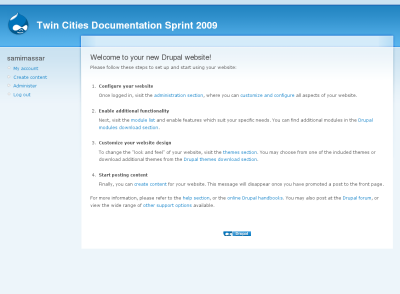
samirnassar commentedScreenshot of "Welcome to your new Drupal website!" right after successful install
Comment #8
samirnassar commentedNew Welcome screenshot:
Dimensions: 400px * 294px
Comment #9
dgorton commentedReorganized as part of the TC Drupal Doc sprint. Ready for review by others. I believe we did more good than harm overall.
Comment #10
add1sun commentedLooks good to me. Marking fixed.