Closed (fixed)
Project:
Vertical Tabs
Version:
6.x-1.0-beta3
Component:
User interface
Priority:
Normal
Category:
Bug report
Assigned:
Unassigned
Reporter:
Created:
22 May 2009 at 13:49 UTC
Updated:
27 May 2009 at 13:51 UTC


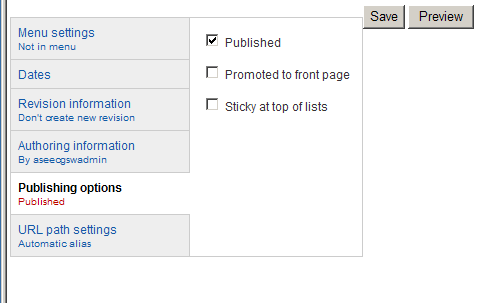
The attached picture shows that publishing options is not expanding to fit the entire available width as done by the all of the other tabs.
In addition, this causes the "Save" & "Preview" buttons to be placed on the top right side of the vertical tabs.
I have only seen this affect the Publishing Options tab.
| Comment | File | Size | Author |
|---|---|---|---|
| ie_problems.png | 11.12 KB | thekevinday |

Comments
Comment #1
quicksketchI can't reproduce this particular issue. Does it occur in core themes like Garland or BlueMarine?
Comment #2
thekevinday commentedhmm, I didn't think to test it against the core themes.
It does seem to work in IE 7 with Garland.
So i take it that I need to do something to my custom theme css then.
Comment #3
thekevinday commentedI am closing this.
It seems that I completely forgot I had applied a fix to the themes css for vertical tabs for IE.
I get so used to having to deal with IE breaking things that I forgot that I apply IE specific workarounds.
For the record, here is what I had done that breaks against beta3: