I am using the latest Drupal 6.12, latest version of ImagePicker (May 31, 2009 version) and the Foliage theme with 3-columns.
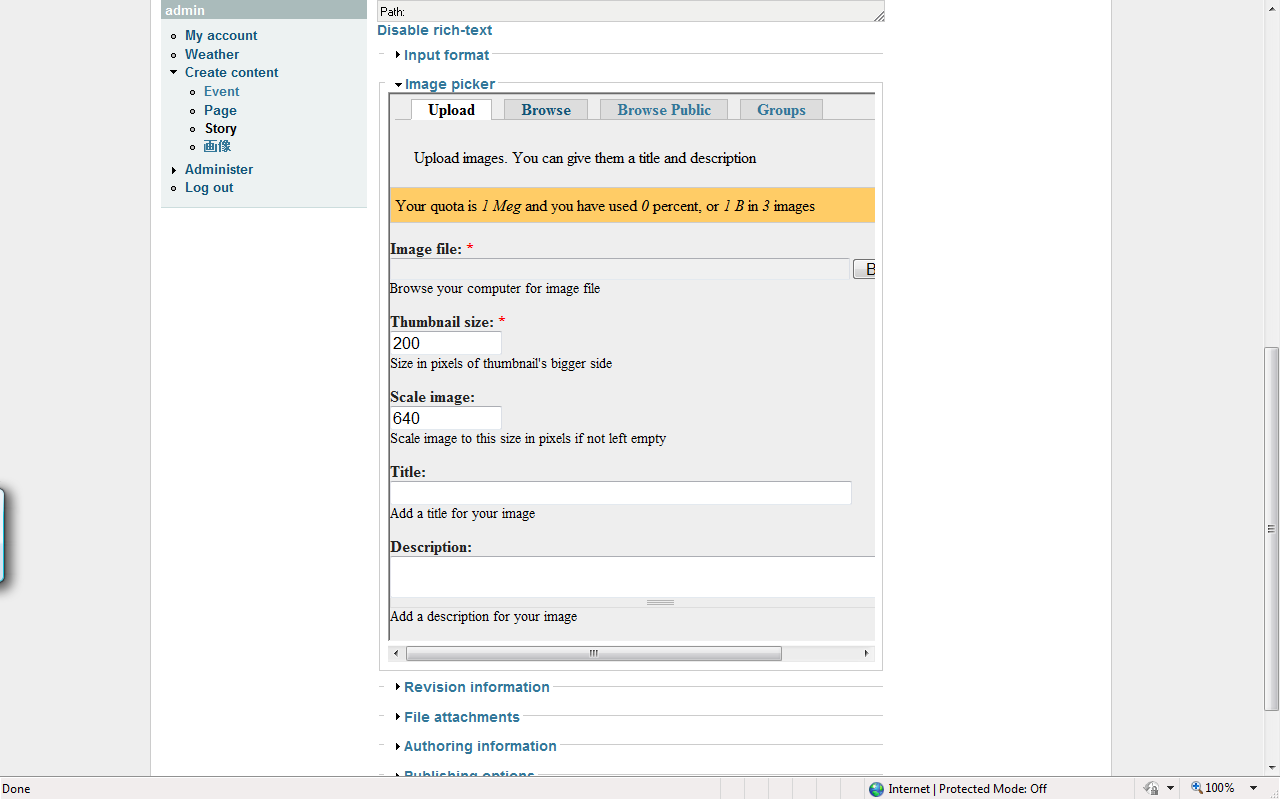
In the Create Contents - Story area, the Image Picker module is too wide to fit in the iframe without setting the width to 120% in the Advanced ImagePicker Settings. But this causes a horizonal scroll bar to show up. I don't want the scroll bar. This web site will be used by people who are not entirely comfortable using blogs or CMS systems. I need this as simple as possibe. Therefore, no scrollbars.
Setting it to the defult of 100% width doesn't show the scroll bars, but then I have a different problem. I can't see the left part of the module in the iframe. That means I can't click the Upload button that appears in the bottom left.
Changing the font size down one in IE to Smaller makes it fit, but I can't have users do this. Many of them prefer larger font sizes.
How can I fix this? To see what I mean, I have a picture enclosed.
Thanks in advance.
Chuckyrose


Comments
Comment #1
chuckyrose commentedTo see what happens when I set the width to 100%, I have another picture. This is what happens when I set the width to 100% in the Advanced ImagePicker Settings.
Thanks in advance.
Chuckyrose
Comment #2
hutch commentedGetting iframes to behave themselves can be a problem, especially in divs, setting the width to 99% helps sometimes. You can also enter pixels in there. You can try tweaking things in imagepicker.tpl.php, if you copy it over to your default theme you can adjust it there. You will need to clear the caches before it will be found.
You can also copy the contents of imagepicker.css over to your style.css and tweak that.
HTH
Comment #3
hutch commented