

 Come together with the global Drupal community in Rotterdam, 28 Sept – 1 Oct 2026. Sessions, contribution, connection, and Early Bird savings until 8 June.
I see this reference over and over again but cannot find this option.
I've checked:
Content Management > Content Types > Manage Fields (Configure and Creating a new field...)
Content Management > Manage Video Uploads
Content Management > Post Settings
Content Management > Taxonomy
Site Configuration > Video Upload Settings
I see this "widget" code in the module code, which has a form API to show all of this, but I have no idea why it's seemingly not appearing in the admin area.
It looks like the code for this is part of FileField for CCK, however I never come across these options (particularly setting a default keyword) when creating a new field for my content types.
The default keyword error is one I'm getting when I upload to youtube.
Can this error be fixed by simply assigning a taxonomy term to the video? ("video" is my content type)
| Comment | File | Size | Author |
|---|---|---|---|
| #4 | admin_cckfield_screenshot.png | 87.7 KB | Pirch |
| #2 | content_type_default.jpg | 316.14 KB | happydrupal |
| #1 | content_type.jpg | 166.1 KB | happydrupal |
| #1 | content_type_2.jpg | 131.56 KB | happydrupal |



Comments
Comment #1
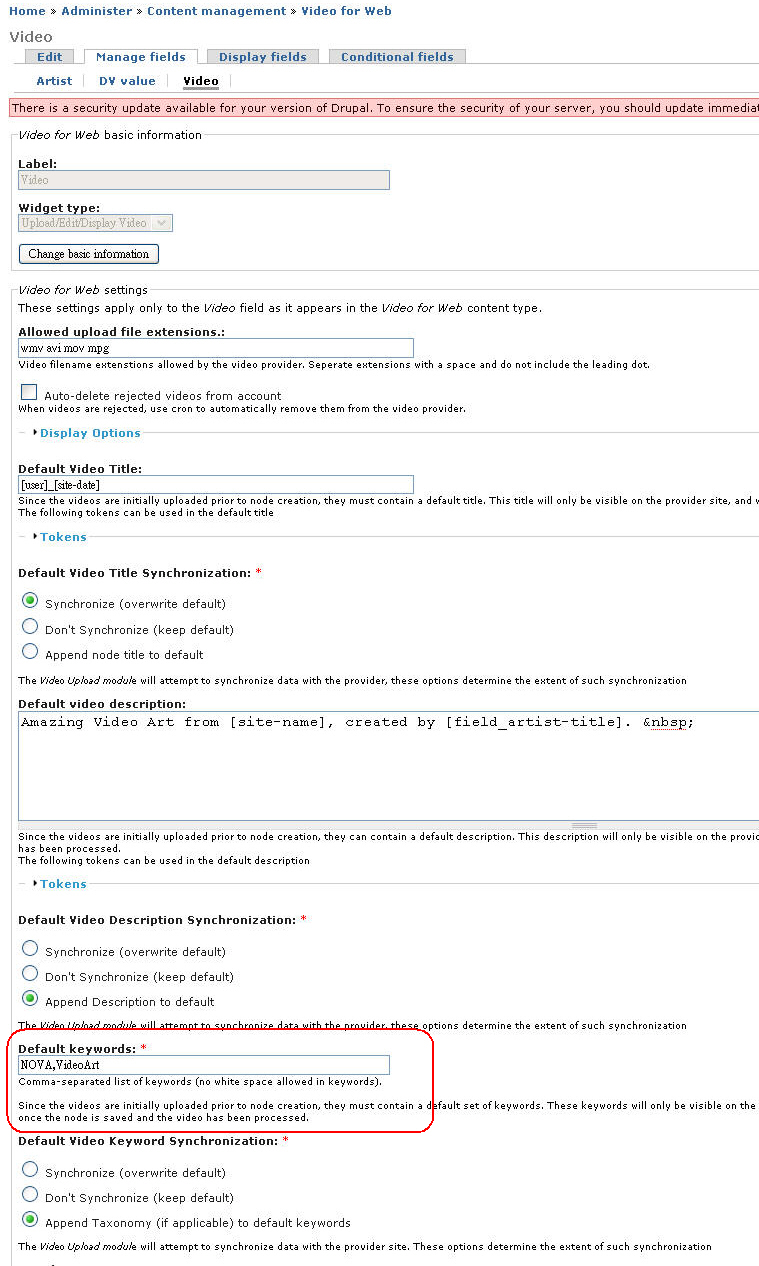
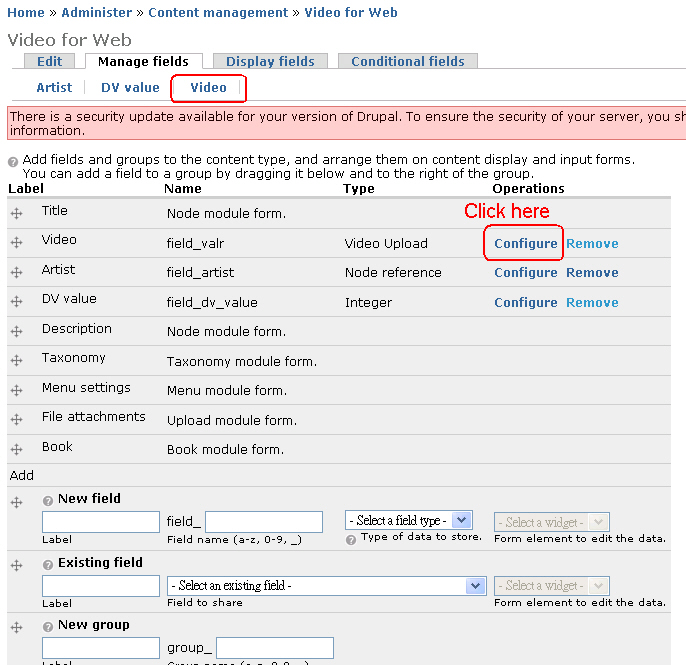
happydrupal commentedClick on the Manage fields tab then click on the configure of your video field when you editing your content type, you'll find the default keyword in the form. Check the attachment "content_type.jpg"
or you can find it in the follwoing URL
/admin/content/node-type/{machine id of your video content type}/fields/{machine id of your video field}Also, don't forget to fill in those fields with red asterisk in the same form
Comment #2
happydrupal commentedAnother capture to show the default keyword fields. Please see attached.
Comment #3
Oke commentedI have an issue other users of your module also posted on Drupal.org. Videos are not uploaded to youtube, but orphaned videos are visible in the "Home › Administer › Content managementManage Video Uploads" section.
I am using CentOS 5.3, PHP 5.2.6, ZendGdata 1.8.2, cron is working fine, the youtube account itself works.
Filefield 6.x-3.0, CCK 6.x-2.2, video_upload 6.x-1.2
The module is configured correctly as far as I know.
I don't get any watchdog errors or httpd errors.
I don't know where to go to solve this.
I also posted this message on Drupal.org.
Comment #4
Pirch commented@happydrupal
I cannot believe it! I am running the same version of video upload and when I add the video upload CCK fiel into my existing content-type I do not have at all the same configuration possibilities!
You can see my screenshot. My videos never reach my youtube account, it is maybe the reason why !
Thank you for your help.
Comment #5
happydrupal commented@Pirch
Well...................... I'm using Video Upload 6.x-1.x-dev (2009-May-19). However, the admin page is almost the same between 6.x-1.x-dev and 6.x-1.2 in my memory.
@Oke
I think you met the same situation like mine @ http://drupal.org/node/455176#comment-1667850
Comment #6
Pirch commented@happydrupal
Do you think I should downgrade to the Video Upload 6.x-1.x-dev ? Does someone has the same admin page than me with the 6.x-1.2 ?
Thank you fro your quick answer :)
Comment #7
happydrupal commented@Pirch
6.x-1.x-dev is newer than 6.x-1.2. You may try it on the test site but never never on your production site.
Comment #8
Pirch commentedOh you are right...
Well I just removed the 6.x-1.2 and installed the 6.x-1.x-dev and that works perfectly ! The upload works, I have it on my youtube account and I have the playback in my website so I will probably tell my users that it is a Beta functionality but I think I am going to put that on my production site as a new Beta module...
Comment #9
bojanz commented