

Closed (fixed)
Project:
Total Control Admin Dashboard
Version:
6.x-1.0-rc2
Component:
Documentation
Priority:
Normal
Category:
Task
Assigned:
Unassigned
Reporter:
Created:
4 Jun 2009 at 22:52 UTC
Updated:
2 Mar 2010 at 06:20 UTC
Jump to comment: Most recent file

Comments
Comment #1
jenlamptonI added one. It's at the bottom of the page under resources where it says "Look at screenshots".
I tried really hard to get something in-line at the top of the page like I see on other projects, but I think the d.o image upload tool is broken because it lets me browse for an image, but not upload it. Saving the project page doesn't add one even if it's been browsed-to :/
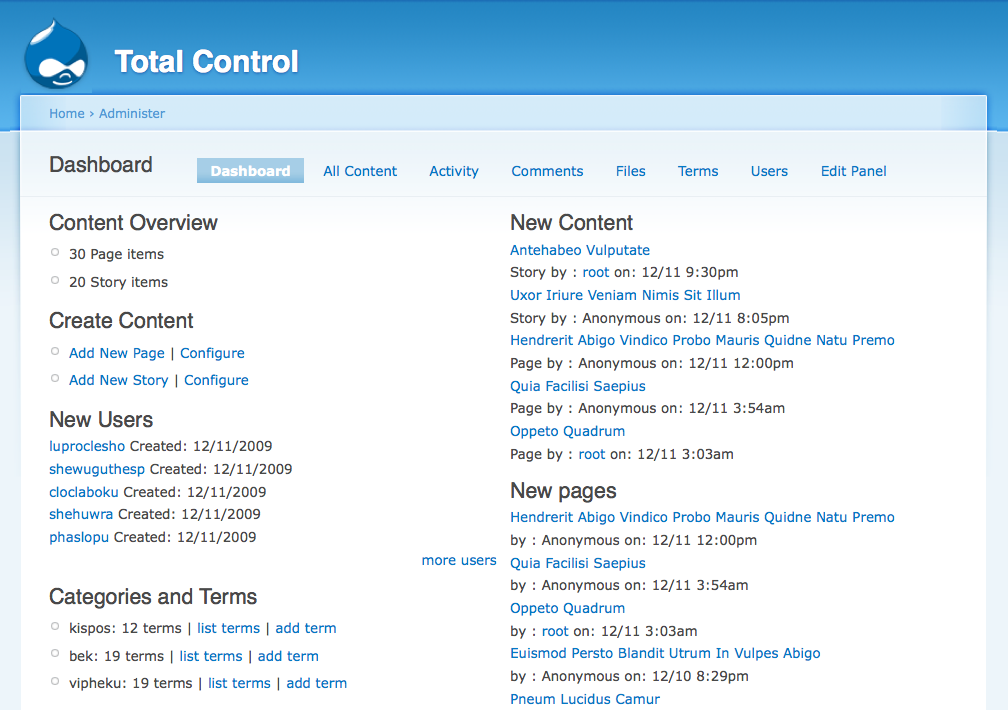
Here are all the screenshots, until I can figure out some better way to get them up there:
Total Control Dashboard:
http://jenlampton.com/total_control/dashboard.png
All-Content View:
http://jenlampton.com/total_control/tc_view_content.png
Total Control Dashboard (with workflow panes):
http://jenlampton.com/total_control/tc_workflow_dash.png
All-Workflow View:
http://jenlampton.com/total_control/tc_workflow_view.png
Comment #2
matt v. commentedIs the image upload field still broken? I just took a screenshot because I was evaluating the module and didn't see one on the front page. It looks like you don't need mine, but it would be nice if you could get one of the ones above added to the project page. Having a screenshot to look at is so helpful when evaluating modules.
By the way, the module looks great and I'll probably install it on a couple of sites very soon. Thanks!
Comment #3
jenlamptonYeah, I can't add uploads to any of my modules :-(
Jen
Comment #4
jenlampton@Killes fixed me, so I can add one now. Anyone have a really pretty screenshot for me?
Comment #5
jenlamptonmarking this as fixed.