

Closed (fixed)
Project:
Lightbox2
Version:
6.x-1.x-dev
Component:
Code
Priority:
Major
Category:
Support request
Assigned:
Unassigned
Reporter:
Created:
6 Jun 2009 at 16:02 UTC
Updated:
5 May 2019 at 20:44 UTC
Jump to comment: Most recent, Most recent file

Comments
Comment #1
stella commentedI can't reproduce that problem using the latest dev release. Can you provide a link to your site where I can see it happening? My contact form is enabled if you wish to do so privately (just quote the ticket number).
Cheers,
Stella
Comment #2
stella commentedDo you have the input filter "Disable Lightbox iframe filter" enabled for the input format you're using? You can check at admin/settings/filters. If so, you should disable it.
Comment #3
Apfel007 commentedIt's disabled..
Comment #4
stella commentedactually it's one of the other filters that interferes - I think it's "HTML corrector", or possibly "HTML filter" (though I wouldn't recommend disabling this one for untrusted users). It's also possible removing the spaces from the rel attribute might fix the problem.
Comment #5
Apfel007 commentedHi,
I setup a own lightbox filter now - and that works :-) for a note but..
if I use the lightframe in a view - "Rewrite the output of this field" - it doesn't work .. I disabled all filters only the lightbox-filters are active...
Comment #6
stella commentedComment #7
Apfel007 commentedsorry to fast ...
Comment #8
taits commentedis there not a way to escape tokens... seems like that is the problem
Comment #9
glen201 commentedI'm also having this problem. Has any maintainer looked into this and what might be causing it? I am trying to use the rewrite in views to make a emfield video lightbox'ed with a specific width and height (or else it plays in the lightbox with scroll bars). Perhaps there's another way to do it.
To be specific, I tried disabling all the default site filters and enabling all lightbox filters except for the Disable Lightbox iframe filter.
In my view, I have a video emfield- Content: Video (field_video_upload)
I am rewriting output of this field as:
in the rendered HTML for the view, it comes up deformed, as:
when I leave out the width/height as:
it renders correctly the video with "caption" in the lightbox.
So, ..... ? What's this all about? @taits asks a good question: can you escape the [] brackets, because maybe views is trying to interpret this as a token? I tried \[|width...\] but that didn't take any differently.
Advice? Is this not workable because of the square brackets? Is your the patch you guys are passing around in #474454: Views lightbox2 custom field handler (update) going to work better for me in this case to display video?
-- glen
Comment #10
stella commentedThe problem is a conflict with one of the input filters. I can't remember which one exactly, it may be the "html corrector".
Comment #11
glen201 commented@Stella, yes I saw that in an earlier post. However, I tried disabling ALL the filters for "Full HTML" and it didn't make a change. I am also using Better Formats to manage filters. Am I missing something? Is there a view-specific filters definition?
Comment #12
glen201 commentedI would recommend that the code check that the offending filter is not enabled when the module is installed.
--glen
Comment #13
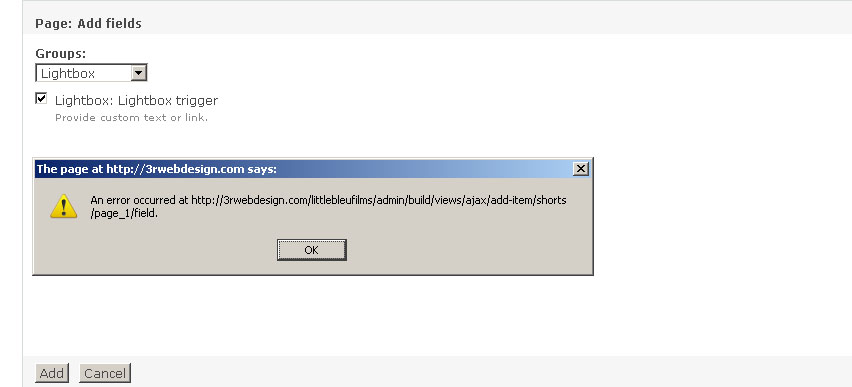
rubenra commentedwhen trying to add a lightbox trigger i get the following error. any help would be appreciated. i have the following config:
FileField 6.x-3.2
Image 6.x-1.0-alpha5
ImageAPI 6.x-1.6
ImageCache 6.x-2.0-beta10
Lightbox2 6.x-1.x-dev (2009-Oct-02)
im also experiencing rewrite issues like above when i add width and height to output field. i have "Disable Lightbox iframe filter" enabled
Comment #14
rubenra commentedto add to my previous post here is the code im using (image thumb to open vimeo emed video).
When i use firebug to see output i get:
you'll see the rel="lightframe[]" is breaking
Comment #15
Renee S commentedI'm having the same problem, it only works if I'm not using any filters (ie: PHP mode... which is obviously not very useful for a community site :) But we're talking about a bigger issue here - allowing certain characters or attributes within an input format that is not as granular as individual HTML attributes, only tags. It's stripping it because it looks like javascript.
Comment #16
glen201 commentedIt's a little off-putting that this important views compatibility issue has not yet been resolved.
Can we get Lightbox2 to support something other than square-bracketed options that interfere with views, like:
rel="lightvideo{|width:400px;height:300px;}{caption}" or whatever????!
Comment #17
dosborn commentedIt happens because of the colon separators in the style part. You could get around it by allowing an alternative separator, such as an equal sign (which worked for me, with a small change to the "setStyles" function in "lightbox.js" in 6.x-1.x-dev (I think the latest release)).
Comment #18
tiato commenteddosborn - you are the man! ran into this very problem in using views to rewrite the output using latest version (6.x-1.9),
starting at line 1030 of lightbox.js, changed setStyles(), lines:
width:
to:
height:
to:
scrolling:
to:
overflow:
to:
I'm not exactly sure if there is a specific reason for using ':' instead of another separator like "="? Maybe stella can answer this but wouldn't it make sense to use '=' by default if there is no real benefit to using colon instead? It seems views likes this better. Just a thought.
Thanks guys
Comment #19
AntiNSA commentedI have the lates dev version, and have modified the lightbox.js version as in#18, and the modification allows the lightbox to appear when being set with and = vs :, however the sizes are ignored
QUICK VIEW
This is a pretty urgent issue for me,
Comment #20
BJ___ commented@dosborn & @tiato rock.
This worked for me too.
Just a note though. If you are using any other lightbox triggers in views this adjustment will break them because they are looking for ":" instead of "="Comment #21
john franklin commentedHere is a patch that accomplishes #18 above.
Comment #22
justclint commentedPatch worked like a charm. Thanks!
Comment #23
DrupalYedi commented@ #19 : Clear the browser cache and reload the page - that works for me
Comment #24
marcoBauli commented+1 for patch #21, working here too
Comment #25
xamountThe patch at #21 worked for me and fixed this issue: #1985346: lightframe does not work for IE 8/9/10
ps - I did this for Drupal 7.
Comment #26
brockybear commentedWe ended up needing to use the patch as well, but with some modifications.
For us, the default method was working properly for most implementations, however, when we tried to add a lightframe to a link contained inside of a option on a form, it broke. Changing the sizing to use '=' fixed it for us, but we needed the backwards compatibility for the numerous other places we'd already employed the code.
So, we extended it to work both using a ':' and '='.
Comment #27
pifagor commentedLook good
Comment #28
alex_optimGood for me.
Comment #30
volegerFixed. Thanks.