

 Come together with the global Drupal community in Rotterdam, 28 Sept – 1 Oct 2026. Sessions, contribution, connection, and Early Bird savings until 8 June.
Hello,
Surely some error at my end. I am using Ecom. 6.x-4.0-rc10.
Other modules installed are : lm_paypal - All details configured in lm_paypal.
Following process is used:
Clicked on "Buy Now"
Lead to check out page - Address is filled and update order is clicked
Clicked on Place your order
This does nothing and simply leaves user to www.example.com/node. With a drupal message on top " YOUR ORDER HAS BEEN SUBMITTED"
No Email is received by buyer/seller.
I want it to lead to paypal site for payment
I want it to come back to site after sucessful/unsucessful payment on sucesspage or unsuccesspage.
The buyer and seller should get email notifications regarding the transaction.
Suggestion:
A simple list of all contrib modules available for EC4.0 should be placed on project page. The list can provide a link to modules' project page and also describe their features summary. I can do this for you if I you can provide a list of contrib modules for 6.x-4.x
Please help.
Thanks
Rugman
| Comment | File | Size | Author |
|---|---|---|---|
| #2 | Modules Enabled.JPG | 122.76 KB | Rugman |
| #2 | Modules Enabled Two.JPG | 111.81 KB | Rugman |

Comments
Comment #1
gordon commentedHi,
lm_paypal is not a e-Commerce module and doesn't actually do anything with paypal. You need to enable the e-Commerce PayPal module which comes with e-Commerce. This module actually implements more of the PayPal API than the lm_paypal module as it also implements the PayPal Express and PayPal Pro methods of payment as well.
Once you enable this module and configure it you will go off to paypal (depending on how you configure it).
The mail I have not yet implemented rules to send emails yet. I want to implement a disabled rule which shows you how to implement mail. The main reason that I haven't done this because I am not 100% happy with this, and would like to have the Mail Editor module handle this but I would need rules integration added and also integration with Chaos Tools to allow e-Commerce to provide default email templates a long with the rules for sending emails.
Here is a rule that you can import which will send a mail message on transaction completion to the customer.
Comment #2
Rugman commentedHello,
Thanks for the code.
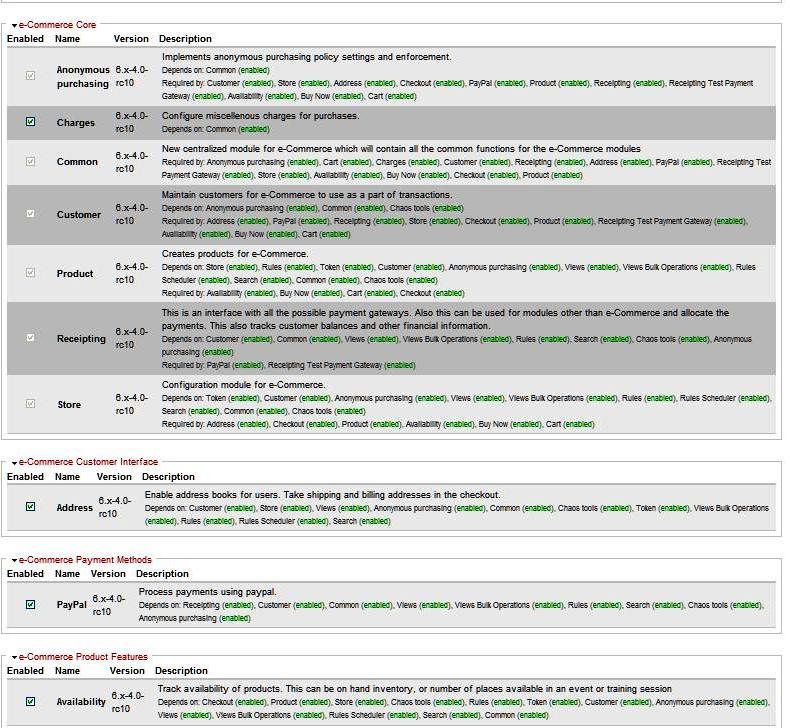
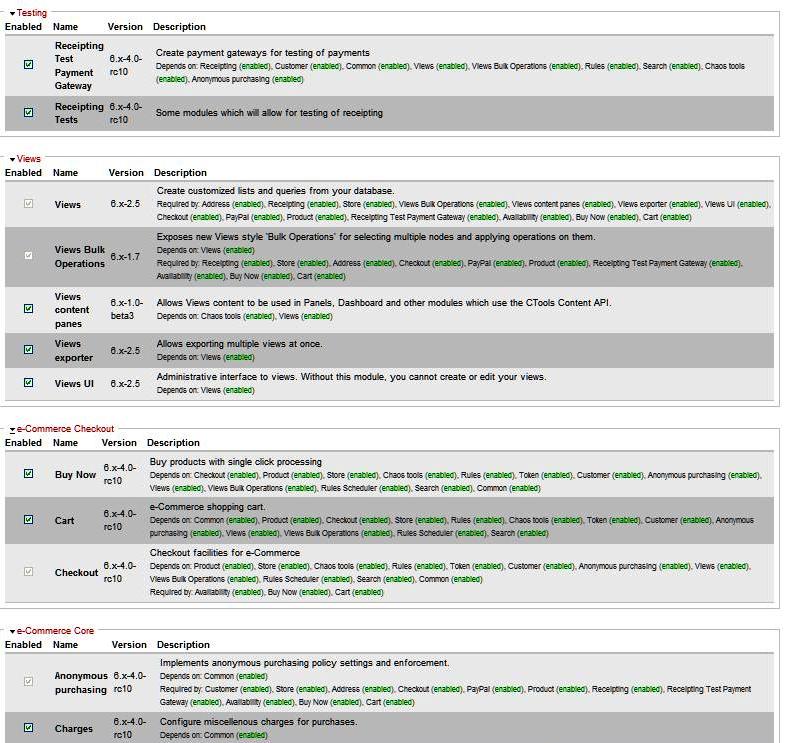
The paypal module with ecommerce was already enabled. (As matter of fact, I always enable all modules of EC4 in recommended steps). (Module setting page Images attached)
It was when I could not step ahead from checkout, I tried to use lm_paypal.
I have now uninstalled the Lm_paypal module. The EC paypal module was always active even with LM_paypal.
Please note that nowhere I can locate the configurations for Paypal. I have check menus of site config., EC config and EC.
Edit *** Found Paypal settings in Receipts section of EC config page and now site is working well. - Sorry for troubling you.
Please help.
Rugman
PS : I have tried reporting bugs/requests to other module moderators, but I can sure say, you are one of the most active people on Drupal network. It is dedication of people like you that we are enjoying drupal. Thanks for your efforts.
Comment #3
gordon commentedI hope that fixed your issue with the paypal integration.
It has been a balancing act to make sure that when e-Commerce is installed (which most people like you just install everything) and being confronted by pages of settings which can be very disheartening.
This is also the reason why e-Commerce has had the number of modules reduced to only 13, which means that if someone installs them all, they would have most likely needed to install most of them anyway.
I have been guessing that if you installed what you really needed people would most likely install 11-12 modules most of the time and then maybe adding 1 or 2 contrib modules. basically a payment gateway and a shipping module.
Gordon.
Comment #4
Rugman commentedHello,
Yes, Thank you very much.
There was no problem indeed, it just required more fiddling.
I would like to write a dummies guide for E-commerce under your guidance regarding details of available core and contrib modules and their functions. I would need a list of contrib modules (Core modules I can list myself). If you agree, I would send a draft writeup to you first.
Regards,
Rugman
Comment #5
gordon commentedI am glad that that sorted it out for you.
Speaking of a book, I am considering setting up a site to build a collaborative communitity based book which anyone can contribute with the aim of being able to submit it to lulu.com to self publish.
If you are interested let me know and we can discuss this more, you can email me gordon@heydon.com.au