Hey Ice,
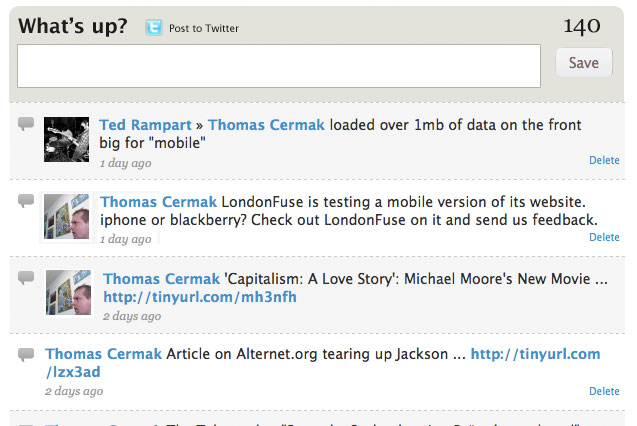
I'm making the suggestion that we move the %Chars tracker above the submit form. Not sure if this creates any problems but works fine form. It looks nicer, twitter does the same, and avoids conflicting (theme-wise) with a view if it happens to sit below the submit form ala the ajax view submit issue. A picture is attached with the look I've got going. I'd also make the suggestion to move the "post to twitter" to sit aloft the submit form as well - I'm probably going to do that. Here's what I did:
  $path = drupal_get_path('module', 'facebook_status');
  drupal_add_js($path .'/facebook_status.js');
  drupal_add_css($path .'/facebook_status.css');
  drupal_add_js(array('facebook_status' => array(
    'maxlength' => $maxlength,
    'ttype' => variable_get('facebook_status_type', 'textfield'))
  ), 'setting');
  $form = array('#cache' => TRUE);
  $form['slider'] = array(
    '#prefix' => '<span id="facebook_status_replace">',
    '#value' => '<span id="facebook_status_slider">'. $slider .'</span>',
  );
   $form['chars'] = array(
    '#value' => '<span id="facebook_status_chars">'. t('%chars', array('%chars' => $maxlength)) .'</span>',
  );
  $form['status'] = array(
    '#type' => variable_get('facebook_status_type', 'textfield'),
    '#field_prefix' => $prefix,
    '#size' => $size,
    '#cols' => $size,
    '#rows' => 2,
    '#maxlength' => $maxlength,
    '#default_value' => $default,
    '#attributes' => array('class' => 'facebook_status_text'),
    '#suffix' => '</span>',
    '#resizable' => FALSE,
  );
  if ($view && module_exists('views')) {
    $form['fbss-view'] = array(
      '#value' => views_embed_view($view, 'default', $account->uid),
      '#suffix' => '</span>',
    );
    unset($form['status']['#suffix']);
  }



Comments
Comment #1
icecreamyou commentedMoving the save button will break the form. I'll move the character count above the submit button but not above the form.
Comment #2
pribeh commentedKool. Thanks Ice.
Comment #3
icecreamyou commentedSo I changed the code locally to move the character counter and twitter checkbox, and it works, but there's some kind of version mismatch between my local copy and the copy in CVS I think. I'll have to look into that and I probably won't be able to do so until I get home next week.
For your reference, note that you should add these two lines to the JS callback function with the other $new_form ones, or the character counter and twitter checkbox will disappear when the form is submitted:
Comment #4
icecreamyou commented...and also simplified the way the wrapper around the AHAH-refreshed content was rendered.
Comment #5
pribeh commentedwicked. cant' wait to try it out.
Comment #7
pribeh commentedHey Ice,
Just wanted to know if you think I could switch around the chars to appear after the twitter checkbox without causing any problems. Everything looks and works great except that. My design mockup shows how I think this could ideally look, for my purposes at least.
Comment #8
icecreamyou commentedThe short answer is Yes.
The long answer is that the form is reconstructed in the AHAH callback in the original order, so your ordering will be un-done after the form is submitted. That means that the most straightforward approach is to edit the module to switch the twitter checkbox and the character counter in both the form function and the AHAH callback. However, editing the module would make for a difficult upgrade path, so you could opt to just use CSS. You could also use a hook_form_alter() to switch the content of the relevant form elements, or to add the
'#weight'property to all the important form elements (probably the best solution). The form elements will probably have weights by default in future versions of the module.By the way, this is unrelated to the original topic of this issue, and this issue has already been fixed and closed, so your question really belongs in a (separate) support request.
Comment #9
pribeh commentedissue closed for sure. thank Ice.