

 Come together with the global Drupal community in Rotterdam, 28 Sept – 1 Oct 2026. Sessions, contribution, connection, and Early Bird savings until 8 June.
Hi,
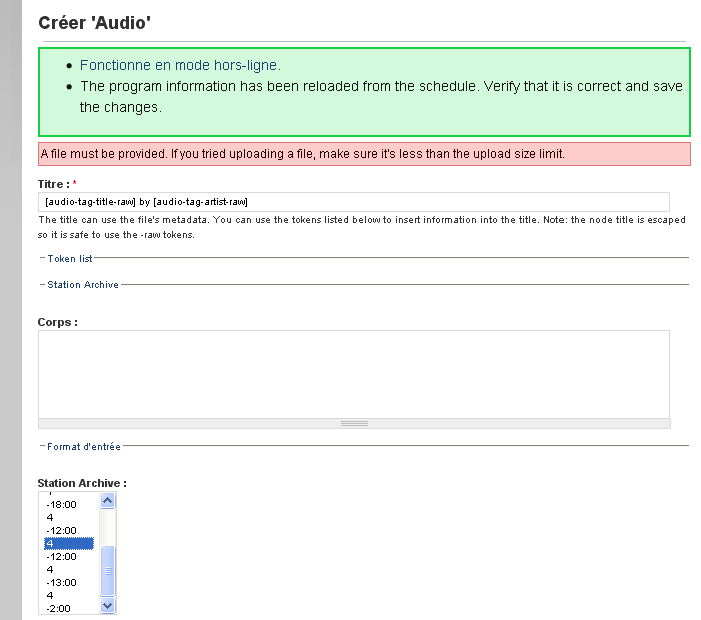
I would like more informations for activated the archive system of station but I don't understand the procedure (see the picture) !
Is it possible with the 6.x-2.x-dev version ?
I record my program via an independant program, and i can upload it directly under drupal (for create an audio node).
Could you give me the procedure for create the Archive system ?
Regards
| Comment | File | Size | Author |
|---|---|---|---|
| Archive.gif | 14.07 KB | lesonunique |

Comments
Comment #1
drewish commentedYou should be able to upload the file into a new audio node then associate it with the archive.
Comment #2
drewish commentedComment #3
jimmyy commentedHello,
I use a independant program for record.
All the archive page are empty.
The directory archive/import is empty.
What information must be present in this directory?
It's the reason why all the archive page are empty ?
Regards
Comment #4
lesonunique commentedHello,
I would like to have some information about station archive module.
I used a delphi programm to create the audio files, and to write in the Drupal's tables also.
I would like to see the audio files of a program, when I will click to "Listen to previous".
How enter a new file audio into a station program archive.
Which table should be modified, which column... ?
Best regards.
Comment #5
drewish commentedThe file name must be a GMT UNIX timestamp of the time the recording started. That will be used to determine which program was playing based on the schedule.
Comment #6
lesonunique commentedPlease,
Can you give more explications ?
Comment #7
lesonunique commentedHello,
I'm testing the version 6.x-2.x-dev, archive doesn't wook.
I'm testing the version 6.x-2.0 unstable3, I can create the archive (I see the archive on principal page) , but I can't see the program archive, when I click on "listen to previous".
How see the archives in program page (when I click on "listen to previous") ?
Best regards.
Comment #8
tim.plunkettComment #9
refreshingapathy commented#6 - For auto-import, the file name should be the UNIX time stamp of when the file's recording was started. For instance, if I start recording right now, the file name would be 1278431081.mp3 because the number of seconds elapsed since 1 January 1970 is 1278431081. You can get a timestamp in this format on *nix systems or cygwin by doing "date +%s".
#7 - double check that you are running the latest -dev release, there was a point in time where the archive links were broken but they have been fixed since.