

Closed (fixed)
Project:
Drupal core
Version:
7.x-dev
Component:
user interface text
Priority:
Critical
Category:
Bug report
Assigned:
Unassigned
Issue tags:
Reporter:
Created:
27 Jun 2009 at 18:54 UTC
Updated:
20 Feb 2010 at 06:28 UTC
Jump to comment: Most recent, Most recent file




Comments
Comment #1
eigentor commentedComment #2
eigentor commentedComment #3
eigentor commentedThis is the actual text:
"Use the list below to review the text formats available to each user role, to select a default text format, and to control the order of formats listed in the Text format fieldset. (The Text format fieldset is displayed below textareas when users with access to more than one text format create multi-line content.) The text format selected as Default is available to all users and, unless another format is selected, is applied to all content. All text formats are available to users in roles with the "administer filters" permission.
Since text formats, if available, are presented in the same order as the list below, it may be helpful to arrange the formats in descending order of your preference for their use. To change the order of an text format, grab a drag-and-drop handle under the Name column and drag to a new location in the list. (Grab a handle by clicking and holding the mouse while hovering over a handle icon.) Remember that your changes will not be saved until you click the Save changes button at the bottom of the page."
Comment #4
eigentor commentedThis was fun. Been able to cut it down to a third. A lot of things are described redundantly on the text format starting page and on the different sub-pages of a specific format, so need to look into this as well. In filter.module, a text for the "more help" link (help system) is provided, but the link does not show up. This might be a bug.
Patch is attached.
Comment #6
eigentor commentedRerolled. Probably some issue with wrong single and double quotes.
Comment #7
eigentor commentedComment #8
keith.smith commentedWe always use 'HTML', not "Html".
"You can add a new one by..." => "Add a new one by..."
"Define which user roles can use which text format; the default format is available to all users." ? That first clause feels like a sentence fragment, at the least, you have to read it several times to parse.
I'm not sure the security warning is useful here and will be difficult to do in a way that is applicable to all situations. In particular, it is not allowing too many tags that may be dangerous; it is more a danger caused by the specific tags that are allowed. Quantity of tags is not all that applicable. And, that last sentence regarding PHP code may not be applicable to a site that has not enabled that module.
All that said, though, there certainly is room for improvement.
What about something like:
Use the list below to review the text formats available to each user role, to select a default text format, and to control the order formats are listed in the Text format fieldset, The text format selected as default is available to all users and is applied to new posts unless the author chooses another available format. All text formats are available to users in roles with the "administer filters" permission.
Comment #9
eigentor commentedI completely agree with your remarks, especially the warning about the danger of allowing certain tags. Probably this warning should be exactly in the place where a user can allow tags or maybe allow all tags, or a drupal message when he changes tag settings.
Whith your alternative proposal though I am not happy at all:
Having in mind a user that does not know what a text format is: you can mention it as often as you want, he just won't get it. What is a text format? Mentioning that the user can select another format he finds out when editing a post, and in a default setting authenticicated user cannot, he can just use filtered HTML. The administer filters permission - yes this is dangerous but again: does someone trying to get a hold of text formats need to know that?
Also you don't have to review: you just choose or set.
Maybe we should meet in IRC and discuss general strategies. Basically I feel like contradicting most changes, and I hate that ;)
What and who are we targeting at? Drupal offers a gazillion options. If we describe all of them, we confuse. Do we want to explain technical concepts? Are we targeting at not-so-technical administrators? At people that know Drupal well or at people who don't know it at all?
Also how do we archieve that everything is explained exactly in the place it is needed and not twice or three times all over the place.
Comment #10
keith.smith commentedLooking at the page without making any changes is "reviewing" the changes. That's a very necessary thing to do considering this page has security implications (you'd review this page to determine what roles have access to what formats, for instance).
This is an important page, and while it may be true that people don't understand text formats, not mentioning the phrase "text format" does not explain what they are, and actually makes it harder to find out. You don't know what to Google, for instance.
In my opinion, trying to "dumb down" a concept is the wrong way to go. That's kinda' what we saw with moving "Taxonomy" to "Category".
But, that said, yeah, it's very hard to really nail the audience we're aiming at here.
Comment #11
eigentor commentedWell actually I have nailed it for myself (and write all the texts in this respect): People who do not know Drupal but may have some experience with other content management systems. In this I orient on the D7UX principles "Privilege the content creator" "Make the most frequent tasks easy" "Design for the 80%" a.s.o. you know them... :P
People who _are_ experienced won't read those texts.
Personally I have learned about _nothing_ about drupal from the help texts. I learned it from experience, recommendations, documentation, and the most from errors I made. So I guess the ones that read the text won't learn any concepts, but should get help how to use the page they're on.
What can I do on this page? Where do I start?
And maybe a very slight hint "What are blocks" or "What are text formats?" Though the only way to learn that is to experience it.
So the sentence: "Text formats control which HTML tags are allowed." was my shot at that.
Comment #12
heather commentedFYI: the location for this is now
/admin/config/content/formats
Comment #13
heather commentedWe attempted to test this, but only scratched the surface. We found this text, in the larger context, is part of a work-flow that needs revision/changes.
- User is unclear what "text format" means in the title.
- On configuration page, there is a loss of the prior context
- "More information about text formats' /filter/tips is not styled the same, and is completely out of the context of 'Text Format' area.
- The link to more information should be on the start page, in addition to configuration page
- The listing of text formats "name" column- the word "name" confusing
Many of the problems with the initial text are also part of a wider issue with the work-flow of this task.
Comment #14
eigentor commentedGood shot to user-test it, heather :)
As the text formats are very important and have a lot of subpages (with a lot more confusing texts) this will not be a quick one.
How do we get users to experience what text formats are? This is also hard on the blocks page, but if you put a block into another region, you might see an immediate effect.
With text formats it is different. The entire form is so confusing, and to actually configure a format, you have to click configure twice (!) the help texts have hardly a chance to be helpful without reworking the entire interface.
So maybe an example that shows what happens when you allow html tags or forbid them could do the trick? (could be very simple: "Allow the
<img>tag to allow the user to insert images" and show what happens if allowed or not...All the other controls only group around this.
Needless to say that only medium advanced users will be able to make sense of this page, so I think we do not need to adress people who do not know what html is - they won't be able to make use of it.
As I doubt we will rework all the forms for input formats for D7 maybe the focus should be on making the texts much shorter (as always) and not trying to explain too much, but get the user to try it out.
Maybe you want to iterate on the text by making suggestions?
Needs iteration anyway, as every issue and particulary core issues...
Comment #15
heather commentedRebecca and I initially thought we could 'fire through' a few of these long-neglected ui-text issues. But we realised it was a bit more than we could handle in the time we had. I wanted to contribute the notes in case they were of use.
But this was like pulling one string on a larger knot that needs unraveling.
I would like to sit down and try a user test again on this. In fact, I am preparing a proposal for a UX testing in Belfast 26-27 Sept: DrupalCamp Ireland. Talked with Yoroy who is advising me. Should be of use, I hope! We might be able to come up with some simple/effective things to ease some of the problems... (i hope :)
Comment #16
lisarex commentedCan 'Text Format' be renamed to 'Text Display' since that is what people will need to understand when setting these?
As for the copy, how about:
"Text formats control which HTML tags can be used in a node once the content is saved. People creating content may need to use additional HTML tags; configure their role to use Full HTML if needed. Anonymous users should be restricted to Filtered HTML or plain text for security reasons.
If you want to create a custom text format, add a new one by clicking on 'Add text format' above. "
Edited: I removed references to PHP since it's not handled on this screen by default (admin needs to enable it first)
Comment #17
dcor commentedTaking this on to try out revising the patch as per comments.
Comment #18
dcor commentedHi! So - my first post seems to have vanished - trying again.
I've created a new patch to reflect the conversation and lisarex's final suggestion - as well as with a few edits of my own. Please review and see if it meets all of our expectations.
Comment #19
scor commentedWe should not advice to switch to full HTML in this case for security reasons. It's best to either modify the set of allowed tags of the "Filtered HTML" filter at
config/content/formats/1/configureor create a new filter with an extended set of allowed tags. It should be mentionned that the Full HTML filter, if granted to any role, should only be used for trusted users.agreed.
Text formats do not only apply to nodes, but to any fieldable entity type in D7 (users, comments, terms...) and possibly more (in contrib), so the first sentence should be made more generic.
Comment #20
David_Rothstein commentedI agree that the current text on this page is a disaster and that it is very important to make it better :) I think the most recent rewrite definitely does that. Here are some comments, though:
I'd suggest something like "untrusted users" here. On most sites, anonymous users aren't the only ones who should be restricted (and theoretically, it's even possible to have a site where anonymous users are trusted, although that's probably the 0.01% use case).
If you want to give people proper detailed warnings about security, the issue to look at is #275811: Warn about potentially insecure filter configurations. It is really, really, really, really important to get that into Drupal 7 - that allows us to (dynamically) detect exactly which text formats on the site are configured insecurely, and to provided specific information about what makes it insecure (e.g., "The HTML filter is configured to allow the following unsafe tags: <script>, <object>, etc").
If you care about security warnings, please review that patch - time is short :) There is also a corresponding design issue at #618902: Design and implement a user interface for warning about insecure text formats that needs lots of help from UX folks to figure out exactly how best to present the information from that to the site administrator.
For accessibility reasons, let's try to avoid the word "clicking" (even though it was there already)... and we don't need to say this sentence at all anymore anyway, since due to recent D7 changes, the "Add text format" link now (happily) appears right underneath the help text.
***
Putting it all together, here's a stab at what I'd suggest:
Comment #21
heather commented@ David Rothstein
Well done! That looks like a really good, clear and concise description. You've incorporated all considerations.
Thanks also for the heads-up about the two patches which need reviewing, (your point #2)
Dcor, you want to re-roll this?
I'll be glad to review it.
Comment #22
David_Rothstein commentedGreat, thanks!
As long as I'm here now, I'll just roll it into a patch...
Comment #23
lisarex commentedApplied the patch and it looks good to me!
Comment #24
eigentor commentedNot bad.
Still, the race is on, who can do the shortest? :)
As the text format descriptons distribute across several pages, this offers a great opportunity: we can distribute the text across at least two pages: the start page that this issue deals with, and at least the next page, when you enter one text format.
So best to only give only the least bit of necessary information on this page. We can be more specific if a user clicks an input format and tries to edit it or tries to create a new one.
We tried to come to some kind of guidelines in Utrecht, which (I hope) the gist can be summarized as follows (compare http://drupal.org/node/504080#comment-2195588 and http://drupal.org/node/501452):
1) Be as short as possible
2) General pattern for the user: "What can I do here?"
3) _No_ explanation of technical concepts. This belongs into the help text and is linked on the page.
All this is intended to match the very short attention-span of a user (desperately?) browsing through the admin pages looking for something particular or just strolling around and wondering what wonders he may find.
Much talk, attached another try as patch, Screenshot here:
I deliberately only mention "HTML tags" even if you can do much more and allow even PHP. But targeting the 80% or say 92% use case... guess people wanna control Html.
Comment #25
eigentor commentedRerolled: corrected typo "confituration" to "configuration"
Comment #26
eigentor commentedAnd changed "Text Formats" to "Text formats" to be in sync with page title.
Comment #27
heather commented@eigentor - I see you're trying to improve David's patch #22 according to the guidelines for UI best practice.
However, I am wary it might be too brief in this case.
This is the one location where a novice site admin can introduce serious security threats to their site, and the latest patch does not explain how this page works. (and it's not obvious, in my experience).
David's 4 points in #20 are very clear. I think we can hit on his 4 points, more concisely, without introducing further confusion.
The text on this page should refer mainly to the functionality of this page alone; should not try to explain text formats & filters in general; and should alert the user to the security threat clearly.
His point 3) is that we should explain the ordering of the formats on this page(!) I, um, for one had trouble with that.
And generally:
We do not need to tell the user to add formats, right below there is a link to add.
Also my other issues with patch #26...
They don't get referred to anywhere else as configuration sets. We should not introduce new language here. They are text formats (filter sets would have been nice, but it didn't happen). We do not need to define it in this case, as the user is learning this notion through the interface.
When someone clicks 'configure' the list of options is referred to as filters. I think it's important not to lose this language. Look to the existing, very clear, documentation on this. http://drupal.org/node/213156
The conceptual model of 'filter' fits here, as any text, code or string can be input and uploaded to the site. Yet the filter controls what is displayed or executed either on the server or client side.
So I'm giving this a roll...
Comment #28
heather commentedCute. I forgot how to make a patch.
I need tea.
Comment #29
David_Rothstein commentedYeah, I agree with making it more concise. However:
The first one is shorter, and I still like it better... does it explain things well enough? I am not sure there is an advantage of using the term "default format" here anymore - IMO that is something of a relic of Drupal 6.
Given that this page is the main overview page for all text format administration (and that the overall "more help" page for the filter.module is a wall of text), I wonder if a one sentence definition is maybe still a good idea? If so, I'd prefer to aim for 100% here, not 80% :) Besides, stuff like Markdown and BBCode is (I'm guessing) much more common than 20% - typing HTML tags into a textarea is pretty old-school, and one of the main purposes of the text format system is to allow people to avoid that. We can probably remove the word "code", though... since if you can be trusted to type PHP code, you hopefully don't need the help text here :)
So, trying to put it all together again, I'd suggest maybe something like this:
If we're bold, delete the second sentence:
If we're really bold, delete the whole first paragraph :)
Comment #30
eigentor commentedHere is another stab, quite similar to Davids first and longest proposal of #29.
I tried a bit more active wording. So rather say "Control the HTML" instead of "Text formats control the HTML" as it is clear that this is text formats: it is in the header of the page.
And rather than saying "They are central to a site's security, so untrusted users should be.." write "Don't allow too much formatting for untrusted users..." Also the "when creating content" of the third paragraph can be cut, for the user has to see that anyway and it is only when creating content.
Also added in a short encouragement to click the configure link next to a text format, since all the magic starts only after they click that link...
Comment #31
eigentor commentedchanged "securitity" to "security"
Comment #32
scor commentedTagsinHTML Tagsshould be all lower case, i.e.HTML tags.Comment #33
lisarex commentedOK, like all the changes :) .. Fixed this minor issue pointed out by scor. Should be RTBC.
Comment #34
David_Rothstein commentedI changed "behaviour" to "behavior" (not sure if there is an official style guide for American vs British English, but "behavior" is what is used elsewhere in Drupal).
Otherwise, looks good. I think the "Don't allow too much formatting" phrasing is a little strange, but don't have any great ideas for anything better at the moment.... Maybe we can improve it later, depending on how other issues go.
Comment #35
yoroy commentedA big improvement overall.
Regarding the last point: one try at rewording it. We want to try and not use "don'ts". Does it help to give examples of risky tags or is that a can of worms we don't want to open now?
Comment #36
dries commentedCommitted to CVS HEAD. Thanks!
Comment #37
David_Rothstein commentedRe #35, mentioning individual tags is indeed a can of worms... but even without that part, your suggestion sounds like an improvement to me. We can also say "tags" rather than "HTML tags" because it's more general and also because "HTML tags" was already used in the sentence right before it.
Also at http://drupal.org/node/558666#comment-2353956 Bojhan suggested killing the sentence about configuring text formats, which sounds reasonable (the "configure" links in the table ought to be self-explanatory).
Made those changes in the attached patch.
Comment #38
sunThis will be very hard to translate.
Additionally, I seriously request to go at least partially back to #20. The second sentence in there was very important, and since this is the first page that site admins see + read about text formats, we want to precisely state that this entire thingy is about security. Every filter is about security, regardless of whether it's a security filter, markup filter, or a macro filter.
I have very strong feelings about this.
David put it this way in #20:
1) The first sentence was much more clear than the half-baked sort of sentence that's in there now.
2) The second sentence is required. But we want to flip the phrases to prioritize the "untrusted".
We can revise this, perhaps especially 1), but 2) I must insist on.
Comment #39
sunhttp://twitter.com/tha_sun/status/7538684384
Comment #40
yoroy commentedI don't think that tweet makes for a better description. Nor will any amount of help text ever fix a broken ui.
re: sentence 1.
There's no substantial difference between the two sentences there. Same information is given in the current, shorter sentence. There is no reason to add more words without giving extra information.
re: sentence 2.
- Too long.
- Don't use 'should'.
- 'more limited' is weird.
- 'may choose': oh really? how nice of you Drupal… Also, not necessary to say admins can do this when you already pointed out that untrusted users should not.
Restrict input by untrusted users to text formats that do not present a security risk.That captures what you're trying to communicate I think.
Comment #41
sunThis issue already started completely wrongly. What's wrong here, and, what's the help text to prevent it?
And what's wrong here?
And here?
(Hint: This only looks safe.)
Comment #42
yoroy commentedSun, making things a riddle is not constructive. If you know better, tell us, show us, but don't make people guess. This way no-one can help.
Comment #43
sunSo we are writing help texts for stuff we do not understand?
Comment #44
jhodgdonsun: Your sarcasm is not needed. Please just state in plain English what is wrong rather than making people guess. It's not that they don't understand the issues, it's that they aren't aware of the particular issue you are trying to bring up. There's a lot of stuff in those screen shots...
Comment #45
webkenny commentedWhile I do not agree with @sun's railroad approach at the end of this issue (because I suppose I am also not able to decipher his screen shot riddle), I like the concept of reversing the importance of the second sentence (in #38). It's a case of UI glaze where if I'm not prompted in some way or feel like it's important somehow implicitly to continue reading, I won't.
The word "Untrusted" as the first makes me feel as a site administrator that I might care about what that has to say. However, I think @yoroy in #40 did the best job by leading with "Restrict" - Now, I know I need to read that.
Just two linguist pennies. Otherwise I am a big +1 on this rework of the copy. My favorite combination so far is some from @David_Rothstein and some from @yoroy.
I guess the only real concern with that would be leaving it totally up to the end user what formats do present a risk. To an average site builder, they may not be familiar with XSS and the fact that the
<script>tag can present that risk.(Also, not sure if this is really "critical", so I'm changing it back to normal)
Comment #46
sunThis week alone, I saw 3 Drupal sites with improperly configured text formats. Anonymous visitors were able to post too much, sometimes even without any restrictions at all.
While the D6 help text wasn't very concise, the new help text does not make the site admin aware of how horribly important this configuration is.
Repeat: This configuration is the most important configuration on your Drupal site in terms of security.
Let's solve the riddle.
Here, "Full HTML" is the default text format for all users that are able to access it. Normally, this means that users can post arbitrary content, including XSS attacks. Look closely. Who can access Full HTML?
By default, the "Plain text" format is accessible as fallback text format for everyone and anyone. This configuration in itself isn't dangerous, it just means that you'll always have to switch to a more permissive when trying to post a new node with regular HTML styling. However, let's think users. This format only looks like "Plain text". It can be configured like any other, and you can disable all filters in this text format. Therefore, this configuration makes sense if you want to shortcut the entire filter system by disabling all filters in the fallback format, and therefore allow everyone to post arbitrary content, including XSS attacks. Users don't care about security, they care about whether something works or not. This works. Only.
Similar real-life scenario here: "Filtered HTML" is only so long "Filtered" as long as you do not disable its filters or make them more permissive. This does not mean that the title of this text format is wrong. It simply means that this system is highly configurable, so that you can customize it to your particular needs.
Important facts:
- Users don't understand text formats.
- Users don't understand filters.
- Users don't care about security, as long as something works.
- Users are not aware that this configuration is responsible for allowing malicious, anonymous users to entirely wreck your site, which may happen through XSS, CSRF, or plain PHP.
- Users are not aware that malicious users can take over their user account on their own sites, if this is improperly configured.
Comment #47
amc commentedApologies if this needlessly repeats a suggestion -- I skimmed this and related issues but didn't read them that closely. Since Drupal's default settings are secure, how about adding something along the lines of, "Don't change these settings unless you know what you're doing." I know every time I see that in a piece of software it usually scares me from changing anything -- or at least makes me think twice.
Comment #48
scor commented#46 summarizes very well the problem with setting up the texts formats (thanks sun for highlighting it): the name of each text format (e.g. plain text) gives a false sense of security, which has to be corrected. I see 2 options:
- make it clear in the text format name that that its settings have been overridden and might not reflect "Plain text" anymore, either using a strikethrough the name, or add a red flag next to it.
- do not allow users to modify the default secure settings of the "plain text" and "filtered HTML" text formats, forcing users to create their own new text formats and making them responsible for potentially setting up a insecure text format (further security education measure should be implemented on a per filter basis).
Comment #49
jhodgdonNot allowing users to modify the default filtered HTML would be annoying. It never has exactly the tags you want available on a particular site (i.e. there are additional tags that are not security risks, but that are not included in the default). So please don't chose that option.
I don't think a strikethrough or a flag is a clear user interface. Putting the word "modified" next to the name would be clear, and sounds like a good idea to me.
I am also in favor of making a detailed help text for this screen that explains the issues outlined by sun (and thanks for writing out the answer to your riddle). There should also be a detailed help text on the modify the filter and modify who can use your filter screen that explains what would be safe and what wouldn't.
Comment #50
webkenny commentedI like "Modified" because it stays in line with another huge part of Drupal that does overrides to its settings. (Views) - Sun, thanks for the explain. I understand the point. They need visual cues for it to be fully discoverable. Makes perfect sense to me.
Comment #51
sunAt this point there's little we can do other than improving help texts to ensure the user is aware of the critical security implications. Furthermore, this issue is about help texts only, no functional changes.
Comment #52
arianek commentedjust skimming this, and just wanted to suggest, if something is used to denote whether the filter has been changed, maybe make it consistent with the language used in Features module's interface? it seems pretty intuitive: "overridden", "default", "revert"
Comment #53
arianek commentedps. just in case, since this hasn't been updated in a bit - http://drupal.org/node/394466 is also about the formats
Comment #54
catch#275811: Warn about potentially insecure filter configurations is the critical issue for warnings, no amount of help text is going to stop people giving people wrong permissions. Let's leave this as help text cleanup and keep the self-pwnage fixing to the other issue.
Comment #55
arianek commentedheh. sounds good to me, thanks catch.
Comment #56
sunI disagree. #275811: Warn about potentially insecure filter configurations deals with warnings for user permissions and does not touch the text format configuration at all (and additionally I'm not convinced by that patch yet). The actual issue for adding any warnings or notices to the text format configuration pages is #618902: Design and implement a user interface for warning about insecure text formats, but there's not even a sense of a patch or way forward.
Comment #57
yoroy commented"Don't change these unless you know what you're doing." Something to this effect seems like the way to go. It would need a link to a page that teachers you to know what you are doing…
It's important to warn about potential security holes, but equally important to not make the impression the defaults are already unsafe.
Comment #58
yoroy commentedEnough reviewing.
#45 has the review and summary of best option so far:
- Is there a help or handbook page we can link to?
- Not sure this needs the 'don't change unless" bit still, but if we have a help page to link to we could make it say
Comment #59
David_Rothstein commentedCan we maybe just link to the main Filter module help page (i.e., admin/help/filter)? It seems like that would be the place to have any links to outside resources (if there are any).
Comment #60
jhodgdonThat's an excellent idea. And the main filter help page would be a good place to describe the pitfalls in a bit more detail. It does already have a link to the Handbook page on the filter module (which may currently just be a stub, but the plan is to flesh out all of the core module help pages before release).
Comment #61
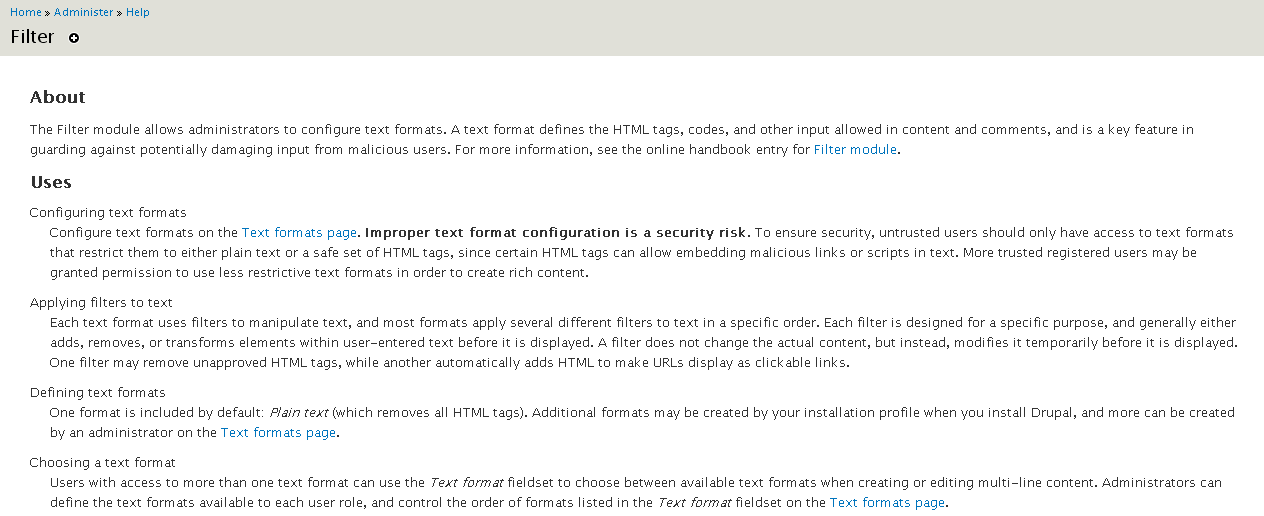
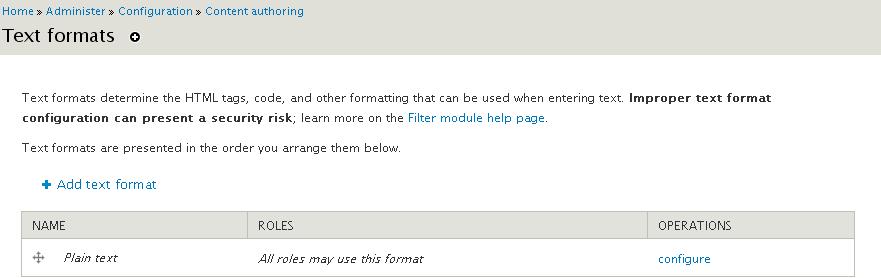
jhodgdonHere's a suggested patch. Screen shots show the help text shown on the Text Formats page, as well as the module-level help page.
Comment #62
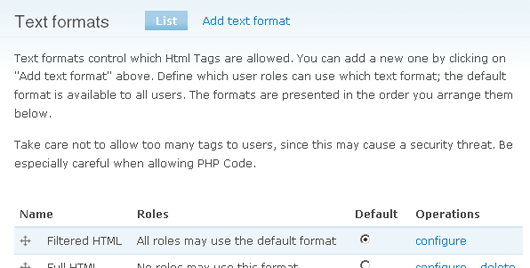
yoroy commentedBefore:
After:
proposed new text:
Review:
• I think this almost there now and definately an improvement over the existing text.
• Using strong tags is ok here.
• "…be a security risk" was changed to "present a security risk". Is the latter more correct? It's a bit harder to translate.
• Any specific reason to use the "…; learn more…" instead of two seperate short sentences?
• "below" could be removed
New proposal:
I could patch it but then I couldn't RTBC :)
Comment #63
yoroy commentedOh well…
Comment #64
yoroy commentedI forgot to mention that this patch also adds a bit about this to the actual Filter help page, which looks fine to me as well.
Comment #65
catchThis is a big improvement, RTBC.
Comment #66
sunThanks!
To ensure security, untrusted users should only have access to text formats that restrict them to either plain text or a safe set of HTML tags, since certain HTML tags can allow embedding malicious links or scripts in text. More trusted registered users may be granted [permission] to use less restrictive text formats in order to create rich content.
s/determine the/define/
Powered by Dreditor.
Comment #67
scor commentedIn order to be consistent with first hunk: "Improper text format configuration can be a security risk" should read "Improper text format configuration can present a security risk"
Comment #68
jhodgdonLet's just say "Improper text format configuration is a security risk".
Comment #69
jhodgdonHere's a rework of the patch from #63, addressing #66, #67, #68.
Attached are screen shots of the filter module help and the filters screen, with this patch applied.
Comment #70
sunComment #71
yoroy commentedThank you jhodgon. +1.
Comment #72
webchickAlthough this changes strings, I think it's worth doing. This is the most sure way to totally screw up your Drupal site, and we catch big-name sites and Drupal shops with problems like this all the time.
Committed to HEAD.
Comment #74
sun.core commentedSeems like we need to continue in #717176: Clarify relationship between order and selected status of text formats