This is a weird issue that I'll have to illustrate with screenshots. Replicable on FF and Safari, Ubuntu and Mac.
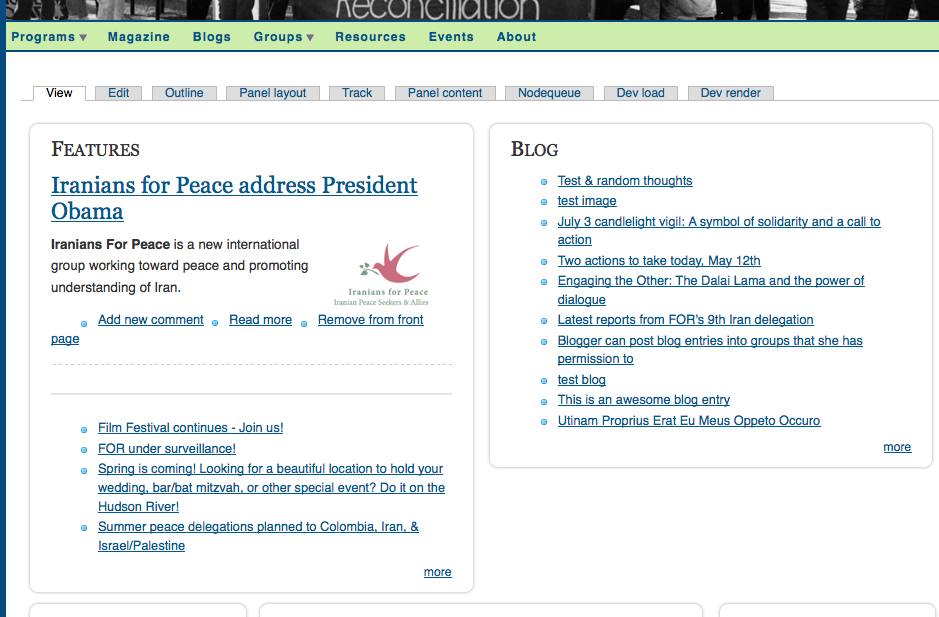
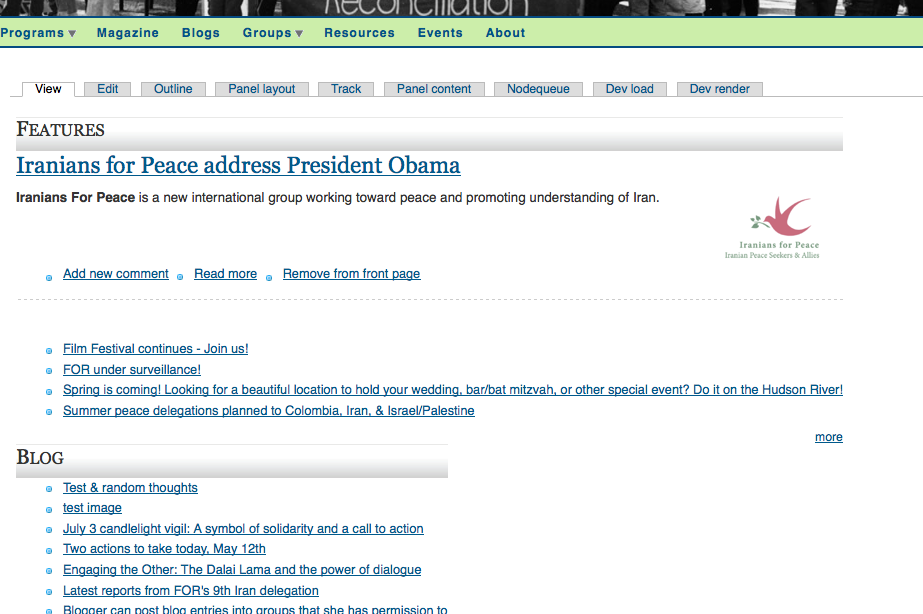
When you visit either a Panel Page or a Panel Node, the first time you visit it for a few days it appears like this:

When you refresh your browser, it's back to normal, like this:
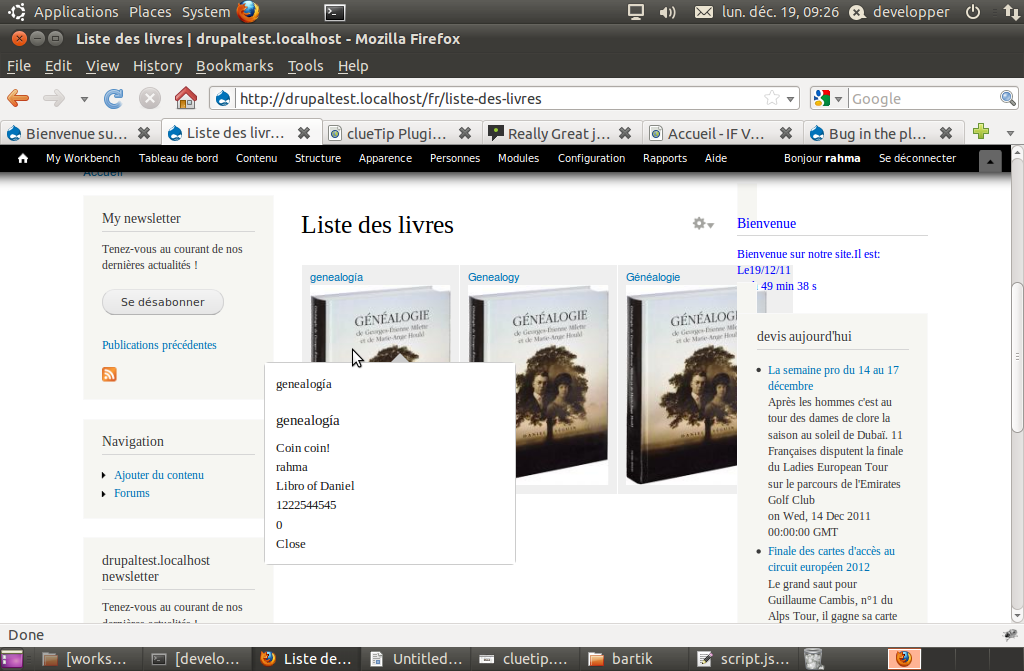
The panel is normal until you wait a day or so and then return. Clearing the browser cache or the site cache does not cause the issue to return. Disabling or enabling CSS caching has no effect. Disabling or enabling Views caching has no effect. The site is set to caching disabled, but I'm testing it with caching enabled and I'll report back if it changes.
You may be able to see this in action at http://www.forpeace.mayfirst.org


Comments
Comment #1
zcferres commentedSame issue here with FireFox 3 in Vista.
Comment #2
glass.dimly commentedEnabling caching does not fix problem.
Comment #3
merlinofchaos commentedWeird. When you see this happening, can you attach a paste of the HEAD of the sourcepage both when it is failing and when it is not? In it there should be a line to include a file in ctools/css with a very ugly css filename. During the failing instance, check to see if that file is there?
Comment #4
glass.dimly commentedI'm attaching the ctools CSS files as well as the page source for both the fixed and the buggy pages.
The CSS files are accessible via their URLs after the buggy page is loaded. Though, to note, if I refreshed the page, they'd be there too. So if I load the page, find that it's buggy, and then I attempt to load the CSS file, it might have the same effect as refreshing the page. So the fact that they're accessible in that way does not mean they're being drawn in by the page.
I'm no developer genius, but I'm unfamiliar with the ?c on the back of a url like that:
/sites/default/files/ctools/css/4a1151955127fcbf185c57db56546d18.css?c
You can feel free to visit the our live beta site as well: http://forpeace.mayfirst.org/
Let me know what else you need.
Comment #5
merlinofchaos commentedWell,the ?c is supposed to help deal with browser caching issues. Except it seems like you're getting a browser caching issue of some sort.
Is your webserver running multi-headed or something? I can't think of many reasons this would happen, but if you've got multiple webheads and are using rsync (or something) to copy files from one to the other, that delay could cause this.
Comment #6
zcferres commentedHere is my buggy head source, and the ctools css before and afters.
This test site is at http://www.bounceitblog.com
It seems that my tmp css file created by cTools on the bad run was BLANK. Upon refresh it actually generated some good code for it.
Comment #7
merlinofchaos commentedHmmm. Okay, now we're getting a little somewhere. On fail, that css file contains no css at all! But it does exist as a blank file. That is very odd! That gets us a step further, now we have to figure out why there's a blank file there. This explains why clearing the css aggregation fixes it, because that forces the css cache to regenerate.
Comment #8
glass.dimly commentedIs there any more information I can get you?
Comment #9
zcferres commentedLet me know if I can get you any more info as well.
Thanks!
Zach
Comment #10
glass.dimly commentedIssue unchanged in beta4.
Comment #11
merlinofchaos commentedglass.dimly: Unfortunately, I never see this problem. The issue is that I have no idea how that .css file gets written completely empty. I'm not even sure how to debug such a thing. Perhaps what needs to happen is to go into includes/css.inc and check out the function that writes a css cache to a file. If it sees it trying to write an empty file, maybe dump a debug_backtrace() to error_log() ? -- this is obviously a little complex to do if you don't know PHP very well.
Comment #12
zcferres commentedI turned on CSS optimization and it seems to have fixed it at least temporarily. Does this tell us anything?
Comment #13
merlinofchaos commentedHm. I don't think so, because we know that a cache clear fixes the problem, so the blank .css file is not being written during recache, so CSS aggregation should actually reliably work around this for you.
Comment #14
zcferres commentedI take that back, I thought CSS aggregation was working but I just got another broken panel.
Comment #15
chrism2671 commentedI filed the same issue here #534358: Bizarre intermittent behaviour of panels. I added some screenshots which show the same behaviour.
Curiously I notice we are both using themes derived from bluebreeze.
Comment #16
chrism2671 commentedCould the intermittent nature of this problem be related to cron?
Comment #17
merlinofchaos commentedhttp://drupal.org/node/534358 marked as a duplicate of this.
Worthwhile nugget from that conversation: A common factor is that the theme in use is bluebreeze.
Could that somehow affect things? I don't see how but I don't have any idea what's happening so maybe yes it could!
Comment #18
chrism2671 commented@glass.dimly are you working on a production site? would it be possible to see if you can isolate this behaviour on one of the core themes? I will see if I can have a go at this today as well.
Comment #19
zcferres commentedI am using the "basic" theme and getting this problem.
Comment #20
chrism2671 commentedInteresting. It is unlikely though that the theme has anything to do with it- maybe bluebreeze is just a coincidence here. Anybody had any more thoughts about the potential cause? Could it be related to cron?
Comment #21
merlinofchaos commentedThat can be tested by manually hitting cron.php and seeing if anything changes, maybe?
Comment #22
problue solutionsI am experiencing this problem also, I only encounter it when not logged in.
If I am logged in, and then log out, the panels are not displayed correctly. However if I clear the cache before logging out, the panels *are* displayed correctly once I am logged out, but then if i refresh the browser they display incorrectly again! I have repated this several times and it always behaves the same way.
I'm using Pixture-Reloaded theme.
Comment #23
chrism2671 commentedYeah, I've noticed this is more common for anonymous users too.
Comment #24
zcferres commentedIt looks like Glass.dimly got this fixed on his site? I am still not having any luck. Any possible hack/workarounds?
Comment #25
chrism2671 commentedFigured out what's causing this. It happens when there's a cron run.
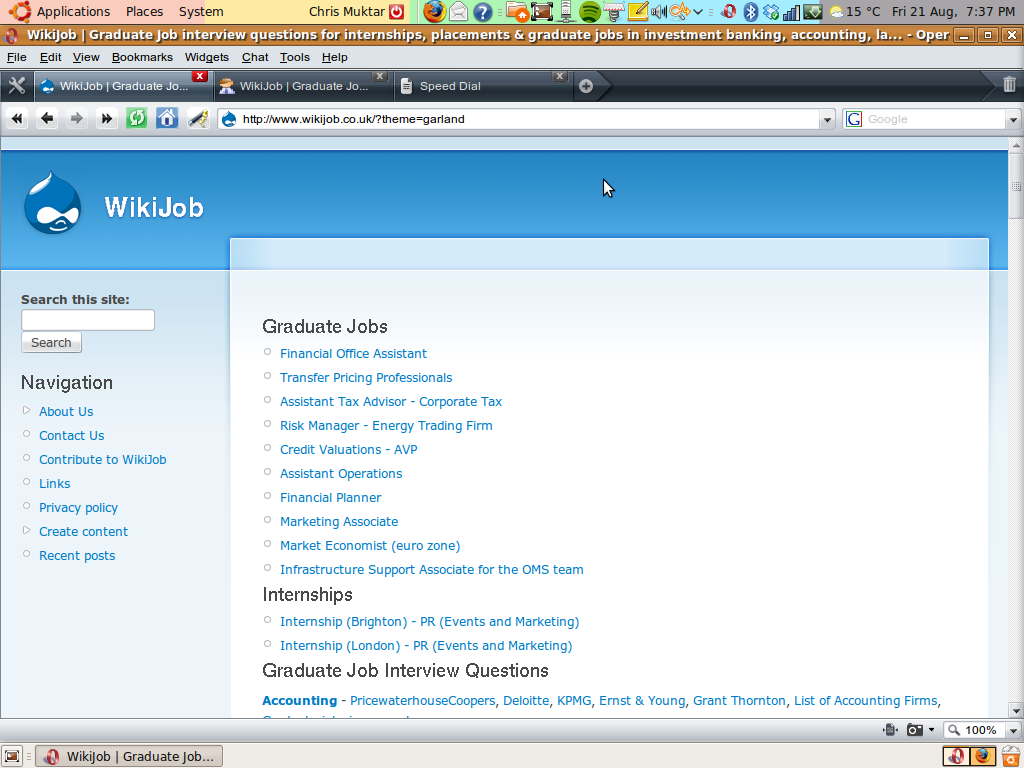
It's independent of theme, the bluebreeze mention above was a distraction (garland screenshot attached).
To reproduce, create a panels node for a frontpage, run cron in a seperate window, and the as soon as you've run cron (i.e. while it is still running early on), hit refresh on the panels window, and the layout will be all messed up.
Comment #26
merlinofchaos commentedI bet this only happens for *panel nodes*, then. I tried the cron theory but I rarely use panel nodes so I didn't check that avenue. Can you confirm that for me?
If it is, I bet it has to do with the search index.
Comment #27
chrism2671 commentedSorry I missed one extra detail, when refreshing the browser while cron is running, that browser must not be logged into drupal- i.e. it affects anonymous users!
Comment #28
zcferres commentedI can confirm this is happening with Panel Nodes on my site.
Comment #29
glass.dimly commentedHey all, good to see some movement. I'd been on vacation and neglecting this issue. Next, I thought this was fixed after upgrade to rc1, as I didn't see it for a week or two after upgrading. However, I'm still seeing it on rc1. I've updated the issue to reflect this.
I'll upgrade to current in the next week. We're migrating data into the site, so the database isn't stable currently.
Our site is pre-production, so I can troubleshoot as needed. Chrism, if you need anything from me, contact me though drupal.org's contact and I'll get back to you as soon as possible with chat or phone number. You may also feel free to test your theory/run cron on our site: forpeace.mayfirst.org.
I can confirm that all of the panels which display this behavior are Panel Nodes on my site. I don't have non-Panel Nodes that I can test, but I will create some. This may be a key.
Second, previously, in beta3 and 4 this used to affect anonymous and authenticated users the same on the site. However, it may be affecting anonymous users with greater frequency, as I hadn't seen it until today when I saw it as an anonymous user (normally I'm user 1). Did something change in the treatment of authenticated users from beta3/4 to rc1? I'm not totally sure if beta4 only displayed this to anonymous users.
Third, I can't find any correlation to cron. That is, refreshing before, during, or after cron as an anonymous or authenticated user does not induce the problem on my site. I can't find a specific behavior to induce it, even clearing browser or site caches.
Comment #30
glass.dimly commentedOne last, I'm using Marinelli, not bluebreeze.
Comment #31
sparklet commentedI can add to this that I am getting this issue on panel pages. It does appear to affect a page variant designed for an anonymous user - so non authenticated. I don't use panel nodes. At first I thought this was an IE quirk, but clearly it is not just related to this. I hope we can get to the bottom of this.
Comment #32
junro commentedHello, I've got this bug sometimes, I have to reload the page to have the correct display.
The problem appears when you load for the first time a page or after cleared the cache.
It's happen with all navigators (Firefox, Opera, Chrome at least).
This bug appears when I upgraded Panel 2 to Panel 3.
Comment #33
sparklet commentedDisabling cron runs via Poor Man's Cron appears to be stopping this from happening.
Comment #34
problue solutionsI experience the problem and I don't have Poormans cron installed.
Like I said in post #22, there's nothing random or intermittent about it in my case and it's definitely not connected to cron. It behaves in a predictable way like I described, each and every time.
Comment #35
merlinofchaos commentedthiokol: Have you checked to see if your problem is related to the IE style sheet limit?
Comment #36
problue solutionsWhat's the IE style sheet limit?
The problem exists with firefox, I haven't actually tested to see if IE behaves in the same way.
Comment #37
junro commentedThe problem appears when you didn't navigate for a given time...
I should be a cache problem.
In admin/settings/performance
I've got: Cache mode disabled. (My website is not yet on production).
Everybody who get this problem could tell us if they have mode cache enable or disable please.
Comment #38
chrism2671 commented@Junro - all my cache's are enabled. As it's a production site, it is impossible to disable them. Furthermore, IE requires all my stylesheets to be complied.
Comment #39
junro commented@Chrism2671 ok, it's not about the cache.
Maybe it's about cron, on my webstite, I run it every hour with RSS feeds.
I don't have the problem if I run myself cron.php,
Every morning I've got the bug, and something during the day.
I've got it with all roles, Authentificated and Anonymous roles.
I've change the priority to Critical because I can't put my webstite on production with it, my frontpage and user profile are so ugly...
Comment #40
glass.dimly commentedI agree with the update to critical. My website obviously can't go live with the front page in this state, either. CSS caching is disabled for me, which seems to increase the frequency of the issue.
Comment #41
zcferres commentedI had this problem happen with and without CSS caching.
Comment #42
problue solutionsI've looked into this again, and it's occuring for both authenticated and anonymous users now, after logging in and out with various usernames, running cron, clearing cache etc, doing all of this several times over, I get exactly the same behavior as explained in post #22. Except now its happening for autheticated users also, I couldnt possibly pinpoint why, I guess I have maybe made a few changes recently that could have had an effect, no idea tbh.
I had orginally just used a different page for anonymous users, but it seems the panels only actually display properly for user 1 now (admin), so I've had to disable the module and look elsewhere for a solution on displaying the content how i want. I'd rather use panels, but hopefully it will be sorted soon :)
Its an odd problem, one thing to remember tho, It may be frustrating, but merlinofchaos isn't being paid to develop this module for any of you ;)
Comment #43
bigbob446 commentedI am pretty sure I am having this same issue and may have some more details. I am encountering the same issue of the right panel falling underneath the left panel.
When I am editing a panel page and have Content tab open (where you add content to a panel) I have observed that it displays the the right panel region below the left region. If I save, the page displays the right panel below the left.
Now when I resize the browser window when I am editing the panel-page content. I have observed that the right content panel repositions it self next to the left. As I change the size of the window the right content region jumps back and forth between being below and to the right of the left content region. Similarly, I have observed that re-sizing the displayed viewed (note Edited) panel-page results in simlar behavior as described when editing the panel page.
This behavior is Strange as it does not happen for all layout styles, and does not occure initially, but after some time I suppose after some event occures. I do not know what even triggers the behavior. However I have observed that not all conten layouts exhibit the behavior.
Layouts that do NOT exhibit Behavior (Or at least havent durring my trials):
The two column staked
Single Column (obviously Lol)
Flexible (limited trials)
Layouts that DO exhibit Behavior:
Two Column
Two Column Bricks
I Do not know about the rest of the layout types I havent really tried them.
Work Around:
I have found that if you are using the Two Column and are getting this strange behavior, switching to the Two Column Staked fixes the problem and yeilds the same results as the unused Top and Bottom regions will not be displayed if thier is no content.
If you are using the two Column bricks... well I suppose makeing your own flexible layout may work :-/ I don't really know.
Anyway I hope this helps. It would be greate to isolate what is causing this. It is anoying and disturbing.
I am using Garlend, I think I have page cacheing, and I do have poormansCron running...
Comment #44
problue solutionsChanging to two column stacked makes no difference. Same behavior as before.
Always the same, if i clear the cache as user1 and log out, then log in as an authenticated user the panels display properly only this first time...refresh the page and its screwed up again, also screwed up on every subsequent visit. Repeat the process and the panels display properly again one time only etc etc.
btw - it was mentioned earlier about it being limited to panel nodes, this is not correct as I am using mini panels.
Comment #45
chrism2671 commentedCould somebody try disabling all other non-critical modules (e.g. search etc), turn off caching, and work through and see if they can find a stumbling point.
My guess is that one of the modules that has a cron hook might be interfering- merlinofchaos suggested it might be the search module...
Comment #46
merlinofchaos commentedOk. I am simply unable to reproduce this, using a variety of ideas. Whatever is causing this is simply not in play on my site.
Are any of you willing to give me UID #1 access to a site that is exhibiting this behavior? Maybe clicking around a bit on a site that is doing it might show me something more.
Comment #47
problue solutionsSearch module is not enabled on my site, so that's not responsible.
Unfortunately I have removed panels and I'm using composite layout module to achieve what I need, otherwise I'd have been happy to give you the user #1 login.
Comment #48
zcferres commentedMerlin, please contact me on the personal contact form and I will give you UID 1.
Thanks,
Zach
Comment #49
glass.dimly commentedMerlin, you may also contact me for user 1 access to my site.
Comment #50
chrism2671 commented@merlinofchaos - likewise.
Comment #51
sanestrategy commentedDitto with the panel display showing up incorrectly. I DO have poormanscron running. Cache mode is enabled.
Also, I'm using a Flexible layout, so you can add that to the list of layouts that are being affected.
Comment #52
junro commentedI've got Poormanscron too, but not cache mode disable.
I disable Poormanscron, I don't have the bad display anymore after running update.php.
But "avant de crier victoire" (French expression), I should wait and see if I've got the bad display again...
Every body having Poormanscron enable should disable it, and wait and see...
Comment #53
sanestrategy commentedThe problem is it's not just poormanscron but ALL cron jobs. Try running www.domain.com/cron.php and you'll probably have a similar thing happen. I've turned off cron for now, but that really doesn't work in the long run.
Comment #54
junro commentedRunning cron.php update.php, update module page manually since one hour, I definitly don't have the bad display anymore.
Comment #55
junro commentedAfter 5 days with Poormanscron disabled, I never had the bad display anymore. I update my rss with cron.php and everything works fine.
Comment #56
sparklet commentedI agree, since turning off Poormanscron, this issue has not reoccurred.
Comment #57
glass.dimly commentedHaven't seen this in a week since disabling Poormanscron. Cron is now running just as a linux cron job. I'll post back whether or not this issue occurs, but I haven't been able to induce it. If I or my cohorts don't see it in another week on our site, I'll close this issue as resolved, and move it over to the Poormanscron issue queue.
Can anyone else confirm for sure that disabling Poormanscron does the trick?
Comment #58
junro commentedI confirm.
I don't know what is the cause.
Comment #59
jannalexx commentedsubscribing
Comment #60
merlinofchaos commentedOk, so far poormanscron is getting a lot of attention as the culprit here. Is there anyone participating in this issue who has this problem and does not use poormanscron?
Comment #61
problue solutionsI was having this problem without poormanscron installed, but by reading through the thread I honestly think there is more than one issue at play.
Comment #62
ayalon commentedI have exactly the same problem with my completly custom theme. Sometimes it seems that the css files are empty. After refreshing the error is gone. Very strange!
Comment #63
guyzalon commentedI don't use use poormanscron, and have this problem when not logged in. HELP!!!
Comment #64
junro commentedGrrrrrr
Disable Poormanscron works only with autheticated users.
But I still have the bug with anonymous users...
http://us.pariscine.com
http://fra.pariscine.com
www.pariscine.com
But sure it's not always...
Comment #65
merlinofchaos commentedSee if this patch helps? I suspect it will help for some and not others.
Comment #66
problue solutionsWas just looking at Junro's sites and they all look fine to me, I'm just wondering if everyone experiencing this has confirmed the problem exists on a machine other than the one they use for user1, not sure if thats relevant at all, but it wouldnt be the first time i've thought I had an issue, clearing cache, logging out, clearng browser cache etc so that I visit my site as any anonymous user would, but i still got different behavior than other anonymous visitors did.
In saying that I vaguely remember this happening on my laptop as well as my desktop, but like I say Junro's sites display ok for me, and someone else posted about the problem earlier in this read whose site also displayed ok as confirmed by another user on the thread, just a thought!
Comment #67
AdamFx commentedI also have this issue for all users except User1. What is the procedure to implement the css-cache-clear.patch above? I'd like to give it a try.
Is this the definitive solution?
FWIW This issue is something that I just noticed today after installing http://drupal.org/project/seo_checklist and a number of modules on the seo checklist. Previously I had poormancron installed without this issue occurring.
Comment #68
merlinofchaos commentedIt is not the definitive solution, it is simply one that might do the trick for some people. Search drupal.org for the phrase 'applying patches' -- the instructions are pretty exhaustive, I think.
Comment #69
glass.dimly commentedhttp://drupal.org/patch/apply
Comment #70
AdamFx commentedIs there an alternate module to Panels that offers similar functionality (perhaps a basic level) but doesn't require patching?
I checked out http://drupal.org/patch/apply . As a Drupal and coding newbie I've no idea how to execute that command in the video and there is no Dummies Guide for patching as other commenters on patch/apply page have pointed out. Its a 2 minute task if you know what you're doing and worthwhile testing the patch if you do. If you don't know how to do it, it is a steep learning curve of hours or days to backtrack through and learn all the implied knowledge in the video to implement that 2 minute patch, all with a 50:50 chance that the patch won't work anyway.
If there was an alternative module with similar functionality to Panels I could try first I'd appreciate a pointer in that direction.
Cheers
Comment #71
glass.dimly commentedAdamFX,
I understand your frustration. Panels is sort of the panels module for Drupal. Many modules depend on it and it's rather central. This bug is rather frustrating for all of us because it's not replicable, its erratic, and its difficult to trace.
We're working on it as we are able.
For me, the issue seems to have gone away when I disabled poormanscron (at least, I haven't been able to confirm it since then), so I won't know if this patch is effective.
You're right, patching is not an easy job for folks who don't use the command line much. I remember trying to apply patches myself when I first started Drupaling, it took a very long time and I wasn't sure if I had done it right.
May I respectfully submit that by patching your module and testing the fix supplied here, you are in a position to be quite helpful to the Drupal community.
Here are some other resources that might be useful to you:
http://indiawebsearch.com/content/how-to-apply-a-patch-to-a-drupal-modul...
http://community.contractwebdevelopment.com/patching-drupal-modules-in-w...
Thank you,
glass.dimly
Comment #72
glass.dimly commentedTwo cron jobs at the same time plus page load
Folks,
I was able to replicate this issue by opening about 10 separate windows and running cron in each of them, then refreshing the panel page while running these cron jobs.
Here is my best explanation of this:
The way I had poormanscron configured was such that it's cron job overlapped with my linux crontab settings so that at a certain time per day, they ran at the same time.
When I disable poormanscron, cron jobs only ran one at a time, and thus I didn't experience the issue after that point until today, when I ran cron jobs concurrently and refreshed the page.
I'll apply the patch and get back to this thread.
Peace
glass.dimly
Comment #73
ajs17 commentedI can replicate this issue with a two column stacked mini panel, after manually running cron.php in the browser. I don't use poor man's cron, and I have a custom theme. I tried the patch, and it didn't work for me. I also tried clearing both Drupal and browser caches, then refreshing the page without success.
Comment #74
merlinofchaos commentedajs17: Can you make this happen every time? When you replicate it, is the .css file 1) missing or 2) blank? Also, are you sure this is the same problem? There's a similar problem that is IE-only that happens when you have too many stylesheets.
Comment #75
ajs17 commentedIts happening in Firefox and Opera, and I haven't been able to get it back to normal yet. I assume I am looking for panels.css? If so, its there, and has styles. I can send the output if you like. (Actually, I see there is also a stylesheet called twocol_stacked.css that also has styles in it.)
Thanks for your help!
Comment #76
merlinofchaos commentedHm. Ok, I think you're experiencing a different problem, as you're not using generated css. The .css file I was referring to would be named with an md5 string. Would it be possible for me to see the site?
Comment #77
ajs17 commentedOK, I just opened the site up, the mini panel is on the home page:
http://test.staffweb.library.cornell.edu/
...and I don't see an md5 named css file. For what its worth, I turned on the 'optimize css' feature under site configuration -> performace briefly and saw no change either.
Thanks again for any help you can give. We really like the panels module!
Comment #78
merlinofchaos commentedajs17: One of your pieces of content (I do not know which one) has an unclosed
<div>tag which is throwing off the layout. Completely unrelated to this issue. =)Comment #79
ajs17 commentedWell, I'm embarrassed but relieved. I'll check it out--I guess either the cron was coincidental, or I was looking at a cached version of the normal page. Thanks for the extra pair of eyes.
Comment #80
glass.dimly commentedFolks,
I patched the ctools/css.inc file
and I was able to generate the same issue still with the method I described above.
That is, the patch does not fix the problem.
But hey, progress, I can replicate the issue to test patches.
-glass.dimly
Comment #81
pfharlock commentedI am also experiencing this bug. Thanks to the comments already posted I was able to track it down to poormanscron
I disabled poormanscron and the problem has gone away. I have not as yet enabled normal cron functionality, so I'm unsure whether that will re-introduce the issue, but I suspect it won't. I'm guessing it has something to do with the fact that cron is running as the page is loading that is causing the problem.
Comment #82
junro commented@ pfharlock
With autheticated user role, could you run cron.php (with poormanscon disable) and see if you have the bug please.
Comment #83
glass.dimly commentedSo the css file is included like so in the "page source" view:
What I've discovered is that when the error happens, these files are missing, not blank. If I put them into the URL bar directly after accessing the front page, I get a page not found error.
After I refresh the page and the error is eliminated, I can paste the URLs in and see the CSS for the files.
Mind you, this is with the patched ctools/includes/css.inc file.
Comment #84
glass.dimly commentedIf this doesn't work the first time, try it a few more times. You'll get it. Maybe even try refreshing your panels page again before its done loading and refreshing your cron pages some more.
For me, this bug only happens when two separate cron jobs were running at the same time.
Comment #85
pfharlock commentedI think the problem is as follows
* cron is clearly generating the css file in question
* the code that is generating the new css file and potentially deleting the old one is doing so in the wrong order.
* because poormanscron fires cron as the page is loading it make the bug very easy to notice.
What the code that cron is firing should be doing is
* generate the new css file
* only after the new css file is created does it direct pages to start using it
* it should also probably wait until the next time cron is run before it deletes the old css file just in case a page is still using it.
Comment #86
merlinofchaos commentedThe .css files are not generated on cron. The .css files are generated on an as-needed basis. If it were as simple as pfharlock's description I would've been able to fix this by now.
The problem seems to be that cron is doing something to cause the .css files to be generated or deleted, but as of yet I am not sure what. I had theorized it was search reindexing with panel nodes, but that does not match the description of what some people are seeing.
Comment #87
problue solutionsAdamFX, try composite layout module
Comment #88
AdamFx commented@Glass.dimly Thanks for the comment #71. I'll have a look through those pages you referenced. I also take on board your comment about learning then helping the Drupal community - I appreciate you and the other folks here as the example.
@ Thiokol #87 Thanks for the tip - I'll check it out also.
Comment #89
pfharlock commentedI apologize, I didn't mean to make the problem sound trivial or easy, and I would like to re-iterate what allot of other people have said above. I think panels is a great module and I really appreciate it and all the work you've done on it :)
Is is possible that one of cron's responsibilities is for cleaning up temporary files, thus when it runs the file disappears before the browser has a chance to use it?
Comment #90
merlinofchaos commentedIt shouldn't. The .css files should only get cleaned up on cache clear. And the best part is that if the file does not exist, then it should automatically go and recreate it when asked. So it seems to me that there may also be some other caching involved; the HTML that utilizes the .css file is already cached somewhere, for example, even though the file has been removed by something else, possibly.
Comment #91
artscoop commentedHi,
Maybe useless, but here are the ways for me to reproduce the bug (at least the config) :
- Cache enabled (il also happens with other caching methods, such as Cache router)
- Poormanscron 1.x
1. Open a tab and run cron.php. Wait for it to finish.
2. Reload a faulty page.
It worked everytime, with any user role (even as admin).
I've upgraded to Poormascron 2.0 (backport of the Drupal 7 automatic cron), and I can't reproduce this bug anymore.
Comment #92
marco.falconi commentedhi,
I have the same problem (I see the panels without style since when I click on "refresh").
I followed this discussion but I don't understand what is the correct method to solve the problem.
I realized that perhaps this form must be turned off Poorsmancron, but I keep it active because I need to index content for search.
I hope that you can suggest me the best solution to the problem. Possibly clearly (sorry but I do not speak English well :) ).
Thanks for the support
Marco
Comment #93
artscoop commentedHi Marco,
Just try using Poormanscron 2.0b
Comment #94
merilainen commentedI've been getting this behavior randomly on some of my panels. It happens more often on flexible panels, but I've seen it happen with others too. I have fixed them always by going to edit the panel -> content -> update -> save. That has always fixed them for some time.
I have one panel which is kind of user's dashboard, which never breaks. it's a 33/34/33 stacked panel. Currently I don't have caching on and I'm using Pixture reloaded theme.
Comment #95
stompersly commentedI also get this problem where the right column goes under left column.
Using the following:
Browsers Safari, FF 3.0, FF 3.5, IE 7, IE 8
To repeat: go to a non panels page logged in as admin, run cron, log out, go to the panels page, bingo problem occurs
Has anyone found a fix or work around for this?
Comment #96
hefox commentedHello,
I believe I'm also encountering this issue.
I'm not using poorsmanscron, but it's on acquia and cron is being run by acquia (either 5 or 10 minutes).
Custom theme, base theme 960.
Not a panel_node; panel page.
I'm not sure if I've been logged in when it's happening.
(Since I'm only using panels for the front page, I think I'll just be making the css a permanent file in the theme till this is resolved).
Comment #97
hefox commentedAdded a temporarly work around for myself till it is to disable cron cache clear (unless it's been a day).
Cron sets a semaphore using variable_set (how do 2 cron jobs run at the same time? Variable cache not changing in time before the second starts?) so can check that in hook_flush_caches and not run in that case. The second part copied from ctools_cron; need to have ctools run after system so the variable isn't reset (system_cron is what clears cache; it should run first as long as ctools weight isn't < 0 or put in a folder that is alphabetically before modules/system). Did only a bit of testing but looks okay temporarily.
Comment #98
Poieo commentedSubscribing
Comment #99
lirazsiri commentedI'm going to guess this problem is closely related with the following issue report:
http://drupal.org/node/626562
Which states:
"""
Occasionally a page with a flexible layout would be displayed to anonymous users without any styling, but only if Drupal caching was enabled.
This was an extremely frustrating bug to diagnose as it was hard to reproduce consistently. It may or may not be a duplicate of the issue described in http://drupal.org/node/539228, but note that I am not using the poormanscron module.
I finally managed to nail it using FireBug's Net module which reported that the ctool's CSS link was broken. For some reason this file expired while the page was still cached by Drupal. This happened regardless of the cache TTL, but it was hard to catch and reproduce until we increased TTL to 1 hour, which may explain why people are reporting that display problems may "go away" on reload.
Until this is fixed, a simple workaround is to include the CSS in the missing ctools file directly inside the page template in your theme.
"""
Comment #100
cbassig commentedI can say I was also getting this problem.
My Set Up
The panel layout was being broken only for anonymous visitors. If I was logged in, it would work just as expected. Looking in the error log, it was mentioning the css files located at /files/ctools/css could not be found. Also, it would only affect certain pages at certain times. Some of the pages would look fine, others would be broken.
I have turned off Drupal's Minimum Chache Lifetime (set back to none), as suggested by lirazsiri most recent post. It appears to have solved the issue, but may not be the best answer for some sites. I will report back if the problem comes back.
Comment #101
merlinofchaos commentedcbassig: Patch in #65 SHOULD address the issue in #100.
Comment #102
merlinofchaos commentedActually, the patch in #65 appears to have been committed in october. Also that's a patch for CTools (and in general this bug is probably a CTools bug not a Panels bug).
Comment #103
merlinofchaos commentedChanging status to reflect.
Comment #104
dicreat commentedsubscribing
Comment #105
TC44 commentedSame issue here. Primarily as logged in user. today's dev 3 version of panels and today's 6.x-1.x-dev of ctools.
It happens both as anonymous and logged in, caching disabled or enabled. I am using boost also.
This is with a flexible layout.
Comment #106
TC44 commentedOn further testing, it's now only showing incorrectly for anonymous users. I've disabled normal cron and boost. Still no luck. I'm viewing in Firefox and Safari on OSX.
Comment #107
TC44 commentedI've been doing some more digging with Firebug. I'm guessing that this might have something to do with the css files that are generated by ctools. In my case those files are in /memberfiles/ctools/css and have the names 3bf1f3df582b98d6a66fc5e335ec62ae.css etc. (there are 3 css files generated).
I'm also wondering if maybe there's a bug in ctools that adds an extra
</div>tag somewhere where it shouldn't be, but only for the output files generated for anonymous users. Something like that would close the nested divs in panel pages and explain why the second column gets pushed below the left side column..I've also been testing with today's dev of ctools, but no change since the prior version.
Anyone else have any ideas?
Comment #108
TC44 commentedok, I've got some more information to report after trying to nail this down further.
First of all, I'm also using APK. I have a template file in my theme directory (advanced_profile_author-pane.tpl.php) which is used to customize the author panel pane.
This file contains standard divs with php code to display some data from the database.
In troubleshooting, I removed that file, and things seemed to format correctly. So to further test, I checked the advanced_profile_author-pane.tpl.php file to make sure that all div tags were correct and closed, which they are.
If I remove one of the closing div tags and upload the file again, panels display correctly for anonymous users only. If I add that div tag and upload the file, it displays correctly for logged in users only.
So I'm still guessing that somewhere there is an extra
</div>tag being generated for anonymous users, with certain themes and/or certain template overrides. (It's also possible that I've got something else going on somewhere in my theme with an errant extra closing div tag, so I can't rule that out yet).I'm not sure if this info will help anyone, but I can say that all things being equal, the problem for me happened after updating panels and ctools, so I think there may be an extra tag being generated somewhere between those two modules..
So in my particular case, the solution was to add this to my advanced_profile_author-pane.tpl.php.
So now it will add the closing div for anonymous users, and ignore it for logged in users.
Comment #109
TC44 commentedOne caveat with my last post in my particular case with Panels/APK. It still displays incorrectly if you are logged in and viewing your own profile. So I need to check if uid is author...
Comment #110
merlinofchaos commentedTC44: You are probably seeing your results due to anonymous page caching. Logged in users see the newest HTML, but anonymous users see what's in the page cache. You need to clear cache when making changes to templates.
Comment #111
merlinofchaos commentedAnd yes, we already know that the problem is directly related to CTools CSS caching, and that somehow, someway, when this happens, that CSS file is not there when the page is rendered.
The problem is: we do not know why it is not there. The code is set up to cache that file when it is needed. It would appear that something is somehow clearing away that file for us (thus the cron link) but it should be getting regenerated.
Comment #112
TC44 commentedHi Merlin, thanks for the reply. Sorry if I'm a bit off on a tangent with this (and I realize that much of this is above my head). The workaround for me is working, except for in the case of Panels/APK, viewing your own profile. I do have caching turned off completely, and have also been manually clearing each time, and it seems ok. I realize this doesn't really help with the root problem, but I thought it might help some people in the meantime come up with a useable workaround, as there's a few Panels+APK users with the same issue.
Comment #113
sobol commentedsame issue here..
newsflash theme
nocache..
gzipped css.
but this might be helpful to solve it:
created 2cols...
everythin' works under authenticated user logged in.. but anonymous neither works on ie nor firefox.
ive turned off css optimization, cleared cache and under auth user i see:
link type="text/css" rel="stylesheet" media="all" href="/sites/all/modules/panels/plugins/layouts/twocol/twocol.css?T"
link type="text/css" rel="stylesheet" media="all" href="/sites/all/modules/panels/css/panels.css?T"
under anon i see only :
link type="text/css" rel="stylesheet" media="all" href="/sites/all/modules/panels/css/panels.css?T"
so it looks like some problem with plugins layouts?
....
temporary it can be fixed by copying content of twocols.css into panels.css. (so i've done it)
temporary it's working for me. probably all layouts can be copied to panels.css or other css of yours.
Comment #114
rismondo commentedsubscribing
Comment #115
alexfisher commentedSame issue here with both two column and two column stacked on a brand new site. Checking Firebug and twocol.css is not listed (no error, either).
Interestingly, on a panel using threecol stacked with a block/mini-panel using twocol stacked, threecol_33_34_33_stacked.css is listed and twocol.css is not.
My current hack to fix this is to place a copy of the twocol_stacked.css in my theme directory and override it using the Theme's .INFO file.
Comment #116
crea commentedI also have this problem. Refreshing the browser won't fix it. Only clearing the anonymous page cache helps.
This happens with CSS and JS added by Panels styles: both Tabs style and Rounded Corners style are broken on one of my sites.
Attempting to load JS and CSS files referred in the page manually returns 404, so it seems like files already expired but Drupal anonymous page cache doesn't know about it.
Comment #117
crea commentedTo help debug this problem, you can install Devel module and use it's "execute PHP" block to run the following code:
This will print all modules you have that run cronjobs so we can get some hints on common modules that can be the cause.
Comment #118
crea commentedI found the root of the problem for me. It was Memcache API, so if you use other cache backend than core DB cache, the following may also apply to you.
Issue in Memcache API is #655538: cache_page not cleared via system_cron.
Core page_set_cache() caches pages with CACHE_TEMPORARY.
Memcache API cache_set() function sets temporary cache to 30 days lifetime:
So page cache never expires on cron events in Memcache API.
OTOH, core cache_clear_all() runs the following:
CACHE_TEMPORARY == -1 is always less than time(), so page cache is being emptied on every cron run.
Also, there's system_cron() running which runs hook_flush_caches for many cache tables including "cache_page". CTools module implements hook_flush_caches() which deletes its own files on cron. So in the end we have CTools that expects cron clearing page cache, and Memcache API not doing it.
I can replicate this for CSS files, can't replicate for JS files (but I once got same situation with JS file not found, maybe this applies to JS too). Order is like following:
1) Cron is run.
2) system_cron() runs hook_flush_caches() which makes CTools to clear CSS files, expecting core to regenerate them together with cached page.
3) system_cron() runs cache_clear_all() for cache_page. Memcache API cache_clear_all() doesn't clear page cache.
4) Any subsequent anonymous access gets broken page because CSS files are missing and page is still served from cache.
5) Any subsequent logged in user access will regenerate CSS files because cache is skipped.
6) On next cron run go 1.
So I have 3 questions for all:
Comment #119
crea commentedMemcache API is not clearing page cache on cron because it would be performance hit for sites where pages rarely get updated.
As far as I understand, CTools using hook_flush_caches() as convenient way to hook inside drupal_flush_all_caches() function. Because this approach is rather hackish, I suggest that CTools also implements *explicit* cache_page flushing. Attaching patch that does it.
Oh and it's CTools patch :) Not moving there cause it's rather common Panels problem which could have different causes for different people.
Comment #120
crea commentedOn a second thought, this patch is bad too, because it's still performance hit since we are flushing whole page cache anyway. CTools should use some other way to clear it's own files, because if it's done in hook_flush_caches() then files are being cleared on every cron run and we are forced to clear page cache, while we should not be.
People can try the patch above as a temporary workaround though.
Comment #121
crea commentedI've opened separate issue in CTools queue: #717036: Remove css cache clearing from hook_flush_caches().
Comment #122
crea commentedUPDATE: This bug in CTools also could affect sites without Memcache API but with minimum cache lifetime configured, since it behaves similarly, not always deleting page cache. So probably this is pretty much the root cause of ALL bug reports posted in this issue.
Please post here only if patch in #119 doesn't help. If it does, please refer to #717036: Remove css cache clearing from hook_flush_caches()
Comment #123
torgospizzaThis patch did not work for me. After Cron ran, I am now getting 404 errors for the CSS file generated by CTools for Panels pages. Suggestions?
Comment #124
crea commented@torgosPizza
What kind of cache do you have ? Do you have Boost module ? The patch won't work for Boost. If that is the case, consult Boost documentation on how to clear boost cache and insert that function near cache_clear_all() in this patch.
Comment #125
torgospizzaHmm, yes - this is related to Boost, at least - possibly. The CSS file is the same whether you're on a Boosted page or not, though, since CSS aggregation is on. But I could be mistaken.
Thanks for the pointer, I'll dig a bit deeper.
Comment #126
ianchan commentedsubscribe
Comment #127
kclarkson commentedTo all,
I GOT MY PANELS WORKING !!!!! A little unsure what did it but here it goes.
Before I explain what I did, I am a Drupal Newbie and have refrained from posting on this board because of my lack of coding knowledge both in PHP and CSS.
Anyway my problem with views was that when I logged out as a user my panels (i am using the three column) lost all of the css formatting , format. This started after I ran a cron update this past Friday, March 5. After reading all of these posts I assume that the problem has to do with the one of or a combination of, CACHE, CTOOLS, PANELS and maybe user permissions.
So here is what I did not sure if it will work:
1. I "disabled" Boost Module (Cleared All Cache After)
2. Deleted the Panels Folder files on server
3. Deleted the C-Tools Folder and files on server (cleared all cache after)
4. Downloaded the Newest version of Panels to my "local" drive.
5 Downloaded the newest version of C-Tools (6 x 1.3) to my "local" drive. (I read somewhere in the drupal forum that the new version of panels needed the 6 X 1.3 version of C-Tools uploaded "at the same time".
6. I use dreamweaver: So I selected both the "panels" and "c-tools", folder and uploaded them to my server.
7. Enabled Boost Module
8. Performance Settings: Caching mode-disabled; Min Cache life-none; Gzip Page-enabled; Block Caching-disabled; Optimize css-enabled; Optimize java-enabled
9. Boost Settings: boost static page cache-enabled; gzip-enabled, 1 hour for default max; Boost cahceability settings checked; url variables, html documents, css, js. Clear Expired pages on crun runs-enabled; Ignore Cache flushing-disabled. Everything else I left as the way boost settings are defaulted.
10. Cleared All Flush Caches from the Admin menu.
Let me know if this worked for you !!!
Comment #128
floretan commentedI've been having the same symptoms with a three-column mini-panel. What causes the problem is the layout-specific css file being only included on the anonymous page that is first rendered after a cache clear. Other pages are missing the css file, and if css compression is used a different compressed file is attached.
I've temporarily solved the problem by duplicating the content of the layout-specific css file in my custom theme.
Comment #129
crea commentedThere is no point for repeating same again and again. Problem is already described and addressed in #717036: Remove css cache clearing from hook_flush_caches().
Please only write here if you ensure that
1) Patch in #119 doesn't help.
2) And you don't have Boost module
In all other cases please refer to #717036: Remove css cache clearing from hook_flush_caches()
Comment #130
Anonymous (not verified) commentedHello!
I'm experiencing this same problem for authenticated users using 3 33/34/33 mini-panel.
After much troubleshooting I've narrowed it down to block caching. Disabling block caching seems to have solved the problem in nearly all instances. However, this isn't a good solution as once this site goes live performance will be an issue.
For the record:
No poor mans cron or boost,
Works on first refresh after flushing caches, than CSS "dissappears" on future refreshes.
html code remains unchanged
only mini-panel affected. Regular panel no problem
switching to Three column 33/34/33 stacked and enabling block cache also seems to eliminate the problem.
the patch in 119 has no effect
Comment #131
Anonymous (not verified) commentedI stand corrected. Switching to Three column 33/34/33 stacked has not corrected the issue.
Comment #132
merlinofchaos commentedThe problem with mini-panels has its own issue. That problem is that Drupal's built in block caching is incompatible with Mini Panels and should not be used. The issue that exists is a feature request to disable that mode so it can't be accidentally turned on.
This issue is not about mini panels. Please do not report them here. Thank you.
Comment #133
alfthecat commentedSubscribing
Comment #134
hongpong commentedSubscribing - I was able to fix by disabling systemwide Performance block caching. I had issues with mini panels behaving this way, it seems a similar behavior between other people's panels / mini panels all around.
All the Relateds? The main thread for Panel Nodes #504552: Problems with panels styles CSS and JS on cached pages.
The feature req to fix mini panels/block caching is: #675844: Mini panels should tell Drupal core they cannot be cached with block caching
Duplicates of related problem #539228: Panels not displaying correctly for anonymous users // #534358: Bizarre intermittent behaviour of panels
Related cache hook issue #717036: Remove css cache clearing from hook_flush_caches() (Duplicate: #626562: Panel page's ctools CSS file may expire while page is cached - may break panel for anonymous users ) Thanx everyone
Comment #135
merlinofchaos commentedHongPong, your behavior in the issue queue is offensive. I already explained in #132 that the mini panels issue is
NOT RELATED
Now please stop posting nonsense that only confuses the issues.
Comment #136
Jerome F commentedsubscribing
Comment #137
alfthecat commentedHi,
I experienced the same issue (on a custom theme) and the issue was solved for me definitively by turning on CSS optimization under the performance settings. I know this solution appears somewhere way back in this thread and I wouldn't dare to disagree on the many culprits theory I also read here. But, perhaps, some of the people subscribed to this thread haven't tried it yet and it may come as a solution for a few....
Comment #138
buttonwillowsix commentedsubscribing
Comment #139
Jerome F commentedI'm experiencing something very similar. The CSS and JS aggregated files act as emty files on the browser side (I mean the display is html only), though there is script in these files when I read the file downloaded from the ftp.
When I disable the performance css and js aggregators everything works fine, but I have a huge performance issue as drupal and the modules come with many css and js files. I tried to hardcode the css and js in the page.tpl.php it's a working work around for the css, but this breaks many drupal behaviors, mostly on the admin side. And the js doen't work at all once I aggregate the files manually (no more cycle, no more lightbox, etc.)
cron run, cache flush doesn't do any good
I can't think of any way to troubleshout this.
Comment #140
drm commentedI have a site with a front page using flexible layout (see for ex www.solarportalusa.com) and it is in a multisite, and each site has an identical front page row and pane structure, with different content in the view or whatever. The way the multisites were set up, their crons are each shifted by a minute or so, and since the css cache file is in sites/default/.... not in the sites/[domain] folder, it seems that these cron jobs delete the file every minute, but it is only irregularly regenerated. Seems that refreshing a page doesn't do so, but going to another site and displaying it's front page does.
I'm not sure what is supposed to be triggering the file creation. The Status report says that the Ctools css cache "exists", and the log reports complains that the css cache file is not found. There are no permission complaints.
Comment #141
Chris Einkauf commentedSubscribing
Comment #142
alfthecat commentedCould it be that this is cron related? Does cron delete certain (cached) files and with performance optimization turned on it confuses something and deletes aggregated CSS and JS files?
I know this is vague, it's just a hunch. But I believe I've heard of such behaviour once (unrelated to panels but related to performance optimization and empty CSS files.) Couldn't find the post anymore though. And if I'm not mistaken, the cron mechanism has changed from drupal 6.16 onwards.
Looking at the original description of this issue, I don't think it sounds too far fetched.
Comment #143
jitse commented@Jerome F
If 0Kb files are written, make sure your disk isn't full.
I experienced the same thing, and i was very late realizing it could be space related, checked the disk (df) and saw a 100% usage on the drupal filesystem.
Fixing that also fixed the 0Kb *.js/*.css.
Comment #144
andread commentedIt seemed that I had the same problem too.
I upgraded my site from drupal 5 to 6. I am working on a dev. site.
I have a panel page with flexible layout. (With a zen theme) Don´t have boost module, but poormanscrons is running.
When anonymous was viewing the page in the source code: I didn´t had the .css file from ctools, mention above.
In my panel page I have view blocks and some other html content (banner-blocks). The only thing showed up for me, was the two banner blocks.
I tried the patch, and many other suggestions.
What helped was:
I had to rebuild permissions. at: admin/content/node-settings
Maybe I didn´t had the same problem, that is mentioned above, but it seemed very much the same. (Maybe it can also help others.)
(And I love this module!!! Thanks for the great work!!!)
Comment #145
merlinofchaos commentedcrea: I just committed a patch that will check for the cron semaphore, so we should no longer be flushing the cache on cron when the caches aren't actually being flushed. That should fix this problem too.
Comment #146
torgospizza@merlin: Thanks for looking at this issue. I'm going to download the latest dev and will keep an eye on things. Hopefully this problem will disappear :)
Comment #148
Anonymous (not verified) commented-edit-
Comment #149
Anonymous (not verified) commentedComment #150
willazilla commentedI am having a similar problem. But, it only occurs in Chrome and Safari. I think the screenshots speak well to the prob. The one labeled as "prob1" is from Chrome on Ubuntu, and accurately represents what is occuring on Vista with Safari, but not Vista with IE. The one labeled "no-prob" is from Firefox on Ubuntu, and is the same in Firefox on Vista.
In occurs for Chrome and Safari in all roles, all states of caching (performance & views) and whether or not I run Chron.
I have slide shows in four of the six panels on the page, in separate panels. When I swap one of the working slide shows into the miscreant (red bkgd) panel, all is well in the Willa Way. The difference between that one and the other three is the content source - it is coming from the profile / user profile (APK) modules. Anyone else bringing this content to a views slide show in a panel presentation?
Comment #151
willazilla commentedComment #152
willazilla commentedIf someone can recommend a better place to post this, please chime in.
Comment #153
willazilla commentedDownloaded the ImageCache Profiles module, and that hopefully fixed everything!
Comment #154
vinoth.3v commentedsame here :( (latest dev of ctools and panels)
it is working well on panel preview but not at the actual page.
Comment #155
Letharion commentedComment #156
jeovani33 commentedMy Problem Happened when I enabled Boost and then only logged in users were able to see the properly styled website but anonymous users could see a messy style.
When I disabled boost, the site was fine, but I needed Boost for Caching.
The problem was with boost configurations, I disabled the "Asynchronous Operation: output HTML, close connection, then store static file. " option in the boost setting page, and all my problems were solved.
I hope this will help somebody and save him the hours I had to spen on this.
Bespoke web design London