The 2026 Drupal Business Survey is open. Your response will help shape the future of the Drupal business ecosystem.
Making Apache Solr the only search engine available
This documentation is obsolete!
Much of the functionality of Suppress Search module has been integrated into Apache Solr Search Integration module since version 6.x-1.0-rc1 of 2009-Jul-02. Read more at http://drupal.org/node/504808#comment-1766820
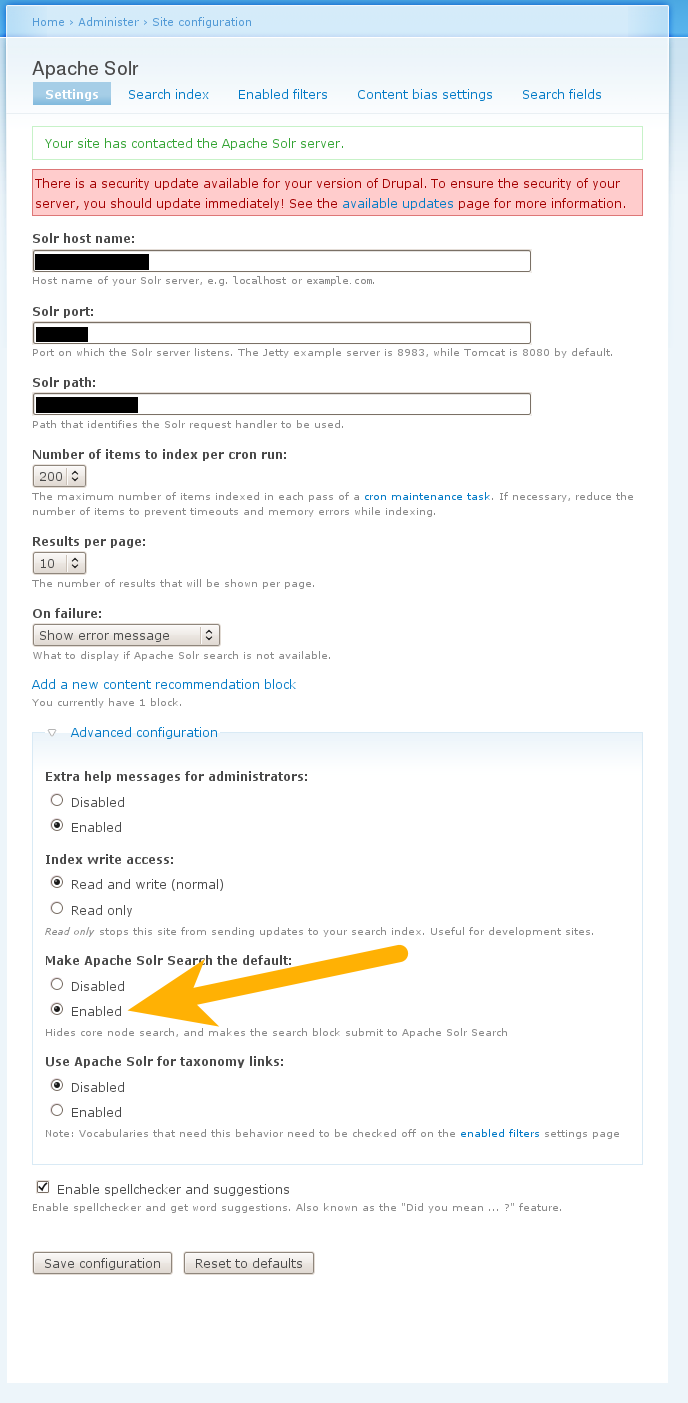
To find the Apache Solr Search Integration setting go to admin/settings/apachesolr
Then expand the Advanced configuration section.
href="http://drupal.org/files/issues/Make_Apache_Solr_Search_the_default.png">View this screenshot to clarify.
----------------------------------------------------------
This how-to handbook is for absolute beginners.
We are now going to disable the default Drupal search engine. Then make Apache Solr the only search engine available. This is a big performance improvement for large Drupal site.
There are currently two modules able to do this. CORE SEARCHES & SUPRESS SEARCH. CORE SEARCH module modify Drupal core whereas SUPPRESS SEARCH does not. Modifying Drupal core is considered really bad by the Drupal community. You should not modify Drupal core. But override it instead. For this reason this handbook will use the SUPRESS SEARCH module.
Download and install SUPRESS SEARCH module.
Navigate to ADMINISTER > SITE CONFIGURATION > SUPPRESS SEARCH SETTINGS
Under section SEARCH FORM SUBMIT PATH type in
search/apachesolr_search/
Check HIDE CONTENT TAB box.
Check HIDE USERS TAB box.
Click on SAVE CONFIGURATION button.
Click on EMPTY CORE SEARCH INDEX button.
Drupal will ask
Are you sure you want to empty core's search index?
Click on EMPTY CORE SEARCH INDEX button again.
If successful the last two lines of the EMPTY SEARCH INDEX section should now read.
search_index: 0
search_dataset: 0
Navigate to ADMINISTER > SITE CONFIGURATION > PERFORMANCE
At the bottom of the page click on CLEAR CACHE DATA button.
Navigate to ADMINISTER > SITE CONFIGURATION > SEARCH SETTINGS
Under section INDEXING THROTTLE set the NUMBER OF ITEMS TO INDEX PER CRON RUN to 0 (zero).
Click on SAVE button.
To test go to http://yourdomainnamehere.com/search/apachesolr_search/
Under ENTER YOUR KEYWORDS.
Type in a keyword.
Click on SEARCH button.
If your Solr search returns no result go to http://yourdomainnamehere.com?q=admin/settings/apachesolr/index
Make sure that the first line reads
The search index is generated by running cron. 100% of the site content has been sent to the server. There are 0 items left to send.
If not 100% click on 'running cron' link until 100% of the site content has been sent to the Solr server.
Tips: Clicking the 'running cron' link does the same thing as going to http://yourdomainnamehere.com/cron.php
You have successfully disabled the default Drupal search engine. Then made Apache Solr the only search engine available.
Help improve this page
You can:
- Log in, click Edit, and edit this page
- Log in, click Discuss, update the Page status value, and suggest an improvement
- Log in and create a Documentation issue with your suggestion