

Active
Project:
Featured Content Slider
Version:
6.x-1.1
Component:
User interface
Priority:
Normal
Category:
Support request
Assigned:
Unassigned
Reporter:
Created:
29 Jun 2009 at 13:37 UTC
Updated:
16 Dec 2009 at 01:12 UTC
Jump to comment: Most recent file

Comments
Comment #1
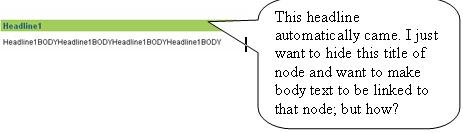
Yuki commentedPlease see the attached screen shot.
Comment #2
Acert93 commentedSame issue. Thanks for posting this support request.
Comment #3
davemybes commentedUse CSS to hide the node title.
Comment #4
Yuki commentedPlease kindly indicate the css and where to write. Thanks.
Comment #5
3djeff commentedI created a new node-content-type.tpl.php, put it in my themes directory and then commented out the following line:
It will remove the title when viewing the node in the slider as a teaser, but will show up when view the full node.
Comment #6
rpinkham commentedI commented out the line above (post #5) in node.tpl.php in the WhiteJazz theme (Drupal 6.13). This removed the content titles in the slideshow, but had the unintended effect of removing other titles of pages and stories which had been promoted to my front page.
Does anyone know how to remove just the node titles in the node type used in the content slider (e.g. featured), and not the titles in all node types on the front page?
Comment #7
davemybes commentedUse the following CSS:
Comment #8
rpinkham commentedThank you for the help. As simple as the solution above seems, after a number of tries, I have not been able to successfully implement it.
I have tried the CSS above in contentslider.css and in my theme's CSS file (in conjunction with the Blocktheme module) to no avail.
I can probably can live with the node titles, but if anyone can offer further help, I would appreciate it.
Comment #9
davemybes commentedIf your site is live, send me the link so I can take a look at what the actual code is for the title.
Comment #10
3djeff commentedI created a unique content type for my content slider nodes called 'Featured', then that commented out line only affects those node. The new tpl file is called node-featured.tpl.php and is a copy of node.tpl with the only difference being that commented out line.
Comment #11
rpinkham commentedThe new tpl file does the trick! Thanks.
Comment #12
msjones design commentedThis works too, editing the contentslider.css within the module
.sliderwrapper .contentdiv h2{
display:none;
}