

Closed (fixed)
Project:
Multi-column checkboxes radios
Version:
6.x-1.3
Component:
Code
Priority:
Normal
Category:
Feature request
Assigned:
Reporter:
Created:
3 Jul 2009 at 05:19 UTC
Updated:
30 Jul 2009 at 13:50 UTC
Jump to comment: Most recent file

Comments
Comment #1
mattyoung commentedDo you have any information on how to do this?
Comment #2
jtjones23 commentedThis page should get you started - http://drupal.org/node/101742. Wish I could be more helpful but not a coder, yet.
Comment #3
mattyoung commentedI don't see anyway to add this multi-column feature to the built-in CCK checkboxes and radios widgets. If anyone know of a way to do it, please let me know.
Comment #4
vkareh commentedThanks for creating this module!
Here's a patch to provide integration with CCK optionwidgets. Please test it and let me know if it works for you.
Comment #5
jtjones23 commentedThanks for the patch. Patch applies successfully and I'm able to display a list as columns. I also get the following error message.
Running Drupal 6.13, PHP 5.2.5
Comment #6
mattyoung commentedvkareh: thanks for the patch. I tested it and it works very well. I've checked it in HEAD.
I made a few changes:
1. I took out '#access' => user_access('administer multicolumncheckboxesradios'),
I think this is not need as only role with CCK admin can access the admin/content form.
2. I changed
if (arg(0) == 'admin' ....
to
if (arg(0) == 'admin' && arg(1) == 'content'
because I want multicolumn to work in admin/settings forms
3. I had to change the beginning of element_process() a little to make it work with normal form element as well as CCK widget. I need this to work for both use cases.
**I wonder if the CCK multicolumn settings can be move from 'CONTENT-TYPE settings' section to 'Global settings" section? It seem to me it make more sense to be there. The same settings should apply to every instance of that widget.
If you can make this change, please apply to HEAD of multicolumncheckboxesradios.module. The version is 1.6.
*
*
jt_jones:
Can you download the dev version and try it? I've just made this dev release so it should show up any minute now on the project page (I hope).
EDIT: the dev tarball can be fetch here: http://ftp.drupal.org/files/projects/multicolumncheckboxesradios-6.x-1.x...
Comment #7
vkareh commentedThat's awesome, thanks! I will test it all today.
When you say Global Settings, you mean for each individual content type, or for all content types in the site? I still think that the settings should be for each individual instance of the widget, since in some cases you would only have a few options, and in others you might have a lot arranged in a different way. Maybe a good compromise could be a global setting for the whole form, with individual settings to override the global in specific instances? Although I see what you mean: if I have a themed form that can only display up to, say, 6 columns properly, I don't want another [admin] user to make a widget with 9 columns, as it could break the theming.
I put the
#accesspermission there, but really didn't do anything with it (I didn't even implementedhook_perm()), so thanks for removing that.Comment #8
mattyoung commented>When you say Global Settings, you mean for each individual content type, or for all content types in the site?
I mean for all content types for a particular field.
For example, if I define a field called "Meal choices" of type "Text", widget type "Checkboxes/Radios", its multicolumn settings should be the same for all content types that use the "Meal choices" field.
Go to configure the "Meal choices" field, right now, the multicolumn settings is under "CONTENT-TYPE settings" ("These settings apply only to the Meal Choices field as it appears in the Picnic Content content type.") So multicolumn settings is set for each content type. The multicolumn settings should be in "Global settings" ("These settings apply to the Meal Choices field in every content type in which it appears."), in the same place where the "Required" checkbox is.
Comment #9
vkareh commentedOh! I see what you mean now, thanks!
To do that, I think we need to override
content_field_edit_form(), but I don't think there is a hook for that. I'll try a few things and see if it's possible.On a separate note, the Division by zero error could be solved if you do
right before each division. That's a separate issue, though.
Comment #10
jtjones23 commentedInstalled the July 7 dev on a site I'm building. Module installs and the columns work. But when I tried to create content I got the following error.
Fatal error: Call to undefined function dpm() in /usr/www/users/xxxxx/xxxxx/sites/all/modules/multicolumncheckboxesradios/multicolumncheckboxesradios.module on line 106Running Drupal 6.13, PHP 5.2.9
Comment #11
vkareh commentedOkay, so apparently the way to have custom global settings is by defining a new field through
hook_field_info(),hook_field_settings(), andhook_field(). This makes sense, since the global stuff is mostly database-centric (required, multiple, max, min, values) and you need to keep it the same for every instance of the field. The node-type settings, on the other hand, deal mostly with how things are displayed, hence the use ofhook_widget_info(),hook_widget_settings(), andhook_widget().My suggestion is to leave it as a node-type setting, since it's quite painful to modify a field (as opposed to just the widget). Also, there's no easy way of knowing what field type you are dealing with, since widgets (radios, checkboxes) should be able to be applied to any field (number, text, decimal).
Comment #12
vkareh commenteddpm()is a function from the Devel module (http://drupal.org/project/devel). I would assume that mattyoung put it there for backtracing while still programming the module.Download this patch to remove it.
Comment #13
mattyoung commentedThe dpm() function is from the devel module. Can you install the devel module: http://drupal.org/project/devel, this is very indispensable for development. Since you are hitting the check, which should never happen. I need to see why it's doing that.
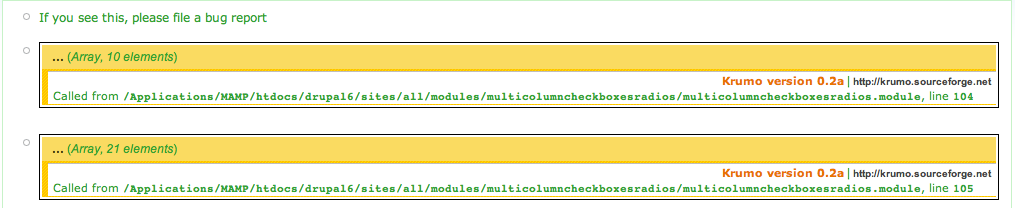
Install and enable 'devel' and try again. If you see the message box with two yellow boxes inside, you have hit a error that should never happen. Something is wrong with my code. Save the page source and attach it to a message here.
Comment #14
vkareh commentedGood call, mattyoung.
More than the
$element['#multicolumn']['width']being zero, I think it might have to do with the checks that decide whether to continue runningmulticolumncheckboxesradios_element_process()orreturninstead. It might be that not all cases for returning are being accounted for?edit: You could probably be safe to just do a
returnif$element['#multicolumn']['width']is zero... although I agree that it shouldn't happen, unless you specifically program it as such.Comment #15
mattyoung commentedjt_jones: Can you download and try the attached version? It will not give you error if you don't have the 'devel' module. But I prefer you install 'devel' to help me track down the bug. I'm not seeing this error on my end so something is different and I'm not testing it here.
vkareh: can you checkout from HEAD now to get the latest? multicolumncheckboxesradios.module version is 1.7
Comment #16
vkareh commentedNicely done. I just updated from the repositories and will proceed to test a few scenarios. I suspect that the zero might be due to the integration with CCK... something might not be coming up properly in
$form_state['#field_info'][$element['#parents'][0]]['widget']['width']inmulticolumncheckboxesradios_element_process().Comment #17
mattyoung commentedvk:
>My suggestion is to leave it as a node-type setting, since it's quite painful to modify a field (as opposed to just the widget).
Alright then. The way it is now works great anyway.
I was afraid it would be hard to figure out what the widget type if it's in the Global settings.
>You could probably be safe to just do a return if $element['#multicolumn']['width'] is zero
For now I just do
$element['#multicolumn']['width'] <= 1. Although I hate to be sloppy like this because there should never be a zero there. So I hope jt will report back to me why he is getting zero.Comment #18
vkareh commentedAha! I think I found it!
The
multicolumncheckboxesradios_element_process()function is trying to assign the#multicolumnarray to fields that are not going to be rendered in that particular page.For example, in the field-edit form (
admin/content/node-type/<node-type>/fields/<field-type>), themulticolumncheckboxesradios_element_process()function is trying to process the actual field for which you are changing the settings, but since the field is not going to be rendered there, it should just return.The instances where
$element['#multicolumn']['width'] == 0is for either fields that shouldn't be rendered in that page, or that do not have the#multicolumnarray set. Checking for$element['#multicolumn']['width'] == 0is also true when$element['#multicolumn'] == FALSE, so that explains why it's being called.I think it's safe to return when
$element['#multicolumn']['width'] == 0.Comment #19
jtjones23 commentedTried the latest dev with Devel turned on...getting the attached message at pages that have nothing to do with CCK - like admin pages.
Comment #20
mattyoung commentedjt: can you try the attached dev version.
Comment #21
jtjones23 commentedLooking good. CCK multi-column feature is working with no error messages on local and hosted test site.
Comment #22
vkareh commentedAwesome work mattyoung!
It's working perfectly for me now as well. Thanks for changing the saved variable names too.
Comment #23
mattyoung commentedHello all,
I'm postponing this to wait for #417122: Allow drupal_alter() on Field and Widget Settings. D7 already has this patch and it should be released soon for D6 so I'll wait for its release before I release multicolumncheckboxesradios with CCK support.
vk:
I already change multicolumncheckboxesradios code to work against this CCK patch and checked into HEAD (multicolumncheckboxesradios.module v1.9). It works exactly as before but the extension is done using
hook_widget_settings_alter()instead of overriding optionwidgets. This leave optionwidgets untouched so anyone else can extend it like we do.I'm attaching the patched cck so you can check out HEAD and give it a try. The code in HEAD should not show multicolumn settings for any widget except checkboxes/radios.
EDIT: I get the dev release to show on the project page now. That has the latest code which require the CCK patch.
Comment #24
mattyoung commentedThis feature is released in version 1.3. Once CCK with #417122: Allow drupal_alter() on Field and Widget Settings is release, the feature will become functional. If you need this working now, you can check out CCK version DRUPAL-6--2 from cvs.
Comment #25
vinoth.3v commentedGreat Drupal Team :)
Thanks all