 Come together with the global Drupal community in Rotterdam, 28 Sept – 1 Oct 2026. Sessions, contribution, connection, and Early Bird savings until 8 June.
| Comment | File | Size | Author |
|---|---|---|---|
| #16 | error.png | 3 MB | shirisha2325 |

 Come together with the global Drupal community in Rotterdam, 28 Sept – 1 Oct 2026. Sessions, contribution, connection, and Early Bird savings until 8 June.
| Comment | File | Size | Author |
|---|---|---|---|
| #16 | error.png | 3 MB | shirisha2325 |

Comments
Comment #1
GPirie commentedI'm getting the same problem, anyone have any suggestions?
Comment #2
patriiiiiiiiiick commentedOK, solved this by taking some action suggested in install.txt. I had upgraded phpBB recently and therefore probably lost some modifications in the files (cf. patches).
Now it doesn't mean that I could run the forum without frame but this is another issue.
Comment #3
patriiiiiiiiiick commentedComment #4
GPirie commentedCould you tell me what you did to get it working?
Mine is a brand new installation of both Drupal and phpBB and from what I can see I did everything in the install file. I would provide a link but it's only installed on localhost at the moment.
Comment #5
patriiiiiiiiiick commentedI did sections II and III of the install.txt. I might have been a bit fast to close this issue, feel free to reopen.
Comment #6
Thyren commentedI got the same issue on a freshly installed Drupal 6.15 / phpBB3 3.0.6 site by using the beta 9 version, and I`m getting quite frustrated with it :-/
I`m pretty sure I followed all the necessary steps mentioned in the install.txt. When I post a blog message, it gets displayed properly on drupal and on the forum, but whenever I try to click on the discussion link, I get a similar error message than the one shown in this topic.
I tried different function_user.php versions but the one I currently have is the one that creates the least amount of problems. I checked the paths and they seem ok. I also verified the file permissions and it`s ok. These specified files are not in that directory (hence the error ... duh :-p) but I think it`s rather because the path is incorrect. Now ... how do we fix it ?
Note that the display of the newly created forum topic works fine if I chose the 'In frame inside Drupal page' option, but not with the `In the Drupal page. (Except for ACP)` one. (which is obviously what I would prefer ^_^ )
Any help would be greatly appreciated :)
Comment #7
IS_NUMERIC commentedDid anyone find a solution for this
I am having the same problem
Comment #8
patcon commentedme too... still working at it...
Comment #9
patcon commentedyeesh... nm! forgot to patch as per INSTALL... thought it was only for upgrades...
** My error was only the "General Error" portion, by the way
Comment #10
gvn2fly commentedGet the exact same set of error messages. I just fresh installed everything. Drupal 6.19. phpbbforum 6.x-2.0-beta12. phpbb3.0.7-PL1
Anyone find anything yet?
Comment #11
gvn2fly commentedI thought the same thing. What patch file did you use? What do I use if I have phpBB 3.0.7-PL1 ?
Comment #12
gvn2fly commentedGot it to work now by using this: http://drupalbridge.org/files/phpBB-embed-3.0.7-PL1-files.tar.gz
Not sure what it is or why I needed it, but it worked.
Comment #13
patcon commentedHey there, that is the zip containing all the patched files needed to make phpbb3 work with drupal. It's required as per the INSTALL.txt file, which happens to be worded a bit clumsily :)
Comment #14
Prof. Chaos commentedThey way i fixed this was going in to the database.
phpbb_config -> default_style -> check the value to the one in the phpbb_style on the template u are using. When it's matching go to the ftp and delete everything in the cache folder and it should be working fine again.
Comment #15
fizk commentedComment #16
shirisha2325 commentedHello
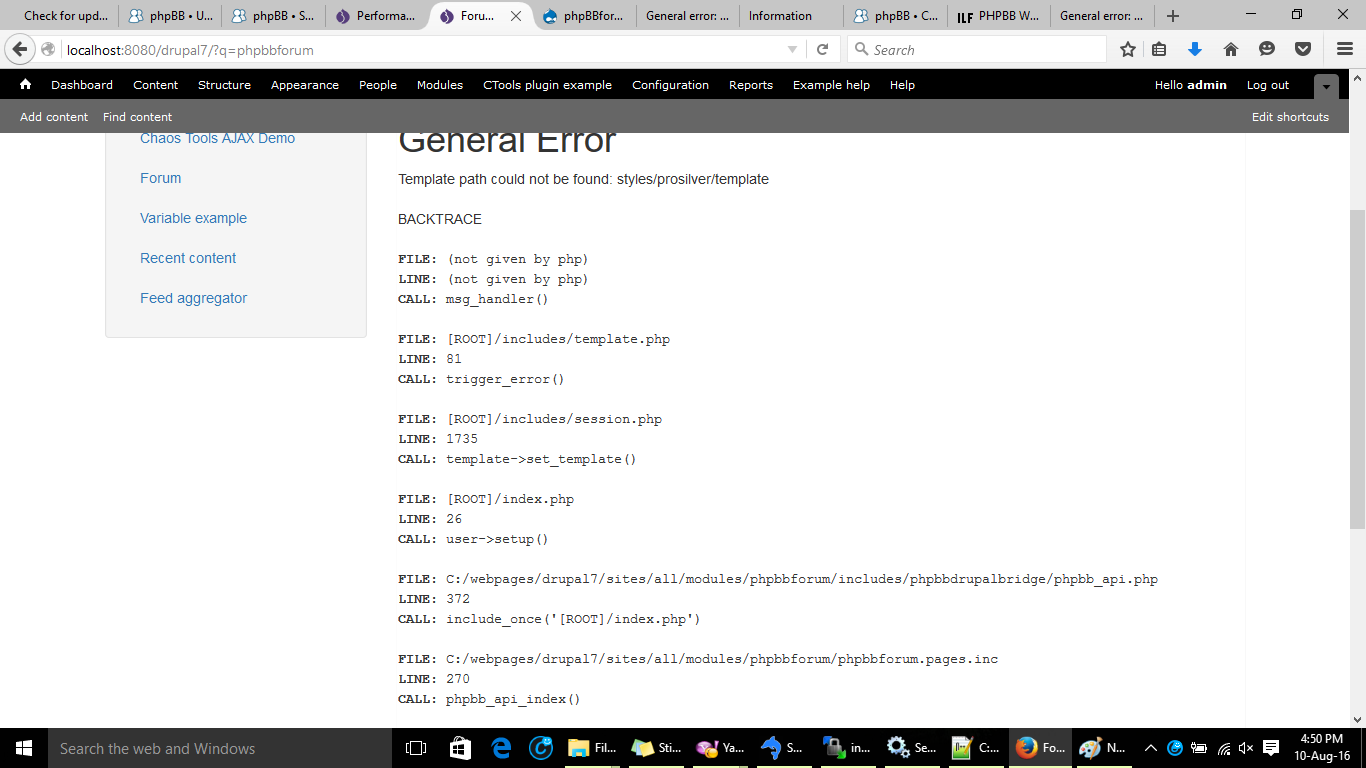
I am using drupal 7 and PHPBB 3.0.12.. while setting the phpbb display option as In Drupal page it is showing the following error.. Please find the attachment below...Could anyone please help on the soultion for this error.
Thankyou
Comment #17
shirisha2325 commentedComment #18
shirisha2325 commented