

Closed (fixed)
Project:
Zenophile
Version:
6.x-1.1-beta5
Component:
Documentation
Priority:
Normal
Category:
Support request
Assigned:
Unassigned
Reporter:
Created:
6 Jul 2009 at 12:39 UTC
Updated:
27 Nov 2010 at 09:50 UTC
Jump to comment: Most recent file


Comments
Comment #1
Garrett Albright commentedHmm. I was just able to build a theme like that with no problems.
Could you check in the directory that Zenophile is creating and make sure it's making the sidebars.css file?
Comment #2
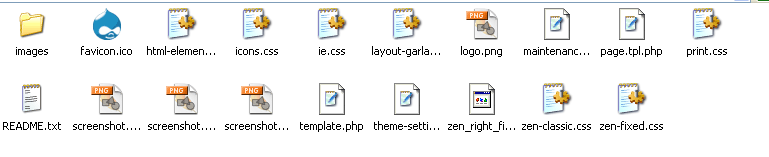
lvl1 commentedCould not see the file you mentioned. Files in the subtheme folder is shown in the attached image.
Comment #3
Garrett Albright commentedHmm, did you use Zen Classic as the parent theme? I don't think it's really intended to be one. Try using STARTERKIT instead.
Comment #4
lvl1 commentedNo success with Starter kit as base. Cleared cache. The sidebars are still on the left and right and there is no sidebars.css file in the directory created. Will report back if something works out.
-thank you
Comment #5
Garrett Albright commentedI'm not sure what to tell you. Are you sure you're looking in the right directory? A directory of a theme made with Zenophile should look something like this:
Comment #6
lvl1 commentedYup. just tried again. please feel free to ignore this. will report back if i find where i went wrong.
-thank you
Comment #7
nvisioncurtis commentedI'm actually having an issue with the columns not taking the widths supplied. The values in the layout.css always default the standard 200px regardless.
Otherwise a great time saver
Silly me, I see now that a sidebar.css is created.
Comment #8
tammo commentedOutput after creating zen-subtheme using Zenophile:
body class="not-front logged-in one-sidebar sidebar-left page-admin-build-themes section-admin tableHeader-processed admin-menu"
it states: SIDEBAR-LEFT; while in the rest of the css it uses SIDEBAR-FIRST.
Not all variables have been replaced in the process of making this work for Drupal 7... May I ask the developers to change that variable in the next release?
Comment #9
Garrett Albright commentedZen 1 uses sidebar-left and sidebar-right. Perhaps this has changed in Zen 2, but Zenophile does not currently support Zen 2 in any way, so you're on your own there. Are you trying to use it with Zen 2?
I don't believe that anything Zenophile does would be changing the classes applied to the body tag anyway.
Comment #10
Garrett Albright commentedComment #11
nonprofit commentedI had to run through this twice, Under "Adjust sidebar widths and placement" "Override sidebar and page widths and placement" must be ticked. Please excuse if this is not your issue, as I know it sounds insulting, however, it's at least worth a look as this would prevent widths and/or placement from being applied. -NP
Comment #13
texas-bronius commentedHi- I am on 6.x-2.0 (June 3, 2010) and don't see these sidebar checkboxes. Drush exposes them in help. Didn't seem that drush sidebar commands did the trick:
drush zen hcf "Community Foundation Theme" --friendly="Community Foundation Theme" --sidebar-left=200 --sidebar-right=330What I ended up with, it appears, is the normal 960 width with 200 left, 200 right sidebars (incidentally called First sidebar and Second sidebar).
Are we talking about a related topic?
Comment #14
Garrett Albright commentedDo you have the Zenophile Sidebars sub-module enabled?
Comment #15
texas-bronius commentedOOps. No, I didn't know there was such a thing: thanks for the tip. I'll enable (looks like it comes with) and give it another whirl.
Comment #16
texas-bronius commentedOk, enabling the Zenophile Sidebars included module did it for me via UI (not tested with drush). Saw said checkbox, and sidebar regions created to spec. Thanks for the tip ;)
Comment #17
omigosh commentedHow are you supposed to work these wonderful controls? There is nothing anywhere that I can find in the documentation that says how to use them or where to find them.
Comment #18
Garrett Albright commentedomigosh, if you mean the controls to modify sidebars, enable the "Zenophile Sidebars" module and you'll see them appear in a section on the normal "Create new Zen theme" page.