

Closed (fixed)
Project:
Flag
Version:
6.x-1.1
Component:
Flag core
Priority:
Critical
Category:
Bug report
Assigned:
Unassigned
Reporter:
Created:
7 Jul 2009 at 18:44 UTC
Updated:
19 Sep 2025 at 10:59 UTC
Jump to comment: Most recent, Most recent file

Comments
Comment #1
ifuyivara commentedUpdate:
I just realized that this "Bad Token" error is happening only with my Admin account. For the rest of the users the flags works perfect. How is that possible?
Comment #2
momper commentedsame problem
Comment #3
quicksketchI can't reproduce this issue on a clean install. If you can provide steps on how to reproduce it from a new Drupal installation that will help resolve the problem.
Comment #4
quicksketchClosing after 2 weeks with no activity. Please reopen if still experiencing the problem with an instruction set to reproduce.
Comment #5
amishra commentedPlease reopen, I see the same issue with admin n non admjin user
Comment #6
gappleI think I have run into this issue due to a conflict with views' cached rendered output.
To reproduce go to the view as one user, causing the output including the link with token to be cached.
Logout, and login as a separate user.
Attempt to click the flag link again and the error occurs.
Digging down,
flag_get_token($nid)generates the token from the users' session_id (viadrupal_get_token()), which will be unique to each user session. If the link is cached as one user, it will cause the invalid links for all other users.I have solved this for now by disabling caching of rendered output. Leaving caching for query results enabled seems to cause no problems, as I assume it will regenerate the token on each request, for each user session.
Could the same type of error occur with page caching for anonymous users?
Comment #7
quicksketchAnonymous users are given less-secure tokens that are not session-specific, however Flag doesn't even support anonymous users at all in the 1.x version, so that's not a problem. The fact is that you simply cannot cache per-user flag states with Views. If you'd like the link to work regardless of caching, you'll need to use a link type such as the "Confirmation form", which moves the token to confirmation form instead of being in the link.
Comment #8
amishra commentedThis happens to me regardless of the cache. I have cleanurl and pathauto enabled.
Comment #9
amishra commentedIs there any hope of this getting fixed?
Comment #10
amishra commentedAlso, the bookmark this link looks as follows
http://host/drupaldir/flag/flag/bookmark/nid
It seems it lacks the destination and token values in the query string, is that right? why is that happening. I have even tried to manually create the link with flag_create. same problem
Comment #11
amishra commentedOn another note, it works fine if i choose confirmation form, but its not the solution in this particular case. why is this happening?
thanks
Comment #12
Andrew Gorokhovets commentedThe same problem for anonymous users.
Bad token. You seem to have followed an invalid link.
I have installed only:
Flag
Session API
Views
Views UI
Comment #13
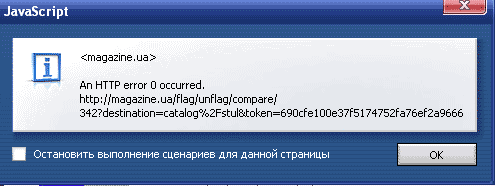
Andrew Gorokhovets commentedOn other my site the error on page View jumps out
An HTTP error 0 occurred.
http://magazine.ua/flag/flag/compare/342?destination=catalog%2Fstul&toke...
Comment #14
KerriO commentedSorry, re-opening. I assumed this is not how it's "designed" to work. It's happening on a site that I just launched, and unfortunately *I* can't reproduce it yet either, but users are experiencing it.
Flags are rendered in a Node View.
Only authenticated users have access to flags.
I have many modules installed. I can't test locally with modules turned on and off, because I can't reproduce it myself!
If anyone has any ideas what may be causing this, please speak up.
I have test both as an Admin and a standard authenticated user. No luck reproducing.
Comment #15
KerriO commentedD'oh. Closing again. I just re-read the thread after getting some sleep! It seems that the View caching is probably my problem as well. Turned off views rendering caching and left query caching on (as described in #6). Hopefully this worked. I'm waiting to see if I get any more reports of this issue on the site.
Comment #16
mooffie commentedInstead of waiting, log the errors: locate the following line, in flag.module:
And add after it the following:
(I hope I don't have a typo here.)
Is this a global flag? Because caching the output for a non-global flag doesn't make sense (different users shouldn't see the same thing). Come to think of it, Flag doesn't clear any special caches when you flag something, so with a cached view output the list of flagged items won't be up to date even for global flags (unless you add custom code to clear the cache).
Comment #17
KerriO commentedmooffie, thanks for the extra info, especially how to add error reporting.
This is a non-global flag (user-specific). I turned of caching output, so hopefully that fixed the problem. Am I correct in assuming it's still okay to cache the query results? I understand your explanation on the most basic level, but I don't fully understand the inter-workings of how things are cached, so I just want to double check.
Comment #18
mooffie commentedKerriO, I don't have the time right now to look into Views' caching mechanism(s), so I can't answer your question. For example, if the cache Views uses is shared among all the users, you won't be able to show each user his own personal "my bookmarks" list. This subject needs investigation. It's also possible that what I wrote earlier isn't accurate.
What _is_ important is to turn off all the factors that may have caused the problem (read: caching) and see if the problem is indeed gone. If so, the caching issue can then be revisited.
Comment #19
momper commentedComment #20
KerriO commentedThanks, mooffie. I certainly don't expect you to. I just figured that, by default, I had the least amount of insight on the topic!
Well, as of this morning when I checked the log, I had five of these errors. So I've turned off *all* Views caching (for the affected views), and will see if that solves it.
Comment #21
mooffie commented(1) Make sure they originate in flag links that indeed appear on your view. In other words, inspect the 'referer' field.
(2) It would be useful to know if these come from the same user. Perhaps one user uses aggressive caching in his browser (which survives across sessions). E.g., add
$_SERVER['HTTP_USER_AGENT']to the string you log, or try to learn this from the IP field.Comment #22
KerriO commentedWell, since then I have only had one more error occcur. The user id was '0', so I'm not even sure how they had access to flags— all I can think is it was aggressive caching on the browsers' end. (e.g. link still rendered after the user was no longer logged in).
Comment #23
ianchan commentedFYI - I encounter this problem with view content-based caching enabled. Per the recommendations above, I turned off caching for output rendering and the error message went away.
Thanks!
Comment #24
inforeto commentedEncountered this error using views caching for authenticated users.
Leaving output rendering turned on gave me the error.
Turning rendering off but leaving caching of the query turned on removed the error but gave outdated results.
e.g. the link keep saying unflagged after flagging until the views cache expires.
Turning off the views cache entirely makes the page work but at the expense of performance.
(reopening, but please help look for a solution for views integration)
Comment #25
hlopes commentedMaybe it has something to do with line 697 of flag.module?
This line was throwing a "Unsupported operand types" fatal error on common.inc at line 1437
on the latest Drupal 6.20.
The fix in http://drupal.org/node/459994
seems to do the trick.
Comment #26
quicksketchSounds like this was fixed in the 1.2 version per #459994: Crash when rendering url() (PHP 5.3 compatibility).
Comment #27
shashank5563 commentedI just installed the flag module and when I click on any flag link I get the next error message:
"Bad token. You seem to have followed an invalid link."
and an access denied.
How can I fix it? Is it something I forgot to configure? Does it has to be with the Token Module?
thanks in advance
Comment #28
shashank5563 commentedComment #29
ivnish