

Closed (fixed)
Project:
Acquia Marina
Version:
6.x-1.9
Component:
Miscellaneous
Priority:
Critical
Category:
Support request
Assigned:
Reporter:
Created:
8 Jul 2009 at 04:41 UTC
Updated:
8 Sep 2009 at 11:22 UTC
Jump to comment: Most recent file

Comments
Comment #1
jwolf commentedPlease review the Acquia Marina Handbook
Specifically, please see the Dropdown menus section located at: http://drupal.org/node/357261#dropdown
Comment #2
YYDrupal-1 commentedHi, thanks for the reply.
I've read the handbook before assigning the issue. However, it did not mention where to put the primary menu to become a drop down menu. I've tried many times to put it on the header blocks, but it never worked.
Comment #3
jwolf commentedYou don't need to put the Primary links in any region, just populate the menu with menu items.
Comment #4
YYDrupal-1 commentedHi, thanks. But can you please do not set the status as "fixed" until I completely make it? That might allow other people to help with more detailed instruction.
I still don't understand how to "POPULATE" the menu. If i don't put the primary menu to anywhere in the blocks, it just doesn't show on my web site anymore. Also I can't see any setting letting me "populate" the primary menu in the menu items.
Comment #5
YYDrupal-1 commentedHi, thanks. But can you please do not set the status as "fixed" until I completely make it? That might allow other people to help with more detailed instruction.
I still don't understand how to "POPULATE" the menu. If i don't put the primary menu to anywhere in the blocks, it just doesn't show on my web site anymore. Also I can't see any setting letting me "populate" the primary menu in the menu items.
Comment #6
tech.gsr commentedHi,
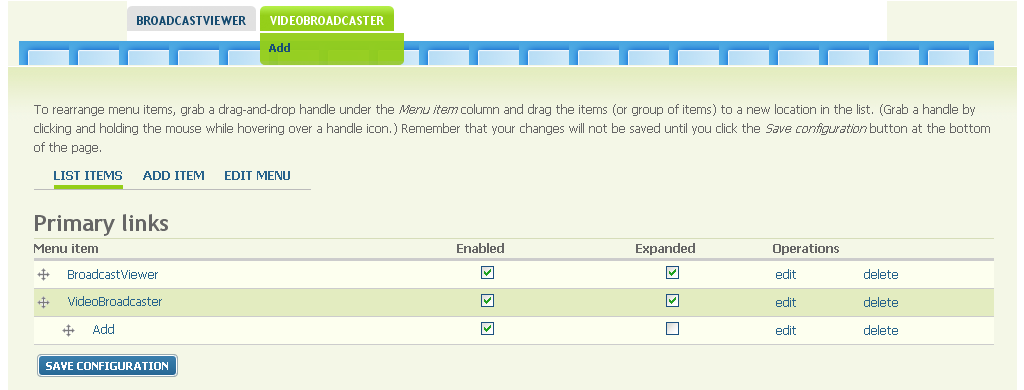
go to Administrator->Site building->menus->primary links
click on add item and create one menu called menu1.
create one more menu called menu2.
after that simply drag menu2 into menu1 and click on expand checkbox on menu1.
thats all
check the attached image file
Regards
Khalid Ahmed
GSR TECH
Comment #7
YYDrupal-1 commentedHi,
I appreciate for your reply.
But that really drove me crazy! I did exactly the same as your instruction: at primary links, add menu1s, add menu2s, expand menu1s... However, it just never showed on my home page! (I have saved the configration!) BTW, it was disabled on block section.
Comment #8
YYDrupal-1 commentedI finally got it! I could not see the primary links menu showing on my web site because I unchecked the primary links menu box at site configuration session. Sorry about that!
Comment #10
maerys commentedthanks! :) got the same issue, but could solve it with your last post.