


After a year-and-a-half of on and off work, the new Harvard Stem Cell Institute (HSCI) website is live. As the designer, developer, themer, and writer/editor on this project, perhaps the trickiest part of the job was the perpetual hat switching.
Content Model
Besides the look and feel, the biggest improvement to the website was the content model. HSCI is made up of people, programs, projects, and events and we have a lot of content associated with each of them.
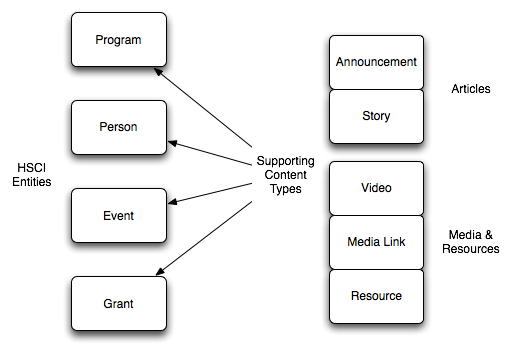
So in planning the new and improved Harvard Stem Cell Institute (HSCI) site, I opened up OmniGraffle and started mapping out what types of things make up the institute. I made a list of the more concrete things that make up the institute and another list of things that were incidentally created by HSCI's actions. I call the the first group the "HSCI Entities" because they make up the heart of the institute, and the second "Supporting Content Types" because they are important on the site only as they relate to the entities. For example, it doesn't make sense to post a media link from the Boston Globe if it doesn't relate to any of HSCI's people, program, projects, or events.

Once I knew how the entities were different from the supporting content types I added a node reference field to each supporting content type could reference an entities. That's why in the diagram the arrows point in that direction. It makes more sense from a content creation workflow perspective to add the relationship in this direction. When I'm adding a new press release, I want to add that it's related to three people. I don't want to go to those three people nodes to add the press release.
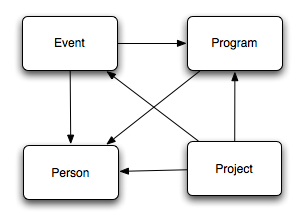
I also needed to set up node relationships between the HSCI entities themselves. That way I could add a person to a program.
Finally I needed to split up my "Supporting Content Types" into two groups: "articles" and "media and resources." I did this for two reasons. First I wanted to be able to relate videos and media links to announcements and articles, and second because I wanted to aggregate stories under a "parent resource." For example, stories that appeared in an issue of the "Stem Cell Lines" newsletter needed to show up on that newsletter's page.

Slideshow
This was built using the jQuery Cycle plug in. Here's the "advanced pager demo" this is based on: http://malsup.com/jquery/cycle/pager2.html
Accordion
Nothing fancy here. It's just the jQuery UI accordion.
Videos
The video flv files are stored on Amazon S3, and I created CCK fields store each video's path, height, width, and thumbnail. Then I embedded the JW FLV Media Player (http://www.longtailvideo.com/players/jw-flv-player/) into video-node.tpl.php, and plugged in the path, height, width, and thumbnail variables where they needed to be.
While there may be a hundred different ways to get videos on a Drupal website, this seemed the most straight forward to me, and so far has worked well.
Layout
The site was designed using the BluePrint framework. It was both fast and easy, and freed-up some of my brainpower to play designer and themer at the same time.
IE6 Issues
Until February of this year, Harvard University's recommended browser was IE6. Though it now officially recommends IE7, many people across the university are still driving around the web in this nine-year-old clunker.
Therefore, it was important that the site look OK in IE6. It didn't have to be perfect, but the better it looked, the less likely there would be grumbling from anyone who hadn't upgraded. The biggest issue by far was the use of all those transparent PNGs, which were fixed with either the jQuery PNG fix plugin or altogether alternative styles.
Overcoming sIFR Fears
On a previous version of the site, I used sIFR for page titles and the headlines in the homepage slideshow. But after it was all set up and working across all my test browsers, I decided that liked the look better without the font change. But even though my designer-self tossed out the hard work of my themer-self, I'm glad that I worked through my fear of this technology and will perhaps use it in the future.
Module List
For what it's worth, here is the list of modules that I used:
- advanced_help
- auto_nodetitle
- calendar
- cck
- custom_breadcrumbs
- date
- devel
- extlink
- fckeditor
- filefield
- imageapi
- imagecache
- imagefield
- imce
- jquery_update
- link
- menu_breadcrumb
- node_import
- nodetype
- pathauto
- simplemenu
- taxonomy_hide
- taxonomy_menu
- token
- vertical_tabs
- views
- views_or
- webform

Comments
_
I love it-- nice clean layout and easy to navigate. Nice work-- and thanks for the write up. Particularly the part describing your thought process for content organization which many showcase type posts often don't go into.
well done
I really admire the restraint you exercised in both design and technical execution... everything seems purposeful and nothing feels forced.
I also appreciate the technical notes you shared... very instructive and concise.