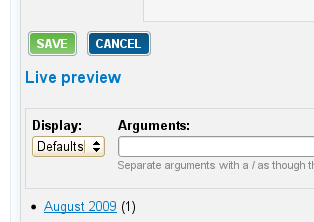
Minor issue - but if you're using an interface like the Views 2 one where while you are editing a particular element of a view, the overall display buttons are disabled (so you can't save a view while you're half way through configuring a field, for example) then the current RootCandy buttons don't show this. The green "Save" button stays the same. It should turn grey with a tinge of green, or something like that, to show that it is temporarily disabled. Otherwise people who are not familiar with a module that disables buttons during actions could get very confused and think something is wrong.

Comments

sign’s picture

Version: 6.x-1.2 » 6.x-1.x-dev
Status: Active » Fixed
StatusFileSize
new9.74 KB
new9.55 KB
new8.82 KB

committed a fix
see screenshots

I can't make it look right in IE, but I am not too worried about that :) IE change the text at least...

thanks for reporting! :)

greg.harvey’s picture

Looks great! Thanks! =)

Status: Fixed » Closed (fixed)

Automatically closed -- issue fixed for 2 weeks with no activity.