

Closed (won't fix)
Project:
Feedback
Version:
6.x-2.0
Component:
User interface
Priority:
Normal
Category:
Bug report
Assigned:
Unassigned
Reporter:
Created:
13 Jul 2009 at 06:39 UTC
Updated:
11 Mar 2011 at 16:17 UTC
Jump to comment: Most recent file

Comments
Comment #1
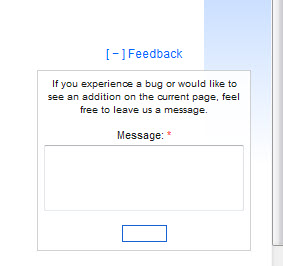
spazfoxI had this problem as well, but noticed that it was because the background color for the submit button in the feedback.css file was set to white....so if you're using it on a white page, the button seems to disappear. Changing its background color in the css file may fix this for you.
Comment #2
sunCould you post a screenshot, please?
Comment #3
spazfoxHere's a screenshot of the problem on my site (using Firefox 3.6)
Comment #4
sunDoes this also happen with one of Drupal core's themes?
Comment #5
jp2020 commentedIt happens on Fusion's theme as well. I went into #block-feedback-form #feedback-submit and changed to background color to something else and nothing. I notice that in FireBug if you disable the line "background-color:fff;" then it works (I see that it is supposed to be blue), but it is actually picking up the class of the css from /sites/default/files/css/css_4dd1564246ddabed59b5a2a9cc6b18a5.css in my case, and I believe it has something to do with it.
Comment #6
jody lynnWe're planning to add support to allow some built-in theming options, but in the meantime we can't support css issues in non-core themes.