Active
Project:
Content Construction Kit (CCK)
Version:
6.x-2.x-dev
Component:
Views Integration
Priority:
Normal
Category:
Bug report
Assigned:
Unassigned
Reporter:
Created:
13 Jul 2009 at 14:21 UTC
Updated:
15 Nov 2009 at 20:41 UTC


This is a site for a church, and I'm using views to create a page of sermons. Within the CCK "Sermons", I have a nodereference field by which to select the preacher. Preachers are a set of users, filtered by a profile field "Staff Type". I created a view "Preachers", filtered by the Staff Type, and for fields have selected only the profile field "Full Name" to show. I then use this view for the select list of Preachers in in the CCK "Sermons".
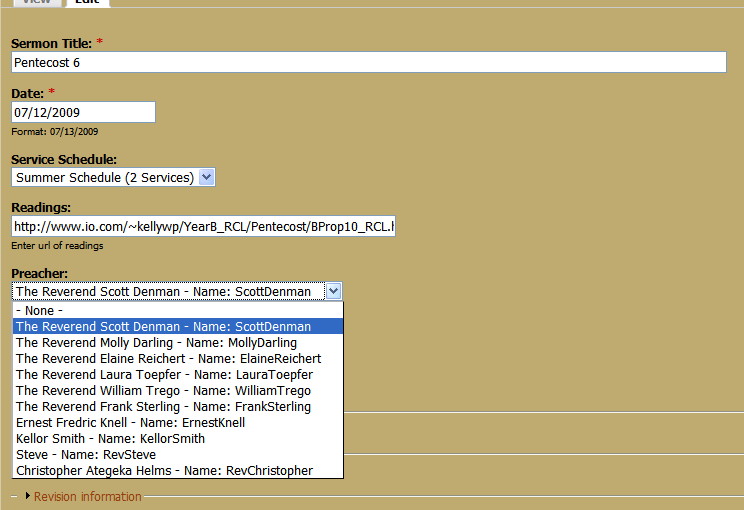
In my CCK edit screen (see NodeEditScreen.png), you can see the "Preachers" view shows the full name, but adds "Name: [username]" after each record. I don't know why it's adding this - I don't have username or name as a display field in the "Preachers" view (see View_Preachers.png). I confirmed this by creating a page view - the only thing that shows is the Full Name field, with no links or "name" field.
This extra "name" field is also seen when used in a view that references the preacher selection from the sermons. This becomes a problem when I try to expose the Preacher list in the Sermons view, where it shows the Full name and the name field, but also shows the coding around it. So each item on the select list looks like this:
<span class="views-field-value"> <span class="field-content">The Reverend Scott Denman</span> </span> - <span class="views-field-name"> <label class="views-label-name"> Name: </label> <span class="field-content"><a href="/users/scottdenman" title="View user profile.">ScottDenman</a></span>
(see View_Sermons.png). This code also shows in the select list to the user if I Expose this filter.
I'd appreciate any help with this.
| Comment | File | Size | Author |
|---|---|---|---|
| View_Sermons.png | 184.31 KB | michellezeedru | |
| View_Preachers.png | 116.8 KB | michellezeedru | |
| NodeEditScreen.png | 76.16 KB | michellezeedru |


Comments
Comment #1
merlinofchaos commentedThis is all CCK integration stuff.
Comment #2
mcneill commentedI ran into the same unwanted "Name: username" issue using the current (non-development) release of CCK (6.x-2.4). I was able to get around the problem by actually adding the unwanted username field (User:Name) to the Fields list for the view and then setting the field property "Exclude from display".
Hope that helps.
Comment #3
markus_petrux commentedNot a CCK3 issue.
Comment #4
bravo commentedThe work-around suggested in #2 saved my day. I tried a few options before coming down here. Adding a second excluded field for User:Name solved the issue.
Thanks mcneill