Hello,
I tried this module but its not working. First i did save my API Key of Login and Transaction as instructed in Install file direction. After that i created one form with fields with Name, Amount, Credit Card Number, Security Number and Transaction ID(Hidden Field). After that when i click to submit button it says "There was an error processing your credit card: (TESTMODE) Credit card number is required.. If the error persists, please try another card."
My account is in test mode and i am using 4111111111111111 and “4222222222222” both as Credit Card number as given by Authorize.net AIM help at http://developer.authorize.net/guides/AIM/
Is anything more needed in this webform or i am doing some odd things ? do reply as soon as possible as i did ask to my other friend also which has same problem.
Thank you.




Comments
Comment #1
tejaspmehta commentedi have added one screen shot for proper understanding...
Comment #2
obsidiandesign commentedLooking at the screenshot, there seems to be spaces in the credit card number. Does the error message change (or go away completely) if you enter it as 4111111111111111? I wonder if the string isn't being communicated properly to a.net with the spaces.
Comment #3
tejaspmehta commentedHello obsidiandesign,
Thank you for your quick response. Now i had tried number without spaces also. But it was not working. Any other solution for this ???
Comment #4
chriscalip commentedHi obsidiandesign,
I also see the same error going through the process I can see the CURL $post_string variable does not include the mapped fields information.
x_login=XXXXXXXX&x_tran_key=XXXXXX&x_version=3.1&x_delim_data=TRUE&x_delim_char=%7C&x_relay_response=FALSE&x_method=CC&x_type=AUTH_ONLY
Comment #5
chriscalip commentedHello Tejaspmehta,
Here's where I think you may have made a mistake, cause this is also where I made the mistake. Be sure to follow carefully the instructions on install.txt especially this section:
4. Create or edit a webform that you would like to have users submit a payment for.
Under 'Webform Advanced Settings', add the following code for 'Additional Validation', with
the leading space removed before the
Then, in the 'Additional Processing' box, add the following code, again removing the leading
space removed before the
For each component added, you may select a Authorize.Net field to map to. The required fields
are listed for easy mapping. Custom fields must be entered into the "Administer" ->
"Site Configuration" -> "Authorize.Net Payment Webform" screen.
Comment #6
tejaspmehta commentedHello chriscalip,
Thank you for your reply. I did try your solution also. but it does not solve my problem. Here i have attached image which shows you how i have added both Additional Validation and Process lines instructed in install file in Step 4. If there is anything wrong there than do let me know. (If you can put your screen shot than it will be great help)
Comment #7
tejaspmehta commentedfinally i got it working. i removed php tags from validation and processing box. is it correct way ??? also i want to know where this payment details are displayed in my admin ?
Comment #8
chriscalip commentedHey tejaspmehta,
It doesn't look and sounds right. Here's why compare error_2.jpg versus the image I attached. You can see its very different. Also I think when you took out the php tags the module is not really activated during the processing phase.
Comment #9
chriscalip commentedon second thought, i might be wrong and something else is the reason.
Comment #10
Canturino commentedI also am trying to implement this module today and was getting the same error. I also removed the
Although it appears to work this way, it really doesn't, because the charge is not submitted to Authorize.net. Without the <?php tags, the code is just ignored.
So the "(TESTMODE) Credit card number is required." problem remains. Any help would be appreciated.
Drew
Comment #11
tejaspmehta commentedHello chriscalip,
Thank you for reply. now i did try your method. But still error remain same.
I am also letting you know details which i set in settings of this module.
Authorize.Net Post URL: https://test.autorize.net/ (First 1 in selection box)
Custom Fields are blank.
Now in Login ID and transaction key i did enter data which i get from authorize.net. but when i save it, it dis-appear from form. might be due to security reason.
i did try following card numbers.
4111 1111 1111 1111
4111-1111-1111-1111
4111111111111111
4222 2222 2222 2222
4222-2222-2222-2222
4222222222222222
This are all details which i can provide to you from my side. Hope this will be sufficient to help me out.
Thank you.
Comment #12
chriscalip commentedHi tejaspmehta and Iamtabu,
Time to do some diagnostics. Here's how email yourself the post string being posted to authorize.net by adding this line to the file authorizenetwebform.module:
mail('YOUREMAILADDRESS','authorize.net TEST',$post_string);
or
drupal_set_message($post_string);
At line 303 or the line after this
It's inside the function authorizenetwebform_process
So it should look like this:
Comment #13
chriscalip commentedHere's what I got from my email:
Contents of $post_string
x_amount=35.00&x_card_num=4111111111111111&x_card_code=973&x_exp_date=0413&x_first_name=Mike&x_last_name=Tester&x_address=312+Sutherland+Ln&x_city=Bloomingdale&x_state=IL&x_zip=60602&x_email=fake_email%40microsoft.com&x_login=3f7Mk5TVbm&x_tran_key=7hT7aK85766rD9ep&x_version=3.1&x_delim_data=TRUE&x_delim_char=%7C&x_relay_response=FALSE&x_method=CC&x_type=AUTH_ONLY;Well it sent it twice cause of checks here's the second content of $post_string
Here's What I got from authorize.net
========= GENERAL INFORMATION =========
Merchant : Developer Test Account
Date/Time : 15-Jul-2009 09:32:32 AM
Transaction ID : 2149402478
========= ORDER INFORMATION =========
Invoice Number :
Description :
Total : US $35.00
Payment Method : Visa
==== BILLING INFORMATION ===
Customer ID :
First Name : Mike
Last Name : Tester
Company :
Address : 312 Sutherland Ln
City : Bloomingdale
State/Province : IL
Zip/Postal Code : 60602
Country :
Phone :
Fax :
Email : fake_email@microsoft.com
==== SHIPPING INFORMATION ===
First Name :
Last Name :
Company :
Address :
City :
State/Province :
Zip/Postal Code :
Country :
Comment #14
Canturino commentedI made the change to the module. Here is what I got in the email:
(The X's in the x_login and x_tran_key fields did correctly have my login id and transaction key.)
So, it is not sending any of the entered items from my webform, and there is no semicolon at the end.
I have gone through all the components of my webform and verified that all the necessary fields are mapped to Authorize.net fields in the dropdown menu, including the hidden Transaction ID field.
I hope the response above gives you a clue as to what the problem might be. Is there some configuration setting that may be wrong?
Thanks.
Comment #15
tejaspmehta commentedHello chriscalip,
I got same data in email as Iamtabu received. If you have any idea than do let us know how to solve this. Can you make some small video of how you made your webform and link it with authorize.net module and post it ? or by screen shot, in step by step method. This will help to all ppl who are facing this problem.
Thank you.
Comment #16
chriscalip commentedHi tejaspmehta and Iamtabu,
It's a good clue! I am slightly confident about this but here goes.
Map the Webform Key to the Authorize.net Webform , and here's how:
On Webform Edit -> Form Components -> choose the individual field -> hit edit -> Advanced Settings -> Map the Authorize.net Field Key!
Why? Because looking at your $post_url contents the webform fields were not inserted. That's why you need to map webform fields to authorize.net webform fields.
Oh by the way dont forget to:
As the last entry in the Webform, add a hidden field 'Transaction ID'. Select 'Transaction ID'
as the Authorize.Net key to map to. The transaction ID must be mapped, or the module will not
work correctly.
Comment #17
Canturino commentedHi chriscalip,
Unfortunately, the mapping of webform fields to Authorize.net Webform is not the problem. All of my fields are mapped, including the hidden Transaction ID field. E.g., see attached screenshot for the Credit Card number field. I have triple checked all of them, but I still get the error.
Something is causing the form to fail to put the items in the $post_url contents, EVEN THOUGH they are correctly mapped.
Thanks.
Comment #18
chriscalip commentedHey Iamtabu,
Humor me on this--- I am really puzzled if they are all mapped in, they should be appearing on your $post_url.. but they are not. Part of the logic in the module really prevents any form fields without the authorize.net webform integration mapped to be passed on to $post_string.
Here's the code logic:
So mind if you do a quick check and see if your amount and card number is mapped?
Check the html source code of the webform:
See if the field names are mapped ( begins with x_ ) : x_amount for Amount and x_card_num to Card Num
If this is not the reason.. for now I am out of ideas.
Comment #19
tejaspmehta commentedHello chriscalip,
Thank you for your reply. After mapping all fields i did get this values in email.
now if you can see that i get trans_id value = 0. due to this my form gives me error like
There was an error processing your credit card: (TESTMODE) A valid referenced transaction ID is required.. If the error persists, please try another card.
now what wrong am i doing here ??? can you tell me ?
Thank you.
Comment #20
chriscalip commentedHi tejaspmehta,
It might be this:
As the last entry in the Webform, add a hidden field 'Transaction ID'. Select 'Transaction ID'
as the Authorize.Net key to map to. The transaction ID must be mapped, or the module will not
work correctly.
Or maybe it's something else, but your close.
Comment #21
Canturino commentedHi chriscalip,
I think we're getting closer to the problem. For one, most of my problem was related to the bug report that was just submitted today by justin_vt: "Not compatible with fieldsets". I had the fields inside my webform within fieldsets, so that explains why the data was not being seen. I hope that the module can be edited so that it will work with fieldsets.
I removed all the fieldsets so that all the data fields are in the root level. Now when I submit the form, it does correctly go through Authorize.net. But it still generates an error on the confirmation message page. Although the transaction has gone through Authorize.net and the confirmation screen is shown, it still displays an error message:
"There was an error processing your credit card: (TESTMODE) A valid referenced transaction ID is required.. If the error persists, please try another card."
I do have a hidden "Transaction ID" field as the last field and it is mapped to the Transaction ID key, so I do not understand why this error appears.
Here's what I get as the contents of the $post_string in the first email:
In the second email, the $post_string contains the x_trans_id field, set to 0:
Any idea why the error is appearing even though the Transaction ID field exists and is mapped?
Thanks.
Comment #22
tejaspmehta commentedHello chriscalip,
i did set it perfectly with mapping hidden field of Transaction ID. but still same error. As in above comment Iamtabu told still trasaction_id value is set to 0.
same msg which i got in email.
Waiting for some solution.
Thank you.
Comment #23
obsidiandesign commented@chriscalip
Thank you for all your help with this issue. I was out of town unexpectedly for the last week & wasn't near a computer. I appreciate your patience & willingness to help.
@tejaspmehta
This behavior of a transaction id of 0 in "TESTMODE" is by design. From the AIM implementation guide, http://developer.authorize.net/guides/AIM/:
By placing the merchant’s payment gateway account in Test Mode in the Merchant Interface. New payment gateway accounts are placed in Test Mode by default. For more information about Test Mode, see the Merchant Integration Guide at http://www.authorize.net/support/Merchant/default.htm. Please note that when processing test transactions in Test Mode, the payment gateway will return a transaction ID of “0.” This means you cannot test follow-on transactions, e.g. credits, voids, etc., while in Test Mode. To test follow-on transactions, you can either submit x_test_request=TRUE as indicated above, or process a test transaction with any valid credit card number in live mode, as explained below.In essence, at this point, everything is working correctly at this point. I will add a note about this behavior to the README to prevent further confusion.
Thanks,
Bryan O'Shea
Obsidian Design
Comment #24
tejaspmehta commentedHello Bryan,
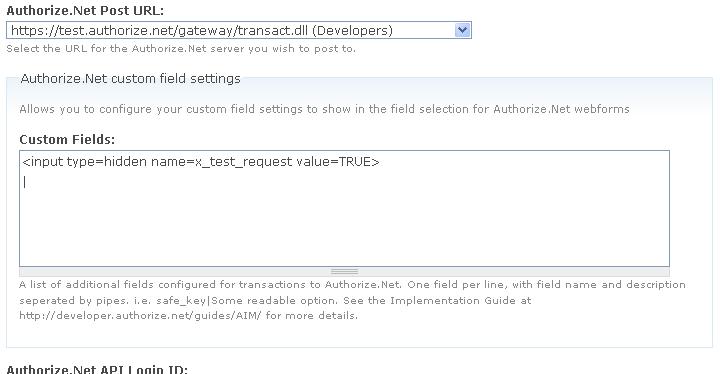
Although i am not much technical guy so it will take time. now you told me to add x_test_request=TRUE. i did like this as attached in image but still getting same error of "(TESTMODE) A valid referenced transaction ID is required."
I can not test live transaction as if it works on testmode than only site owner add his API details. Hope you understand this.
please try to solve this as soon as you can.
Thank you for your reply
Comment #25
obsidiandesign commented@tejaspmehta:
This is not a bug, there is not a way to change it. You can test this module with a developer account or in live mode; Authorize.net doesn't have a method to test authorize->charge transactions, which is how the module is set up.
It *might* work if you add the x_test_request as a hidden field on the webform; the screen you posted is not the place to do it.
1) Delete the text you added on the module configuration page. Instead, add the text:
x_test_request|Test Request Flag
2) Add a hidden field, name it x_test_request, and then map it to Test Request Flag. Set the value to TRUE.
3) Try it again in test mode. If that doesn't work, then there's no way to use the module with Authorize.net's testmode because of how they set things up.
Thanks,
Bryan O'Shea
Obsidian Design
Comment #26
tejaspmehta commentedHello obsidiandesign ,
Thank you for reply.
i did changes you suggested. But i get same error " A valid referenced transaction ID is required".
Also according to you we can test this module only on live payment gateway only ?
Comment #27
tejaspmehta commentedHello obsidiandesign,
can you do me one favor ? can you give me one working example link of this module ? so i can check at least where am i doing wrong ? Also if you have set up some demo of this module than do let me know. If you need demo server than i can provide you demo server for only this module to work. Hope you will help me out as i need to get this module working anyhow.
Thank you.
Comment #28
tejaspmehta commentedI have found that in this module we are not receiving Response Reason Code properly when authorize.net send us an array of values back to website. Due to this we are not able to process it in module. This code should be 0 or less than 1. But when we do it we receive it as 1 so its not working.
now is it necessary that we have https:// page on our server from where we request webform to process this data ?
please do reply.
Thank you.
Comment #29
obsidiandesign commentedtejaspmehta,
I'm currently traveling and can't set up a demo site with the module on it. This was created initially for someone looking to use it on their site, and the module works fine (in live mode) there. If you sign up for a authorize.net developer account, you could test it that way, because the developer site runs 'live'. Other than that, yes, you'll need to test it with a live transaction. Because of how authorize.net has the TESTMODE server setup, this module will always generate a transaction ID error - it's in the API documentation.
The Response Reason Code should be 1 on success. The module only generates an error if the code is greater than one, per the API documentation. In the watchdog, what is the response from authorize.net? If the 3rd key is 1, then it is successful. Other codes can be looked up at http://developer.authorize.net/guides/AIM/Transaction_Response/Response_...
Information about the other keys in the response array can be found at http://developer.authorize.net/guides/AIM/Transaction_Response/Fields_in...
On a live site, the server should use https://, yes, since you're processing credit card data. While it is not saved on the server, it's still proper security measures to handle it in https:// mode.
When I return home I can help more, but I'm limited in what I can do right now.
Thanks,
Bryan O'Shea
Comment #30
tejaspmehta commentedHello obsidiandesign,
Thank you for taking time from your busy schedule to reply. Now when you came back i will make one latest version of demo ready on my testing server. I will provide you details in email. You just have to email me at ####tejaspmehta####@####gmail####.####com. (just remove #). After that we can solve this issue. I do have one test account for my website on authorize.net.
Thank you and waiting for your reply.
Comment #31
tejaspmehta commented