Active
Project:
Waffles
Version:
6.x-1.3
Component:
Code
Priority:
Minor
Category:
Bug report
Assigned:
Unassigned
Reporter:
Created:
15 Jul 2009 at 19:06 UTC
Updated:
8 Dec 2009 at 09:27 UTC


Hi,
Firstly well done with a fantastic theme.
I have two minor bug, I think. Please do let me know if it is me doing something stupid. The problems:
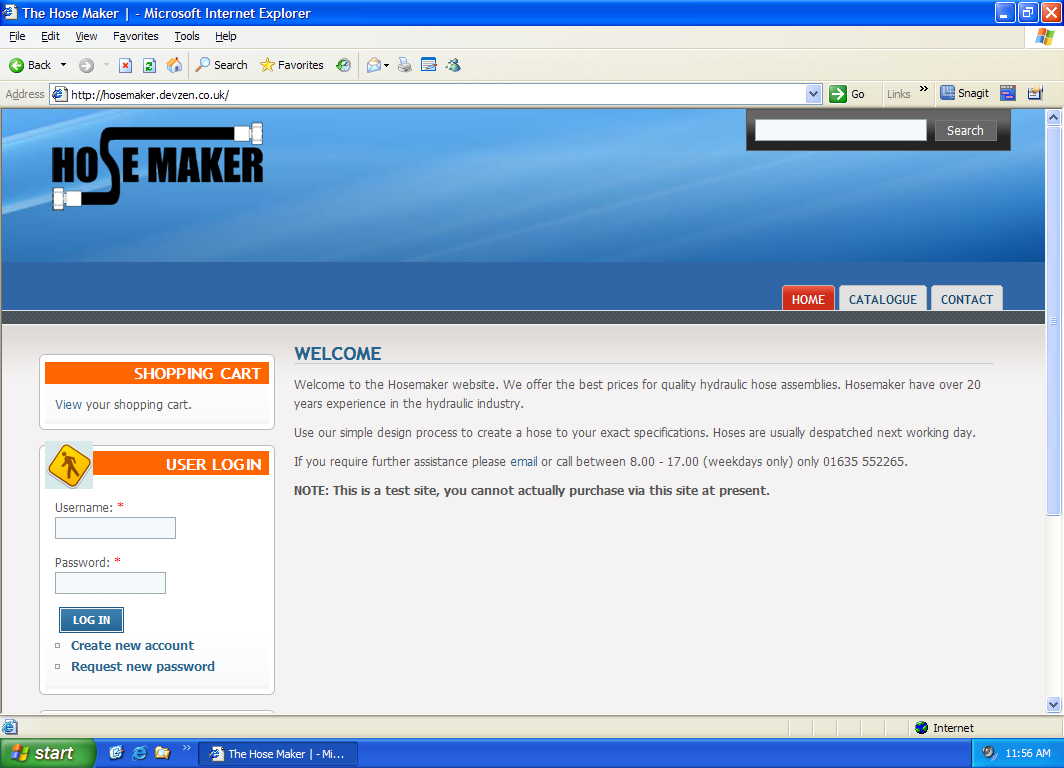
1. The tabs within the header section do not render the same in IE6 as they do in FF. See attached image. IE6 seems to push the tabs down. I have modified some images but have not altered the CSS so beleive it is a bug in the theme. Please do point out if it is another issue.
2. The icons in IE6 (i.e. login block) do not have transparent backgrounds. I have tried using PNGFix, which works fine for the logo but no use on the other icons.
Regards,
Nick
| Comment | File | Size | Author |
|---|---|---|---|
| ie6.png | 126.37 KB | nickbits | |
| firefox.png | 96.01 KB | nickbits |


Comments
Comment #1
benhp commentedHi,
1.There is no reply for your post ; so I don't know if you've found any solution, but I have quite the same problem with the image in the header. The image is cut in FF and there is a background wrapping the image in IE.
In the file style.css, I've change the properties in order to test, but it doesn't resolve my problem
#header {
background: #3066a6 url('images/header-bg.jpg') no-repeat center ;
padding-left: 150px;
}
There are many websites using this theme and it seems that thy don't have this problem... I dont't understand.
2. For the background of the icons, I have made a transparent background with photoshop on the icons, and I finally cleared them because I didn't want to overload the appearence.
In the file icons.css, you have for example :
background: transparent url('icons/tnt_icon_13.png') no-repeat left center;
I wondered if it was the good syntax because ther is no "transparent" property for background in css, but only for background-colour
(see : http://www.w3schools.com/css/css_background.asp)
Actually it is possible with the shorthand property : "The shorthand property for background is simply "background"" ;
e.g.
body {background:#ffffff url('img_tree.png') no-repeat top right}
Best regards,
Phil