

 The 2026 Drupal Business Survey is open. Your response will help shape the future of the Drupal business ecosystem.
1)I made new drupal installation, enabled ctools and panels
2)then i made "Flush all caches" -> "Administration menu"
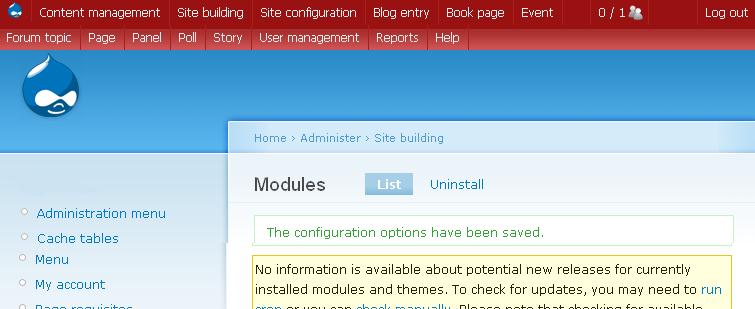
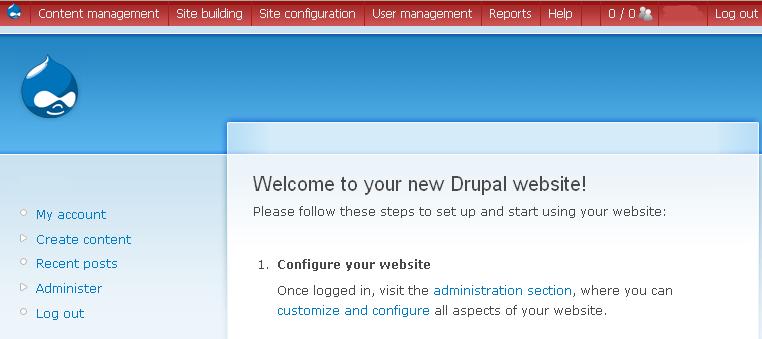
All nested menu items from "Create content" menu now not nested and other bugs (see attached pictures)
| Comment | File | Size | Author |
|---|---|---|---|
| repeated manage fields.JPG | 30.56 KB | Oleksa-1 | |
| after.JPG | 38.93 KB | Oleksa-1 | |
| before.JPG | 35.01 KB | Oleksa-1 |


Comments
Comment #1
mpettitt commentedThis appears to have occured since beta3, and may not be limited to purely administration menu items - upon disabling and uninstalling administration menu module, the extra Display Fields/Manage Fields items mentioned above were still displaying in the Navigation menu. Regenerating the menu with the module disabled sorted the extra items.
Comment #2
merlinofchaos commentedThis looks like the kind of thing that happens when menu_links gets out of sync, which is something I hear about happening with core. The only solution I know of is to clear the menu_links table and then visit admin/build/modules to force a rebuild, which unfortunately clears everything you have. A more targeted solution might be to clear the specific entries that are duplciated from menu_links, then visit admin/build/modules to rebuild. I'm not sure there's much I can do here. :/
Comment #3
bredi commentedI had the same problem with Admin Menu after updating from ctools-beta3 to ctools-beta4.
After disabling ctools-beta4, I rebuilt the admin menu and now it is fine. (admin/settings/admin_menu)
Enabling it and wiping and rebuilding created the error again.
So I disabled ctools beta4 for now.
I also dad to revert to beta3 for other sites with different issue, as it took these sites down. I belive related to taxonomy or page manager not being enabled.
I'm gonna wait...
thanks!
Comment #4
Oleksa-1 commentedproblem only with page manager module (in ctools suite), with delegator before everything was fine. Something wrong with it(page manager).
Comment #5
merlinofchaos commentedFigured it out. Some experimental code I have for menu link altering that wasn't supposed to ever get triggered gets triggered. I don't know how because admin menu doesn't set the keys that would trigger it, but somehow it happens. Anyway, I disabled that code since it's not (yet) in use and won't be for this rc anyway. I'm not sure how that key was being set, but I suppose I can use a different key.
Comment #6
tryitonce commentedThanks for re-directing me to this issue.
My problem - by the way - was a mixed-up navigation menu on top of the mixed-up administration menu. The problem is shown just about in the screen shots of koval2001 (Cache tables & Menu shouldn't be there - and they are leading elsewhere as well).
merlinofchaos - what does you last comment indicate?
Did you disable the code on the 6.x-1.x-dev version and should I download 6.x-1.x-dev for now?
Thanks
Comment #7
merlinofchaos commentedYes, I did. If you don't want to download new code, go to page_manager.module and look for the function page_manager_menu_link_alter() and remove that function.
Comment #8
tryitonce commentedThanks, it seems to work now - though, I just messed up MySQL and are learning to fix this now.
Comment #9
merlinofchaos commentedIn the worst case, you can DELETE FROM menu_links and then visit admin/build/modules
It'll get rid of any customizations you made to the menus, but it should put all the menus back where they belong.
Comment #10
venusrising commentedI did clear out and rebuild the menu table so navigation is fine but admin menu is now missing panels link even after rebuild. The panels link on admin menu is now missing.
Comment #11
venusrising commented#9 worked fine. This would have been a killer if I had many custom menus however.
Comment #12
Oleksa-1 commentedI upgraded from 6.x-1.0-beta4 to 6.x-1.0-dev.
Then I disabled admin_menu module, then i uninstalled it. And then installed admin_menu module again, and everything works fine and admin menu includes panels link as well.
Comment #13
markus_petrux commentedI think you can also use the option Flush all caches / Administration menu to rebuild the menu_links for the admin_menu, but still keep those that may have been customized.
Comment #14
venusrising commentedI noticed that panels links came back but instead of under one "panels" name like prior (panels 3) they are scattered under different regions. Did anyone else notice this too.
Comment #15
merlinofchaos commentedThere is no longer a Panels region. Most of them aren't actually Panels anymore.
Comment #16
tryitonce commentedvenusrising,
What you found is the mixed-up menu. Press Panels and you will end up somewhere else.
To fix this knowledge of MySQL would be good - thought with my limitations I managed to fix a lot via PhpMyAdmin.
Just follow the advice given above:
1. download and install CTools 6.x-1.x-dev - clean your menu as per #9 - you will lose some customisation - but may be you have none or just a little.
1a. download and install CTools 6.x-1.x-dev - clean the menu cache, remove the doubled-up (mixed-up) items in your DB (MySQL, etc.) and you should not loose any customisation - in case you have a lot.
2. follow #7 and then - clean your menu as per #9 - you will lose some customisation ... as above.
I didn't loose much customisation because I mostly use custom made menus and they remained in tact, i.e. instead of customising Navigation Menu I use this for administrators and create a new one like User_Nav. This also allows me to create multi-language menus more easily.
Good luck