Closed (fixed)
Project:
Views Bulk Operations (VBO)
Version:
6.x-1.x-dev
Component:
Code
Priority:
Normal
Category:
Bug report
Assigned:
Reporter:
Created:
17 Jul 2009 at 13:37 UTC
Updated:
30 Jul 2009 at 13:03 UTC


If the result of the view id displayed on more than one page, I have the choice to select all rows in the current page or all rows in the view.
If my view has a Date (from Date module) filter, the "select across all pages" button proposes the correct number of rows.
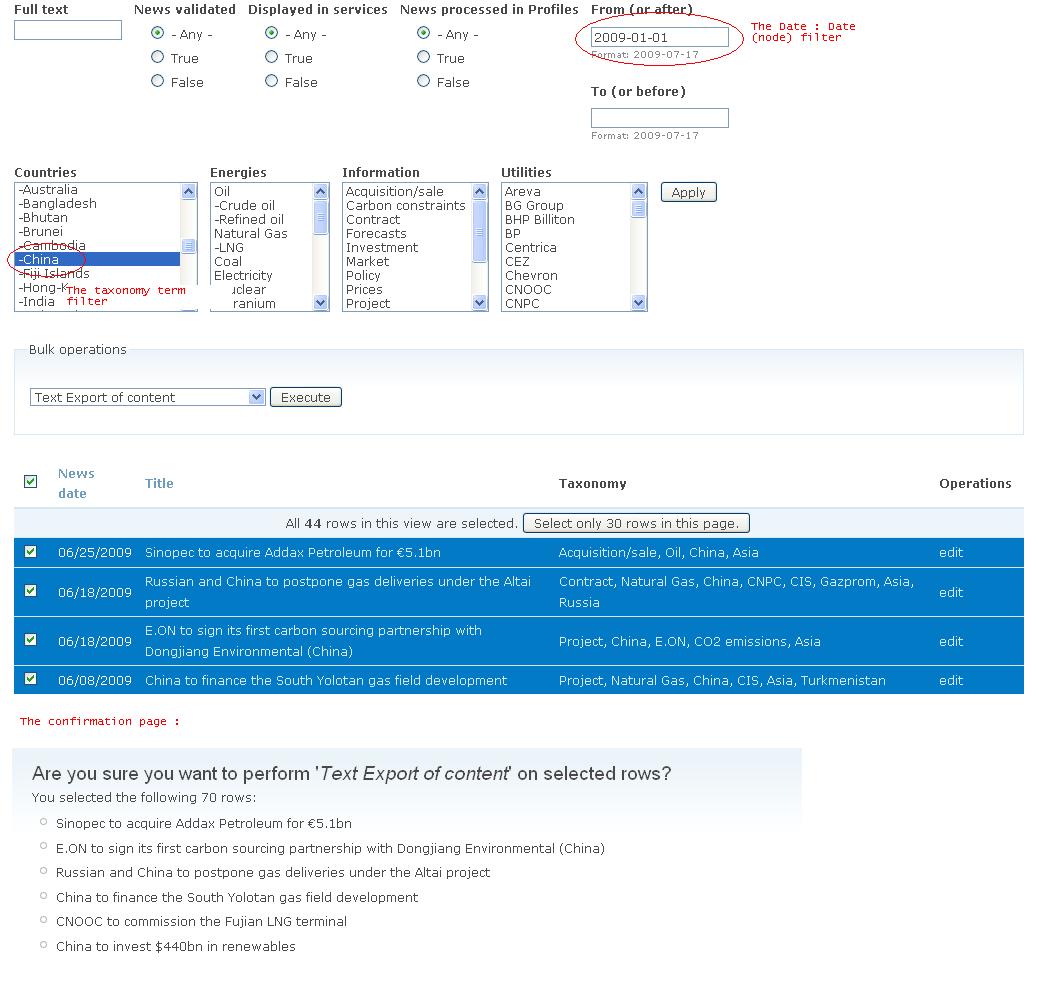
But when I click on the execute button of the operations selectboxes, the confirmation page propose more rows than selected. In fact it proposes the number of rows without the Date filter.
See the attachment : in this example, I have 44 rows with the 2 filters:
- From : 2009-01-01 (Date: Date (node) filter)
- Country : China (Taxonomy term filter)
The 70 rows proposes in the confirmation page is the result of the view with the filter Country China only. If I confirm it will export the 70 rows although I select only 44 rows.
Is it a problem of the VBO module or another one ?
Thanks to help me to solve this issue.
| Comment | File | Size | Author |
|---|---|---|---|
| number_rows_selected.JPG | 129.93 KB | dalf |

Comments
Comment #1
infojunkieThanks for your report. The date filter has caused many problems in the past. I'll look at this one.
Comment #2
infojunkieTo help out, you can search in the Date module's issue queue for similar issues. I am pretty sure this has nothing to do with VBO.Wrong analysis sorry.
What happens if you change your view to display all rows on the same page without paging? Does the VBO confirmation page show the right number of rows?
Comment #3
infojunkieI was able to reproduce that error. I'm investigating it.
Comment #4
infojunkieFixed in the latest dev release. Please try it and let me know.
Comment #5
dalf commentedIt's OK now, thanks !!